

Storage infrastructure decisions made during a data center build or refresh rarely feel consequential in the moment. A SAN for the database tier, NAS for file storage, a backup appliance in the corner — each chosen based on what the immediate workload requires and what the team already knows how to manage. The problem surfaces three years later, when the database workload has grown 4x, the file storage is fragmented across three systems, and the storage team is spending more time managing capacity than managing the business. The architecture that was right for the workload at purchase is not necessarily right for the workload today, and it is almost never right for the workload three years from now.
Enterprise storage infrastructure is not a purchasing decision — it is an architectural one. The choice between SAN, NAS, hyper-converged infrastructure, software-defined storage, and hybrid cloud storage determines not just what the environment costs today but how it performs under growth, how much staff time it consumes to manage, and whether the organization can adopt new workload types — containerized applications, AI/ML, high-throughput analytics — without a forklift upgrade. Those consequences play out over years, which is why the architecture question matters more than the hardware selection question at any given purchase point.
This blog covers the full landscape of enterprise storage architectures: what each one is, what it is optimized for, where it breaks down, and how modern storage infrastructure combines these approaches to meet the performance, scalability, and management requirements of today’s enterprise data centers.
Storage infrastructure is the combination of hardware, software, protocols, and management systems that provide data storage capacity to enterprise workloads. In practical terms, it encompasses the physical or virtual storage devices, the network fabric that connects them to compute, the file systems or block storage protocols that workloads use to read and write data, and the management layer that handles provisioning, monitoring, snapshots, replication, and capacity planning.
The distinction between consumer or SMB storage and enterprise storage infrastructure is not primarily about price or brand. It is about the operational requirements that enterprise workloads impose. Enterprise storage infrastructure is expected to deliver consistent low-latency performance under concurrent load from multiple workloads simultaneously, maintain availability through hardware failures without interrupting running workloads, scale capacity and performance without taking the storage offline, integrate with virtualization and containerization platforms that manage the compute tier, and provide the audit trails, access controls, and encryption that compliance frameworks require.
The management layer is often underweighted in storage infrastructure evaluations. A storage system that delivers excellent performance but requires significant manual intervention for routine operations — provisioning new volumes, expanding capacity, identifying failing drives, responding to performance degradation — costs more in staff time than its hardware cost savings justify. Enterprise-grade storage infrastructure management includes automated tiering, policy-based provisioning, real-time health monitoring, and integration with the orchestration tools (VMware, Kubernetes, cloud management platforms) that manage the rest of the environment.
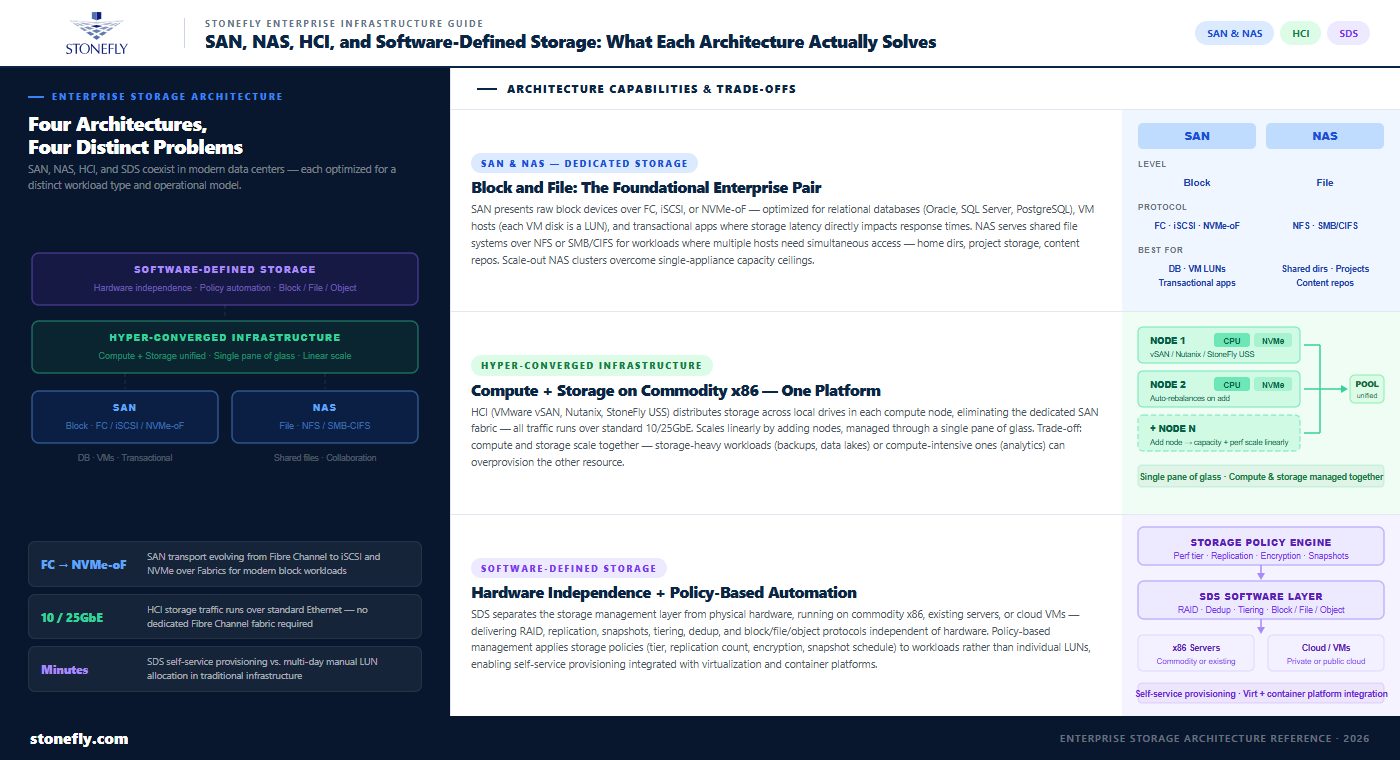
SAN (Storage Area Network) and NAS (Network-Attached Storage) are the two foundational storage architectures that defined enterprise data center storage infrastructure for decades, and both remain relevant in modern data centers for specific workload types.
A SAN delivers block-level storage over a dedicated high-speed network — historically Fibre Channel, now increasingly iSCSI or NVMe over Fabrics — presenting storage to servers as raw block devices that the server’s operating system formats and manages. SAN architecture is optimized for workloads that require consistent low-latency access to block storage: relational databases (Oracle, SQL Server, PostgreSQL), virtualization hosts (where each VM’s disk is a LUN on the SAN), and high-throughput transactional applications. The dedicated network fabric, predictable latency characteristics, and server-side file system control make SAN the right choice for performance-sensitive workloads where storage latency directly impacts application response times.
NAS delivers file-level storage over standard Ethernet using protocols like NFS (for Linux/Unix workloads) or SMB/CIFS (for Windows environments), presenting storage to clients as shared file systems rather than raw block devices. NAS is optimized for collaborative workloads where multiple systems need simultaneous access to the same files: home directories, shared project storage, content repositories, and application data that is naturally structured as files rather than blocks. Scale-out NAS — NAS clusters that expand capacity and throughput by adding nodes — addresses the limitation of traditional NAS appliances, which hit capacity and performance ceilings that require replacing the entire appliance to overcome.
The traditional weakness of dedicated SAN and NAS infrastructure is management overhead: separate management interfaces, separate capacity pools, and separate upgrade cycles for systems that frequently run in the same physical data center space. This overhead drove adoption of unified storage platforms that serve both block and file workloads from a single system, and eventually contributed to the shift toward hyper-converged and software-defined architectures.
Hyper-converged infrastructure (HCI) combines compute, storage, and networking into a single software-defined platform running on commodity x86 servers. Rather than a separate SAN or NAS appliance connected to separate compute servers, HCI distributes storage across the local drives in each compute node, presenting that distributed storage pool to all workloads running on the cluster through a software abstraction layer. VMware vSAN, Nutanix, and StoneFly’s USS are examples of HCI platforms that deliver this architecture.
HCI storage solves a specific set of problems that traditional SAN and NAS architectures do not. First, it eliminates the dedicated storage network: storage traffic flows over standard 10/25GbE Ethernet alongside management and VM traffic, removing the cost and complexity of a separate Fibre Channel or dedicated iSCSI fabric. Second, it scales linearly: adding capacity and performance is done by adding nodes to the cluster, with storage automatically rebalanced across the expanded pool. Third, it simplifies management: compute and storage are managed through a single pane of glass rather than separate appliances with separate management consoles.
The trade-off in HCI is that compute and storage scale together. In workloads where compute requirements and storage requirements grow at different rates — storage-heavy workloads like backups or data lakes that need capacity but not additional compute, or compute-intensive workloads like analytics that need more CPU and RAM but not additional storage — the coupled scaling of HCI can result in overprovisioning one resource while undersupplying the other. Disaggregated HCI architectures and software-defined storage address this by decoupling the compute and storage scaling paths.
Software-defined storage (SDS) separates the storage management and data services layer from the underlying physical hardware. Rather than buying an integrated appliance where the software and hardware come from the same vendor and are tightly coupled, software-defined storage runs as a software layer that manages commodity hardware — standard x86 servers with local drives — and delivers enterprise storage services: RAID, replication, snapshots, tiering, deduplication, and protocol serving (block, file, and object) independent of the hardware underneath.
The practical implication is hardware independence: software-defined storage can run on existing servers the organization already owns, on new commodity hardware that costs significantly less than purpose-built storage appliances, and on virtual machines in private or public cloud environments. This flexibility makes software-defined storage the basis for storage virtualization — presenting a unified storage pool to workloads regardless of where the underlying physical storage is located or what hardware it runs on.
Storage automation is one of the primary value propositions of software-defined storage. Policy-based management — defining storage policies (performance tier, replication count, encryption, snapshot schedule) and applying them to workloads rather than managing individual volumes and LUNs — reduces the manual administration that traditional storage infrastructure requires. In environments where storage provisioning previously required a ticket to the storage team and a multi-day wait for manual LUN allocation, software-defined storage with automated provisioning can deliver storage to new workloads in minutes through self-service interfaces integrated with virtualization and container orchestration platforms.
| Architecture | Primary Use Case | Scaling Model | Management Complexity | Best Fit |
| SAN (Block) | Databases, virtualization, transactional apps | Scale-up (larger appliance) or scale-out fabric | High — dedicated team, separate fabric | Latency-sensitive, high-throughput workloads |
| NAS (File) | Shared file storage, home dirs, content repos | Scale-up or scale-out NAS cluster | Moderate — unified protocol management | Multi-user file access, unstructured data |
| Hyper-Converged (HCI) | Virtualization, VDI, edge computing | Scale-out by node (compute + storage together) | Low — single pane of glass | Simplified ops, moderate-scale virtualized environments |
| Software-Defined Storage | Mixed workloads, storage automation, tiering | Scale-out on commodity hardware | Low to moderate — policy-based | Flexibility, hardware independence, automation |
| Hybrid Cloud Storage | Tiered archiving, burst capacity, DR | Elastic (cloud tiers scale on demand) | Moderate — multi-environment management | Lifecycle management, cloud-integrated archiving |
Storage infrastructure management encompasses the operational processes and tooling that keep storage systems performing, available, and aligned with workload requirements over time. In traditional storage environments, this meant a dedicated storage team managing provisioning requests manually, monitoring capacity trends on per-system dashboards, and coordinating firmware updates and hardware replacements on a system-by-system basis. The operational model worked when storage environments were small and homogeneous; it does not scale to the complexity of modern enterprise storage infrastructure.
Storage provisioning — the process of allocating storage capacity to workloads — has evolved from a manual, request-driven workflow to an automated, policy-driven one in modern enterprise environments. Traditional provisioning required a storage administrator to receive a request, identify available capacity on an appropriate storage system, create a LUN or volume, set permissions and snapshot policies, and present the storage to the requesting server. In large environments, provisioning backlogs of days or weeks were common.
Modern storage resource management integrates provisioning into the orchestration layer. VMware vCenter, Kubernetes storage classes, and cloud management platforms all support storage provisioning APIs that allow compute workloads to request storage dynamically through policy rather than through manual allocation. A Kubernetes persistent volume claim specifying a storage class — high-performance SSD or bulk NFS — triggers automatic provisioning from the appropriate storage pool without storage administrator intervention. This shift from reactive manual provisioning to proactive policy-based allocation reduces the operational load on storage teams while improving the speed at which new workloads can be deployed.
Storage automation extends beyond provisioning to include the full lifecycle of data on enterprise storage infrastructure: tiering data between performance and capacity storage based on access patterns, executing snapshot and replication schedules, enforcing retention and deletion policies, and detecting and responding to hardware health events before they become failures. Each of these tasks, done manually, requires significant staff time. Automated storage lifecycle management converts them to policy-defined operations that run without intervention.
Storage lifecycle management policies define what happens to data as it ages: new data lands on high-performance NVMe storage, data that has not been accessed in 30 days moves to lower-cost capacity storage, data that has not been accessed in 90 days moves to archival object storage. The business outcome is significant: primary storage utilization decreases because aging data is automatically removed, storage costs decrease because a larger proportion of data resides on lower-cost tiers, and the storage team spends less time on capacity management because the policy enforces itself. The management overhead is in defining and tuning the policies, not in executing them.
Hybrid cloud storage integrates on-premises storage infrastructure with cloud storage tiers, creating a unified storage architecture that spans private data center infrastructure and public cloud. The integration can take several forms: cloud tiering (automatically migrating data from on-premises storage to cloud object storage based on access patterns), cloud backup (using cloud storage as a secondary backup target for on-premises data), and cloud burst (using cloud compute and storage for workloads that temporarily exceed on-premises capacity).
The business case for cloud-integrated storage is strongest for data with highly variable access patterns or retention requirements. Data that is actively used and performance-sensitive belongs on on-premises primary storage where latency is predictable and throughput is not limited by WAN bandwidth. Data that is retained for compliance but rarely accessed is a good candidate for cloud tiering to low-cost object storage tiers. Data that is needed for disaster recovery but is not performance-critical can be replicated to cloud storage at a fraction of the cost of a second on-premises DR site.
The architectural challenge in hybrid cloud storage is consistency — ensuring that on-premises workloads can access cloud-tiered data with acceptable latency when they need it, and that the data management policies applied on-premises extend into the cloud tier. Cloud storage gateways address this by providing an on-premises endpoint that presents cloud storage to workloads using familiar protocols (NFS, SMB, S3), managing the caching and prefetching logic that makes cloud-tiered data accessible within the latency budget of the workload.
High availability storage is defined by how the system responds to component failures — drive failures, controller failures, node failures, and network failures — without interrupting access to data. The mechanisms that enable storage high availability include RAID (distributing data and parity across multiple drives so that any single drive failure is survivable without data loss), mirroring (maintaining two or more identical copies of data that can serve reads and writes independently), and erasure coding (a more storage-efficient alternative to mirroring that reconstructs data from a mathematical relationship across multiple data and parity fragments).
Modern enterprise storage systems extend high availability beyond drive-level redundancy to node-level and site-level redundancy. In a hyper-converged cluster, data is replicated across nodes so that any individual node failure does not interrupt access to the data that node held. In a stretched cluster or active-active storage configuration, data is replicated synchronously between two sites so that a complete site failure allows workloads to continue from the surviving site. The recovery time objective (RTO) in these configurations is measured in seconds rather than hours, because failover is automatic and the surviving infrastructure is already running.
Distributed storage systems spread data and management functions across multiple nodes, with no single point of failure and no single controller through which all I/O must pass. This architecture scales throughput and capacity linearly with node count and eliminates the bottlenecks of centralized storage appliances. Object storage and scale-out NAS are both distributed storage architectures; hyper-converged infrastructure storage is also inherently distributed.
Centralized data storage — traditional SAN arrays and NAS appliances with dedicated controllers — offers simpler management and predictable performance characteristics for workloads that are well-understood and bounded in size. The trade-off is that centralized storage scales up (larger and more expensive appliances) rather than out (more nodes), and the controller pair at the center of the architecture is a potential bottleneck as workload demands grow. For environments where storage requirements are predictable and moderate in scale, centralized storage remains a reasonable choice. For environments where storage requirements are uncertain, rapidly growing, or variable in workload type, distributed storage architectures provide more flexibility at comparable or lower cost.
Storage capacity planning is the process of forecasting storage consumption growth and procuring capacity in time to prevent workloads from hitting storage limits. The fundamental challenge is that storage consumption is rarely linear: a new application deployment or database migration can add months of normal capacity consumption in days. Capacity planning that relies only on historical average growth rates consistently underestimates the impact of non-linear events.
Effective storage capacity planning combines historical growth trend analysis (how fast has each storage tier been growing over the past 12 months) with workload pipeline awareness (what new deployments are planned, and what storage each requires) and a defined alert threshold (at what utilization percentage does the team begin procurement, given typical lead times). Most storage teams target keeping utilization below 70–75% on primary storage, with the gap between current utilization and the alert threshold representing the buffer that absorbs unexpected growth between procurement cycles.
Storage scalability — the ability to expand capacity and performance without disrupting running workloads — varies significantly between storage architectures. Traditional SAN and NAS appliances scale up: replacing controllers with larger ones, adding shelves of drives to an existing array, or expanding a cluster with additional nodes. Scale-up architectures have a ceiling: at some point, the architecture cannot be expanded further without replacing the foundation, which is expensive and operationally disruptive.
Scale-out storage architectures — distributed storage systems, object storage clusters, and hyper-converged infrastructure — scale by adding nodes to the cluster, with performance and capacity expanding proportionally. There is no practical ceiling to the scale of a well-designed distributed storage cluster; capacity can be added incrementally as demand requires, without the step-function purchasing pattern of scale-up architectures.
Storage consolidation reduces the number of distinct storage systems an organization manages, replacing a fragmented collection of point solutions (a SAN for databases, a NAS for file storage, an object store for backups, a separate archival system) with a unified platform that serves multiple workload types. Consolidation reduces management overhead, simplifies the vendor relationship, and improves storage utilization by pooling capacity across workload types rather than maintaining separate silos where one is overprovisioned while another is at capacity. The business case for consolidation is strongest in environments where the management overhead of multiple separate systems has become a significant operational cost, or where fragmented storage infrastructure is limiting the organization’s ability to deploy new workload types.
Storage network architecture defines how compute connects to storage — the protocols, topologies, and bandwidth characteristics that determine storage latency and throughput as experienced by workloads. The choice of storage network has historically been a major differentiator between storage architectures: Fibre Channel SANs delivered the low latency and predictable performance that databases required, while Ethernet-based NAS was adequate for file workloads but too variable for performance-sensitive block storage. The convergence of high-speed Ethernet (25GbE, 100GbE), RDMA protocols (RoCE, iWARP), and NVMe over Fabrics has changed this balance significantly.
NVMe over Fabrics (NVMe-oF) extends the NVMe protocol — originally designed for PCIe-connected SSDs with microsecond latency — across a network fabric, enabling remote storage to be accessed with latency close to that of locally attached NVMe. On RDMA-capable Ethernet fabrics or Fibre Channel, NVMe-oF delivers storage latency in the range of 50–200 microseconds — comparable to local NVMe and an order of magnitude lower than traditional iSCSI over Ethernet. For the workloads that have historically required dedicated Fibre Channel SANs because of latency requirements, NVMe-oF over high-speed Ethernet provides an alternative that reuses the Ethernet infrastructure already present in the data center.
For organizations that do not require NVMe-class storage latency, 25GbE iSCSI provides a practical and cost-effective SAN protocol over standard network infrastructure. Modern software-defined storage platforms and HCI systems default to iSCSI or NFS over 10/25GbE Ethernet, eliminating the dedicated Fibre Channel fabric and its associated management complexity for all but the most latency-sensitive workloads.
StoneFly’s storage platforms are designed around the principle that enterprise environments require multiple storage architectures — not a single solution that claims to do everything adequately, but specialized platforms that do their specific workload category well, integrated through a consistent management approach.
For production workloads requiring hyper-converged infrastructure, StoneFly’s USS (Unified Storage and Server) delivers compute and storage in a single scale-out platform. USS combines NVMe storage, virtualization compute, and high-speed networking into a cluster that scales linearly by adding nodes — each addition expanding both compute capacity and storage capacity proportionally. USS supports VMware and KVM hypervisors and integrates with standard virtualization management tools, fitting into existing enterprise virtualization management frameworks rather than requiring a separate management silo.
For environments that need SAN, NAS, and S3 object storage from a unified platform, StoneFly’s USO (Unified Scale-Out SAN, NAS, and S3 Object Storage) delivers all three protocols from a single scale-out cluster. USO eliminates the separate SAN appliance, NAS appliance, and object storage system that many enterprise environments run in parallel, consolidating them into a single management domain. Scale-out architecture means capacity and throughput grow by adding nodes, without the ceiling of traditional storage appliances. The S3-compatible object storage tier serves as a target for backup applications, archival data, and cloud-native workloads simultaneously.
For software-defined storage and automated storage tiering, StoneFly’s SCVM (Software-Defined Storage Virtual Appliance) runs as a virtual machine on existing infrastructure, adding automated tiering, deduplication, and compression without requiring new hardware. SCVM policy-based tiering automatically moves data between NVMe, SSD, HDD, and object storage tiers based on access patterns — delivering the storage cost optimization and lifecycle automation that enterprises need without the operational overhead of manual capacity management.
For scale-out NAS specifically, StoneFly’s SSO NAS delivers a clustered NAS platform that scales file storage capacity and throughput by adding nodes, addressing the growth ceiling of traditional NAS appliances without requiring a rip-and-replace of the NAS infrastructure.
Contact StoneFly to discuss which storage infrastructure architecture — USS, USO, SCVM, or SSO NAS — fits your specific workload requirements and data center design.
The storage architecture chosen for a data center refresh defines the operational reality for the next 5 to 10 years: how much staff time storage management consumes, whether the environment can scale to meet workload growth without disruptive upgrades, and whether new workload types can be accommodated within the existing infrastructure or require separate systems. Getting that architecture right requires understanding not just what the current workloads need but what the growth trajectory looks like and how much operational complexity the organization can sustain.
SAN and NAS remain the right choice for workloads optimized for their specific characteristics — low-latency block I/O for databases, shared file access for collaborative workloads. Hyper-converged infrastructure simplifies the compute-storage relationship for virtualized environments and scales well for moderate-size deployments. Software-defined storage delivers the automation, flexibility, and hardware independence that modern enterprise infrastructure management requires. Hybrid cloud storage fills the archival and DR tiers at a cost that on-premises infrastructure cannot match.
The practical path forward for most enterprises is not a wholesale replacement of existing infrastructure with a single architecture but a deliberate consolidation: replacing point solutions as they age with unified platforms that cover multiple workload types, automating the lifecycle management that currently consumes manual effort, and integrating cloud storage tiers for the workload categories where they make economic sense. The result is an infrastructure that is less expensive to operate, more responsive to new workload demands, and more resilient to the hardware failures and growth events that any long-lived storage environment will encounter.







Join our mailing list to receive the latest news, updates, and promotions from StoneFly.






