Offsite Backup & Replication with Veeam Cloud Connect as a Service
Enable business continuity with backup & replication of your IT environment into StoneFly’s cloud. Instantly spin up your virutal machines or restore backups for individual files, entire VMs and application items in minutes.
Backup, Replication and Disaster Recovery as a Service
Veeam Backup and Replication to StoneFly Cloud helps you achieve 24.7.365 availability for all your workloads including virtual Microsoft Hyper-V and VMware vSphere environments, as well as physical and cloud-based workloads. You can manage flexible, fast and reliable backup, replication and recovery of all your data and applications.
What Makes StoneFly Best in the Market
StoneFly has been in the forefront of the backup and storage industry for more than 18 years. Beginning with its registration of the iSCSI.com Internet domain name, StoneFly shipped its first iSCSI storage appliance in 2002 and subsequently made iSCSI into the established storage standard which today is used by IT professionals around the world. This same expertise is applied to our Veeam Backup and Replication services as we develop, maintain, support, and provide upgrades all under the same roof. StoneFly is a Veeam Software Technology Alliance Partner (TAP) and a Cloud Solution Service Provider. We are the only Veeam Cloud Service Provider that offers Cloud Connect backup in the Microsoft Azure Government Cloud and supports all Microsoft Azure datacenters around the world.
StoneFly Solutions Are Trusted By Customers Worldwide


































Stonefly Veeam backup & replication Features List

Storage Snapshots
Ease of Replication
Built-in Deduplication
End-to-End Encryption
Automated Data Protection
On-demand DR plan
Recovery Assurance
Flexible Cloud Repository

Exceptional support

simplified management
Fast and secure

Availability for ALL workloads
StoneFly Private Cloud Infrastructure
Reduce the time, cost and complexity of deploying and operating an offsite cloud infrastructure while meeting your data needs. StoneFly brings a secure, trusted, scalable, and reliable private cloud to customers to transform their business and reduce costs of offsite backup, replication and disaster recovery services. Some details about the StoneFly Cloud:
- 200,000 square feet
- 3000 Cabinets
- 70 Internet Networks and 2 Internet Exchange Points (SFMIX and AMS-IX Bay).
- Custom designed video surveillance of every cabinet
Veeam Backup & Replication Single-Click VM Recovery
You can immediately restore a virtual machine (VM) with instant VM recovery, by running the VM directly from the backup file in StoneFly’s Cloud. Instant VM recovery helps minimize disruption and downtime of production VMs and improve recovery time objectives (RTO).
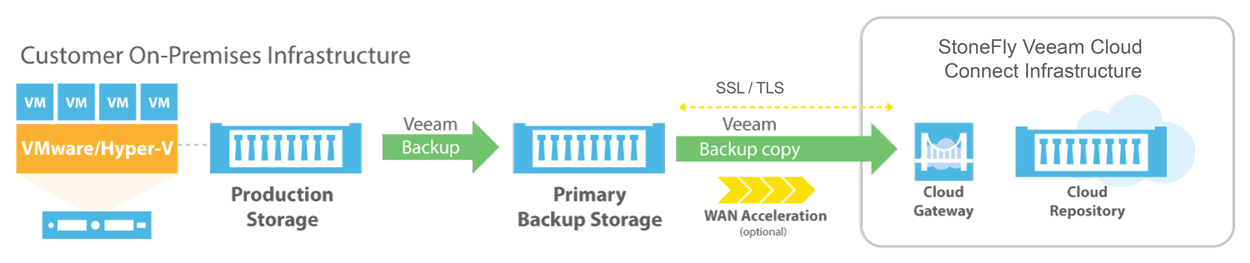
Veeam Backup & Replication to StoneFly Cloud Architecture
Veeam Backup & Replication components are deployed at the customer end. At StoneFly, Cloud repository is provisioned against the customer Veeam Backup & Replication instance. StoneFly is added as a service provider (SP) to the customer Veeam console on-premise, and all the SP details including the cloud repository from StoneFly appear at the customer side. The customer uses the Cloud repository as a target for the backup and replication jobs.
StoneFly has been delivering enterprise-grade solutions for over a decade. Our expertise enables us to effectively address the requirements of all kinds of businesses (ranging from SMBs/SMEs to large enterprises).
Sign up for a free trial of StoneFly’s solution for Veeam Cloud backup and ReplicationFill the form below to get a Veeam Cloud Backup Free Trial (1TB)
Relevant Downloads
DORA Exit Plans: What Backup Teams Must Be Able to Show
Learn what DORA Article 28(8) means for backup and which six pieces of evidence an auditor can check. Confidence in recovery is not proof of a restore.
Backup Restore Proof: Evidence Auditors and Insurers Want
Learn what auditors and insurers expect from recovery testing and how a five-field record proves restores work. Build evidence that holds up at renewal.
How Veeam v13 Changes Object Storage Immutability Load
Veeam v13 reduces lock-extension calls, but listing, versioning and block generation still hit your repository. Learn where the load moves and how to size for it.
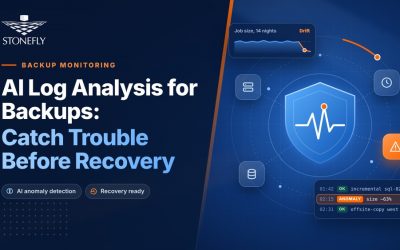
AI Log Analysis for Backups: Catch Trouble Before Recovery
Learn which backup log signals reveal trouble before a restore fails and how AI log analysis spots them. Act on findings with restore tests.

NIS2 DORA Backup Requirements: What Auditors Will Ask
Both NIS2 and DORA treat backup as a legal measure, but the texts differ in detail. NIS2 sets the principle and leaves specifics to implementing rules and ENISA guidance; DORA states them directly. This blog turns both into storage design decisions and the evidence auditors and supervisors will ask to see.
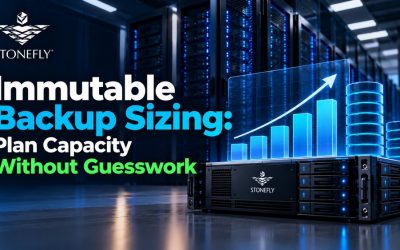
Immutable Backup Sizing: Plan Capacity Without Guesswork
Learn how to size immutable backup storage from measured Veeam backup output, retention and lock periods, filesystem or object-storage behavior, and a clearly stated capacity reserve.
FAQ
What is the maximum size of data transfer supported?
How much bandwidth would be available for the Veeam backup and replication solution?
What is the subscription model?
Veeam Cloud Connect Backup & Replication
Veeam Backup for Microsoft Office 365
Veeam Agent for Microsoft Windows
Veeam Agent for Linux