The attack sequence ransomware operators use against virtualized environments is consistent enough to be treated as a known playbook. Gain initial access through a phishing email, compromised credential, or unpatched vulnerability. Escalate privileges. Move laterally until administrative access to the virtualization host is obtained. Enumerate backup repositories. Encrypt or delete backup data first — before encrypting production VMs — to eliminate the recovery option. Then encrypt production. Then deliver the ransom demand.
The reason backup repositories are targeted before production is straightforward: organizations that cannot restore from backup have no alternative to paying. Backup repositories that are accessible from the production network are not meaningfully separate from production storage. Compromising the hypervisor host provides access to both simultaneously. A Proxmox VE cluster where the backup target is reachable over the production network, protected only by credentials stored on cluster nodes, does not have a backup strategy. It has a second target.
Building genuinely resilient backup for Proxmox VE requires immutability at multiple layers: hardware-enforced WORM at the storage layer, and physical air-gapping that prevents the production environment from reaching the backup repository even with administrative credentials. This blog covers each layer — what it does, what it protects against, and how StoneFly’s DR365V delivers these requirements as a purpose-built appliance for Proxmox environments.
When backup repositories are connected to the production network and backup credentials are stored on cluster nodes, a compromised cluster node provides access to both. Any backup solution that maintains stored credentials on the Proxmox VE nodes and a persistent network connection to the backup repository creates this exposure — an attacker who achieves root on a cluster node inherits access to everything that node can reach, including the backup target.
Modern ransomware targeting virtualized environments is written to specifically identify and act on backup repositories. Variants known to target KVM-based environments search for mounted NFS shares, enumerate storage configuration files for backup target paths, and either encrypt backup data directly or corrupt the backup index — making restores fail even if the underlying data survives. Backup jobs that have run successfully for months provide no assurance against this scenario; the backups exist right up until the moment the attack executes.
The solution is architectural, not configurational. Stronger passwords, more restrictive permissions, and additional monitoring all reduce the attack surface at the margins — but as long as the backup target is network-reachable from the production cluster, a sufficiently privileged attacker can reach it. Removing that network reachability, and enforcing immutability at the hardware layer where software-level instructions cannot override it, is what eliminates this exposure rather than managing it.
Immutability enforced only at the software level — retention locks, deletion prevention policies, or access controls within a backup application — can be bypassed by any attacker who gains control of the server running that software. An attacker with root on the backup server can disable retention policies, modify configuration files, or operate directly on the underlying storage without going through the backup application at all. Software-layer immutability protects against accidental deletion and misconfiguration; it does not protect against deliberate attacks with administrative access.
Hardware-enforced WORM (Write Once Read Many) storage changes this. When immutability is enforced in storage device firmware — below the OS, below the backup application, below anything the connected server controls — the storage device rejects delete and overwrite operations for the duration of the retention period regardless of what instructions arrive from the host. No credential, no operating system command, and no application running on the connected server can override a hardware-enforced WORM policy. This is the level of immutability that ransomware-resilient backup requires.
Immutable storage addresses what happens if an attacker reaches the backup target. Air-gapping addresses whether they can reach it in the first place. An air-gapped backup repository has no persistent network connection to the production environment — the network path to the backup appliance exists only during active backup jobs, controlled and initiated by the backup appliance itself, and is closed at all other times.
The distinction between air-gapping and network segmentation matters here. A backup appliance on a separate VLAN with firewall rules still has a network path to the production cluster — firewall rules can be modified, VLAN configurations can be changed, and a sufficiently privileged attacker with access to the network infrastructure can potentially reach across VLANs. A genuinely air-gapped backup appliance connected only through a dedicated backup interface that is down outside of backup windows has no reachable network path during the hours when ransomware encryption would be running.
WORM storage enforces immutability at the storage hardware level, independent of the operating system and applications running on top. When a WORM policy is applied to a storage volume or object, the storage system accepts writes until the data is committed and the retention period begins, after which it rejects any write, overwrite, or delete operation against that data for the duration of the retention period. The rejection happens in the storage controller firmware — it cannot be overridden by the host OS, root credentials, or backup software on the connected server.
For Proxmox backup repositories, WORM storage enforcement means that backup data written to a WORM-protected datastore cannot be deleted or modified by anything connected to that storage — including a compromised hypervisor host with mounted access, or an attacker with full administrative control over the Proxmox environment. The WORM policy enforces the retention period that compliance or operational recovery requirements specify, providing the audit-ready evidence that backup data was intact at the time of storage.
A Proxmox WORM storage appliance serves as the backup target for VM backup jobs, enforcing object-level or volume-level immutability on backup data as it arrives. Integration can be accomplished through S3-compatible object storage with object lock support — where WORM is enforced per-object at the bucket level using S3 Object Lock in Compliance mode — or through NFS/SMB-connected WORM-capable storage where the immutability is enforced at the storage layer even though the backup application accesses the data through a standard filesystem interface.
The defining characteristic of hardware-enforced WORM for Proxmox backup is that the immutability policy is enforced by the storage device firmware, operating independently of the backup software and the connected hosts. This means the WORM retention window remains in effect regardless of what instructions the connected server sends to the storage device during the retention period. For environments where compliance frameworks require demonstrable, auditable immutability — HIPAA, SEC Rule 17a-4, FINRA — hardware-enforced WORM provides the verifiable enforcement layer that regulatory auditors require.
| Immutability Layer | What It Protects Against | What It Does Not Protect Against | Suitable For |
| Software retention locks | Accidental deletion, misconfigured prune | Root-level access to backup server or underlying storage | Operational accidents only |
| WORM at NAS/NFS layer | Deletions from connected hosts | Physical access to storage appliance; management plane compromise | Network-connected backup repositories with WORM NAS |
| S3 Object Lock (Compliance mode) | Deletions and overwrites via S3 API including with admin keys | Management console access with root bucket owner credentials | S3-connected backup backends with compliance-grade retention |
| Air-gapped immutable appliance | All network-based attacks; compromised cluster credentials | Physical access to the air-gapped appliance | Maximum protection; ransomware-resilient enterprise backup |
An air-gapped backup repository is one that has no persistent network connection to the production environment it is protecting. The term is sometimes used loosely to describe backup systems on isolated network segments or VLANs, but genuine air-gapping means that there is no active network path from the production Proxmox cluster to the backup repository during the periods when backups are not running. The backup connection is opened only for the duration of backup jobs — controlled by a scheduled process that initiates and terminates the connection — and is closed and unavailable at all other times.
In practice, implementing air-gapped backup for Proxmox VE requires specific architectural decisions. The backup appliance must be on a physically separate network interface from the production management network — not a VLAN on the same physical switch, but a separate NIC with no path to production VMs or the Proxmox cluster management interface outside of dedicated backup traffic. Backup job initiation should be controlled by the backup appliance rather than the Proxmox cluster, so that a compromised cluster cannot initiate arbitrary operations against the backup target. And the backup appliance’s management interface should be accessible only through out-of-band management — a separate IPMI or dedicated management network — that does not share any network path with the production environment.
A practical air-gapped Proxmox backup network architecture uses a dedicated backup NIC on each Proxmox VE node that is connected only to the backup appliance’s backup interface — not to the production management network, not to the VM network, and not to any switch that carries production traffic. The backup appliance initiates backup jobs on a defined schedule by opening a pull-based connection to Proxmox nodes over this dedicated interface, pulling VM backup data, and then closing the connection. Between backup windows, there is no path from the production Proxmox cluster to the backup appliance that an attacker on the production network could use.
Pull-based backup architecture — where the backup appliance pulls data from the production environment rather than the production environment pushing to the backup appliance — is a significant security improvement over push-based designs. In a push-based architecture, the backup agent on each Proxmox node has stored credentials to write to the backup repository; compromising the node compromises those credentials. In a pull-based architecture, the backup appliance has credentials to read from the production environment, but the production environment has no credentials that authorize operations on the backup repository. A compromised Proxmox node cannot instruct the backup appliance to delete its own backups.
The operational discipline that distinguishes a functional air-gapped backup program from one that appears functional is regular recovery testing. An immutable, air-gapped backup repository that has never been used for an actual VM recovery provides no validated assurance of recoverability. Recovery tests should verify the complete path: connecting to the air-gapped backup appliance, retrieving backup metadata, restoring a VM to a test Proxmox environment, and confirming that the restored VM boots and operates correctly.
The frequency and scope of recovery testing should match the recovery time objectives the organization has committed to. An organization that needs to recover 50 VMs within 4 hours after a ransomware event should validate that recovery throughput — how quickly VM images can be transferred from the air-gapped backup appliance to the recovery environment — is sufficient to meet that objective. Testing individual VM restores without testing aggregate recovery throughput validates the wrong thing; the bottleneck in a full-environment recovery is almost always the data transfer bandwidth between the backup appliance and the recovery infrastructure, not the time to restore any individual VM.
An immutable VM backup appliance purpose-built for Proxmox environments needs to address the complete threat model, not just one layer of it. The appliance should provide storage-layer WORM enforcement that operates below the OS level; network architecture support for air-gapped or isolated deployment; sufficient storage capacity and throughput to meet backup windows for the protected environment; integration with Proxmox VE via supported protocols; and management interfaces that are accessible only through channels separate from the production network.
Capacity sizing for a Proxmox immutable backup appliance starts with the total data under protection — the aggregate size of all VM disks across the Proxmox cluster — multiplied by the number of recovery points that must be retained. Deduplication reduces this significantly for environments where VM images share common data, but the immutable backup appliance should be sized for the raw retention requirement before deduplication is factored in, with deduplication treated as a storage efficiency benefit rather than a capacity planning assumption. For environments retaining 30 days of daily backups across a 100TB VM estate, a conservative sizing target before deduplication is 3PB of backup storage capacity.
Throughput requirements are set by the backup window — the time available for backup jobs to complete without impacting production workloads. Full daily backups of a 100TB VM estate require approximately 3.2 TB/hour sustained write throughput to complete within an 8-hour backup window. Incremental backups, which only transfer changed data after the initial full backup, reduce daily transfer volumes to a fraction of this in steady state. The network link between the Proxmox cluster and the backup appliance — 10GbE providing approximately 1.2 TB/hour theoretical throughput — is frequently the constraint for initial full backups; 25GbE or multiple bonded 10GbE links address this for large initial backup jobs.
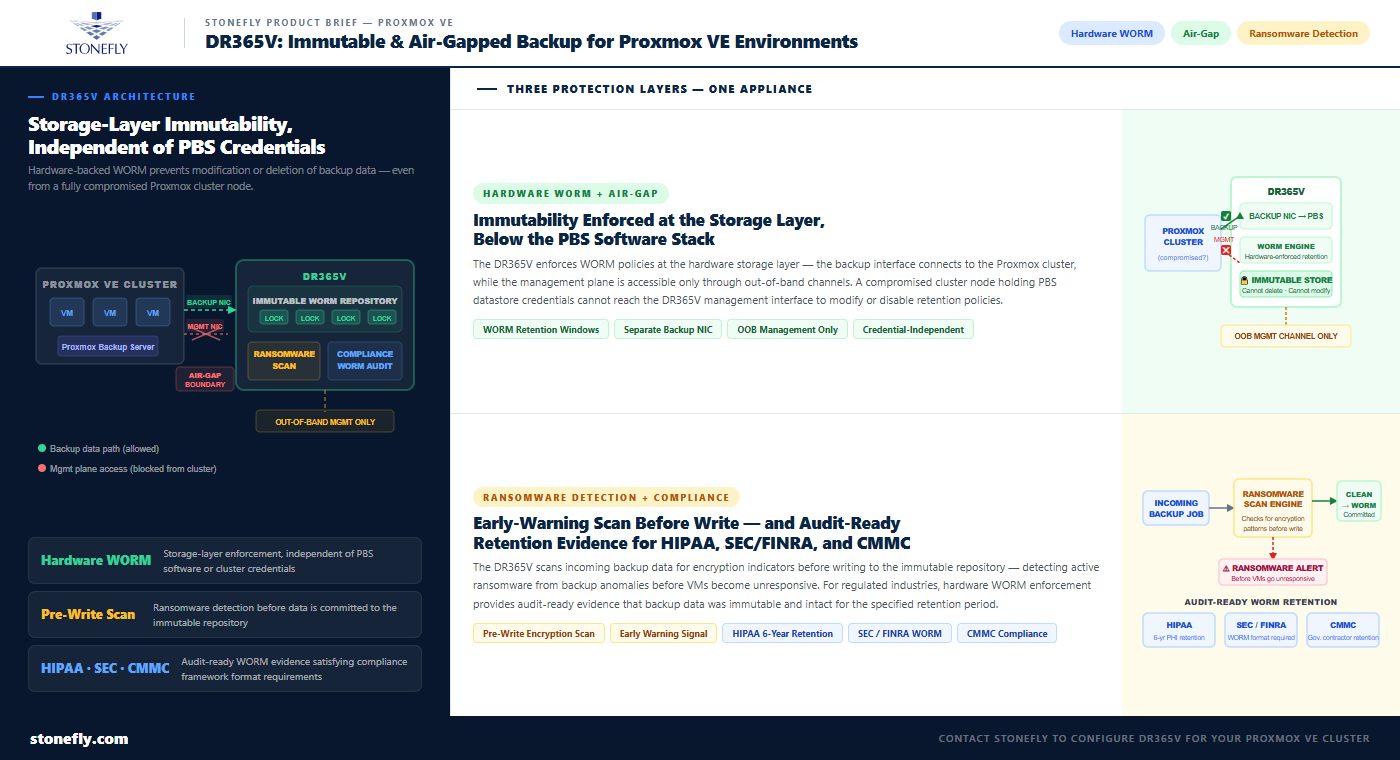
StoneFly’s DR365V is a purpose-built backup and disaster recovery appliance designed around air-gapped, hardware-immutable storage — the architecture that Proxmox environments need to make backup data genuinely unreachable by ransomware. Unlike general-purpose backup software solutions that depend on the network connectivity and credential security of the production environment, the DR365V is engineered from the storage layer up to enforce immutability and isolation as hardware characteristics, not software policies.
The DR365V enforces immutability through hardware-backed WORM policies that operate in the storage firmware, independent of any software running on the connected Proxmox cluster. Backup data written to the DR365V cannot be deleted, modified, or encrypted by anything connected to it over the backup network during the retention period — including a Proxmox cluster node that has been fully compromised. The WORM enforcement is not a setting that can be toggled through the backup interface; it is a hardware characteristic of the storage layer that operates whether or not the management software is running.
For Proxmox VE environments, the DR365V connects over a dedicated backup network interface that is physically separate from the production management network. VM backups are pulled from Proxmox nodes on a defined schedule over this dedicated interface; outside of backup windows, there is no active network path between the DR365V and the production cluster. An attacker on the production network, including one with root on every cluster node, cannot reach the DR365V management interface or storage over the production network.
The DR365V also provides disaster recovery capabilities beyond backup storage. In the event of a ransomware attack or hardware failure that takes down the Proxmox cluster, the DR365V can serve as the recovery point for VM restoration — either directly restoring VMs to replacement Proxmox infrastructure, or running VMs directly from the DR365V while permanent infrastructure is rebuilt. This DR capability is built into the same appliance as the immutable backup storage, eliminating the need for a separate recovery platform and reducing the infrastructure footprint of the backup and DR program.
The DR365V includes ransomware detection that scans incoming backup data for indicators of active encryption before writing to the immutable repository. This allows the backup program to identify an active ransomware event from backup data anomalies before the production environment shows visible symptoms — providing an earlier warning signal that allows containment before the attack completes. For Proxmox environments subject to compliance retention requirements — HIPAA, SEC Rule 17a-4, FINRA, CMMC — the DR365V’s hardware WORM enforcement provides the auditable, tamper-evident retention evidence that regulatory frameworks require.
Contact StoneFly to discuss DR365V configuration for your Proxmox VE environment — backup repository sizing, air-gapped network architecture, retention policy design, and DR runbook integration for your specific cluster scale and recovery objectives.
The ransomware threat to virtualized environments is not a configuration problem that better backup software settings can solve. As long as the backup target is network-reachable from the production cluster, a sufficiently privileged attacker can reach it — and ransomware operators who target Proxmox environments know exactly where to look. Removing that network reachability and enforcing immutability at the hardware layer are architectural decisions, not software features.
A purpose-built air-gapped and immutable backup appliance like the DR365V addresses the threat model completely: the backup storage is hardware-immutable, the backup network is isolated from production, the management plane is out-of-band, and the DR capability is integrated. Proxmox VE environments that implement this architecture have a genuine recovery option when ransomware executes — not because the attack was prevented, but because the backup data was unreachable and unmodifiable regardless of what access level the attacker obtained on the production cluster.
Contact StoneFly to evaluate DR365V for your Proxmox backup and DR requirements.







Join our mailing list to receive the latest news, updates, and promotions from StoneFly.