

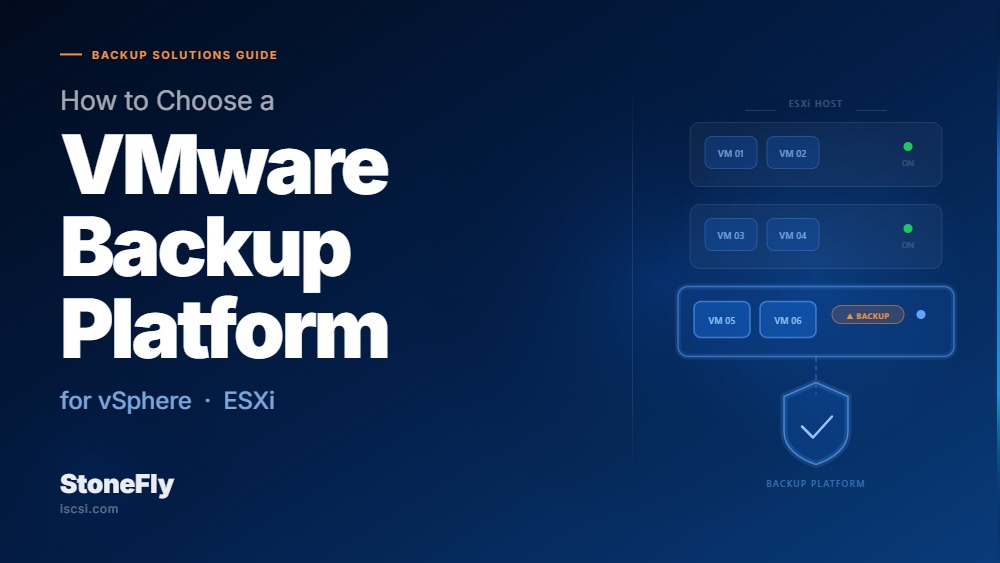
The Broadcom acquisition of VMware fundamentally changed the cost calculus for enterprise virtualization. Per-core subscription pricing replaced the per-CPU model many IT teams had relied on for years, and that shift rippled downstream into every VMware-adjacent purchasing decision — including backup. Enterprises that were content to run native snapshot tools or vendor-bundled backup utilities are now conducting full evaluations of their backup and disaster recovery stack. The question is no longer what backs up our VMs. It is what backs them up reliably, affordably, and in a way that does not lock us in further.
The backup platform decision matters more than most IT teams realize until a failure exposes the gap. A tool that protects 50 VMs in a test environment behaves very differently at scale — when application-consistent backups for Oracle and SQL Server must complete within a maintenance window, when a ransomware event demands sequential recovery of 200 VMs, or when a DR test reveals that published RTOs were theoretical rather than tested. Getting this decision wrong means renegotiating a licensing agreement while the application team watches the clock.
This blog covers the key features that separate adequate from enterprise-grade virtual machine backup software, the DR criteria that should be non-negotiable in any vendor evaluation, a step-by-step migration playbook for moving from native or legacy tools to a third-party platform, and an RFP template you can adapt for formal vendor evaluation.
Broadcom’s 2023 acquisition of VMware and the subsequent licensing restructuring did two things that matter for backup platform decisions. First, it raised the total cost of running vSphere at scale for many enterprises, putting pressure on every VMware-adjacent spend — including backup. Second, it accelerated interest in multi-hypervisor alternatives such as Proxmox, Hyper-V, and KVM, which means enterprises now need backup platforms that are not exclusively VMware-native if they want to preserve flexibility.
The VMware API for Data Protection (VADP) remains the foundation for virtually all third-party VMware backup. It gives backup software vendor-supported access to VM snapshots, Changed Block Tracking (CBT), and application-aware processing without requiring a backup agent running inside every guest OS. Any enterprise-grade backup platform worth evaluating must be deeply integrated with VADP — but VADP compliance is a floor, not a differentiator. The evaluation criteria that separate strong platforms from weak ones exist above that baseline.
No two backup platforms handle vSphere environments identically. The following capabilities distinguish platforms built for enterprise scale from those designed for small or midsize workloads.
Changed Block Tracking is VMware’s mechanism for identifying which disk blocks have changed since the last backup, making incremental-forever backup strategies practical at scale. A platform that does not implement CBT correctly — or that falls back to resource-intensive full backups when CBT data is stale or reset — will consume disproportionate storage and backup window time. CBT can be invalidated after certain snapshot, hardware, or vMotion operations. Verify that any platform under evaluation handles CBT reset scenarios gracefully and documents its exact behavior in each edge case, rather than silently defaulting to a full backup that blows through your maintenance window.
A VM-level snapshot taken without application awareness produces a crash-consistent backup — functionally equivalent to pulling a power cord. For databases and messaging systems, this means transaction logs are not truncated, in-flight transactions are not committed, and restore may require manual recovery steps that add hours to your RTO. Enterprise backup platforms must integrate with VSS (Volume Shadow Copy Service) on Windows workloads and with the relevant APIs for Linux guests running Oracle or PostgreSQL to produce application-consistent backups that restore cleanly without DBA intervention. Verify this for every database platform in your environment, not just the most common one.
Recovery speed is where backup platforms most visibly differentiate themselves. Instant VM recovery — the ability to mount a VM directly from the backup repository and start it running within minutes while data migrates to production storage in the background — is now a baseline expectation for enterprise platforms. Beyond full-VM recovery, evaluate whether the platform supports granular item-level restores: individual files from a Windows or Linux guest, specific messages from an Exchange or Microsoft 365 mailbox, or individual records from a SQL Server database. These capabilities matter when the request is not restore the whole server but recover the file accidentally deleted at 2:47 PM.
A vSphere environment with 200 VMs will generate substantial backup data across daily, weekly, and monthly retention chains. Inline deduplication and compression — applied before writing to the backup repository — can reduce storage requirements by 3x to 10x depending on workload type. Evaluate whether deduplication is source-side (processed on the backup proxy before network transfer), target-side (processed at the repository), or both. Source-side deduplication reduces WAN bandwidth for remote and cloud backup jobs; target-side maximizes storage efficiency at the repository. The strongest platforms support both modes independently.
Given the ongoing shifts in the hypervisor market, committing to a backup platform that only supports vSphere creates a strategic dependency you may regret in three years. Evaluate whether the platform can protect Hyper-V, Proxmox, KVM, or Nutanix guests using the same job definitions, policy framework, and repository infrastructure. Also assess whether the platform supports backup to cloud object storage — S3-compatible endpoints, Azure Blob, or Google Cloud Storage — for off-site copies without requiring a separate tool or a separate licensing tier.
Backup and disaster recovery are related but not synonymous. A backup platform can meet every feature criterion above and still fail as a DR tool if it does not address orchestration, failover automation, and RTO/RPO performance at production scale.
Vendors cite impressive RPO and RTO figures in marketing materials. Before accepting those numbers, understand the conditions under which they were measured. An RTO of minutes for instant VM recovery is meaningful only if the backup repository is online, the recovery host has sufficient compute resources to run the workload, and the network path between the backup infrastructure and the production environment is intact. Push vendors to demonstrate published RTOs against realistic failure scenarios: a full host failure, a storage array failure, and a ransomware encryption event that simultaneously compromised the backup proxy. Each scenario has a different recovery path and a meaningfully different RTO.
According to IBM’s 2024 Cost of a Data Breach Report, ransomware attacks cost enterprises an average of $4.88 million per incident — before accounting for business disruption and reputational impact. Modern ransomware specifically targets backup infrastructure before encrypting production data, because eliminating the recovery option forces the ransom negotiation. Any enterprise VM DR platform must support backup repository immutability — WORM-protected storage that cannot be modified or deleted, even by backup administrators with elevated credentials — and at least one backup copy that is physically or logically air-gapped from the production network.
Manual failover — where an engineer works through a recovery checklist under pressure at 2 AM — is a reliable source of mistakes and extended outages. Enterprise VM DR tools must support scripted, automated failover runbooks that define the sequence in which VMs start, the dependencies between application tiers, and the network reconfiguration steps required to bring a recovery environment online. These runbooks must be testable without impacting production through non-disruptive DR simulation, and schedulable for regular validation against published RTOs. A DR runbook that has not been tested in the past 90 days is not a reliable asset — it is a plan that has not been proven.
Many backup platforms appear affordable at 50 VMs and become cost-prohibitive at 500. Before committing, model the total licensing cost at 2x and 5x your current VM count. Platforms that charge per VM, per socket, or per protected workload compound quickly as vSphere environments grow through consolidation projects, cloud repatriation, or application modernization programs. Favor platforms with capacity-based or site-based licensing that grows predictably and does not penalize VM density as you do more with less hardware.
Migrating from native vSphere tools or a legacy third-party platform to a new solution is a project, not a configuration task. Done without structure, it creates coverage gaps, retention chain breaks, and administrative overhead during the transition. The following three-phase approach minimizes risk and preserves retention continuity.
Before deploying a single proxy or configuring a single backup job on the new platform, build a complete inventory of what you are protecting today. Document every VM in the environment: its assigned backup policy (frequency, retention period, backup window), its application type (SQL Server, Exchange, Oracle, file server, web tier), and its business-defined RPO and RTO requirement. Map each workload to a priority tier — Tier 1 for mission-critical workloads with a target recovery time under one hour, Tier 2 for business-critical workloads targeting recovery within four hours, and Tier 3 for standard workloads where 24-hour recovery is acceptable.
The gap analysis compares what your current platform actually delivers against what each tier requires. This exercise typically reveals that Tier 1 workloads are underprotected — running daily backups when the business requires RPOs of one to four hours — and that a significant portion of Tier 3 workloads consume expensive backup infrastructure without a clear business justification. Both gaps are easier and cheaper to address during a platform migration than they are to remediate on the existing platform mid-cycle.
Run the new platform in parallel with the existing one for a minimum of 30 days before cutting over any workloads. During this phase, configure backup jobs on the new platform for a representative sample of VMs across all tiers, and validate restore capability — not just backup job completion status. A backup job that reports success in the management console but produces a corrupt or incomplete restore creates false confidence that is more dangerous than a visible failure.
During parallel operation, test the following recovery scenarios on the new platform for each workload type in the sample: single-file restore from a Windows and Linux guest, application-item restore (email message, database record), full-VM instant recovery to an isolated test host, and bare-metal recovery to dissimilar hardware if that scenario applies to your environment. Document the actual time and steps required for each test. These are your real RTOs — not the vendor’s published figures.
Cutover should proceed tier-by-tier, starting with Tier 3 workloads where the risk of a coverage gap is lowest. Before cutting over any workload, confirm that the new platform has completed at least one full backup with the required retention policy applied and verified. For workloads with long retention requirements — 90 days, one year, or seven years for regulatory compliance — the legacy platform must remain operational for the full duration of the longest required retention period for pre-cutover backup chains. Most backup platforms cannot import another vendor’s proprietary backup format, so those chains cannot be migrated.
Plan a retention bridge period in which new backups run exclusively on the new platform while the legacy platform remains available for restores from pre-cutover chains. Budget for the additional storage and any licensing overlap cost during this window. Formal decommission of the legacy platform should occur only after the last pre-cutover backup has exceeded its retention period and the storage has been reclaimed and reallocated.
The following question framework covers the evaluation dimensions that matter most for enterprise VMware backup and DR decisions. Add your organization’s specific workload counts, compliance requirements, and current infrastructure details before distributing to vendors.
| Evaluation Question |
| PLATFORM CAPABILITIES |
| Does the platform support VMware vSphere 7.x and 8.x via VADP with full Changed Block Tracking (CBT) support? |
| What hypervisors does the platform support natively — Hyper-V, Proxmox, KVM, Nutanix? |
| Does the platform support application-aware processing for SQL Server, Exchange, Oracle, and SAP HANA? |
| What is the maximum number of concurrent backup and restore jobs per proxy server? |
| Does the platform support source-side deduplication, target-side deduplication, or both independently? |
| RECOVERY CAPABILITIES |
| What is the minimum RTO for instant VM recovery, and under what conditions was that figure measured? |
| Does the platform support granular item-level restores for SQL Server, Exchange, and Microsoft 365? |
| Is non-disruptive DR testing (production failover simulation without service impact) supported natively? |
| Does the platform support automated DR runbooks with application dependency sequencing? |
| What is the maximum number of VMs that can be simultaneously recovered in an automated runbook? |
| SECURITY AND RANSOMWARE RESILIENCE |
| Does the platform support immutable backup repositories — WORM-protected storage that backup administrators cannot modify or delete? |
| What air-gap mechanisms are supported — physical, logical, or cloud-based? |
| Does the platform support role-based access control with multi-factor authentication for backup administration? |
| Can encryption keys for backup repositories be stored separately from the backup infrastructure? |
| Does the platform generate tamper-evident audit logs for all backup administration actions? |
| SCALABILITY AND LICENSING |
| Is licensing capacity-based, VM-count-based, or workload-based? Provide pricing at 100, 500, and 1,000 VMs. |
| Are there additional charges for scale-out storage, additional proxies, or additional backup repositories? |
| What is the vendor support and upgrade lifecycle policy for the current platform major version? |
| Does the platform support multi-tenancy for enterprises managing backup across multiple business units or locations? |
| MIGRATION AND INTEGRATION |
| Does the platform support import of existing backup chains from the incumbent vendor format? |
| What professional services are included or available for platform migration assistance and cutover planning? |
| Does the platform integrate with SIEM, SNMP, and enterprise monitoring infrastructure natively? |
| What REST APIs are available for automation, orchestration, and self-service recovery integration? |
The DR365V is StoneFly’s purpose-built backup and disaster recovery appliance, designed for enterprises running VMware vSphere and mixed-hypervisor environments. Rather than requiring IT teams to source and integrate separate compute, storage, and backup software components, the DR365V delivers a converged architecture with Veeam Backup and Replication pre-integrated, validated, and configured for production workloads from day one.
For enterprises evaluating VMware backup platforms against the criteria covered in this article, the DR365V addresses several requirements directly. The appliance supports immutable, WORM-protected backup repositories with physical air-gap capability — a critical requirement for ransomware resilience. Because backup data is stored on a purpose-built, hardened appliance rather than on general-purpose storage reachable from the production network, the attack surface for credential-based ransomware that targets backup infrastructure is substantially reduced compared to software-only deployments on shared storage.
On recovery, the DR365V supports instant VM recovery, application-aware backup processing for all major workloads running on vSphere, and granular item-level restore for Microsoft 365 and SQL Server workloads. Enterprises with DR requirements beyond backup — including VM replication, automated failover, and DR runbook orchestration — can leverage Veeam’s full disaster recovery capabilities on the DR365V’s infrastructure without standing up additional licensing tiers or separate hardware platforms.
On scalability, the DR365V is available in configurations sized from branch office environments through large enterprise data centers, with capacity-based deployment options that avoid per-VM pricing penalties as the vSphere environment grows. To evaluate the DR365V against your specific environment size, workload mix, and retention requirements, visit the DR365V webpage or contact StoneFly to schedule a proof-of-concept evaluation.
A VMware backup platform is not a quarterly decision. Once a backup chain is established and retention policies are running across a production vSphere environment, switching platforms requires a retention bridge period, a structured migration project, and retraining for the operations team. Enterprises that get this decision right spend the time upfront: documenting requirements against each workload tier, running structured proof-of-concept tests against real failure scenarios, issuing detailed RFPs that expose actual vendor capabilities rather than marketing claims, and validating published RTOs through hands-on testing.
The evaluation checklist is consistent regardless of environment size. Verify VADP and CBT compliance. Validate application-consistent backup for every critical workload type in your environment. Test instant VM recovery and granular restore under realistic conditions — not vendor-controlled demonstrations. Confirm immutable repository options that satisfy your ransomware resilience requirements. Model the total licensing cost at two and five times your current VM count before signing. If you are currently running native VMware tools or a legacy platform that predates your current vSphere scale, the migration playbook above provides a risk-minimized path to a modern, enterprise-grade backup and DR platform that supports how to choose a VMware backup platform decision with evidence rather than assumptions.
To see how the StoneFly DR365V performs against this evaluation framework in a vSphere environment matched to your workload profile, contact StoneFly to schedule a demonstration or proof-of-concept engagement.




Join our mailing list to receive the latest news, updates, and promotions from StoneFly.









