The arithmetic of availability is unforgiving. A service that achieves 99.9% uptime is still down for almost nine hours a year; 99.99% allows about 52 minutes; 99.999% — the five-nines standard for critical systems — permits barely five minutes. No single server, however well-built, hits those numbers, because hardware fails, operating systems need patching, and both happen on their own schedule. Failover clustering is the architecture that closes the gap: multiple servers operating as one logical system, so the failure of any one of them is an event the service survives rather than an outage the business absorbs.
The stakes keep rising. In ITIC’s hourly cost of downtime surveys, 41% of enterprises report that a single hour of downtime costs $1 million or more — and the applications enterprises depend on most, from SQL databases to virtualization hosts to file services, are precisely the ones users expect to be continuously available. High availability IT systems are no longer a premium tier; they’re the assumed baseline.
This blog explains what failover clustering is and how it works, the major server cluster architecture patterns, what a production failover cluster setup requires, how failover cluster management and monitoring keep clusters healthy, and where clustering fits in a complete data protection infrastructure.
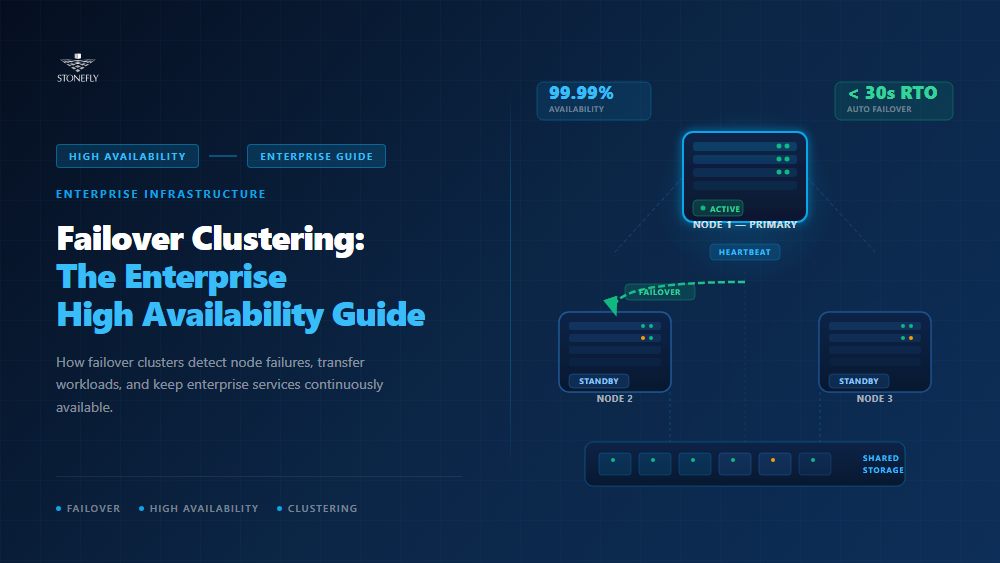
Failover clustering is a high availability technique in which two or more servers — called failover cluster nodes — work together as a single logical system. The nodes continuously monitor each other’s health; when one fails, its workloads automatically restart on a surviving node. Applications stay reachable at the same name and address, and users experience seconds of disruption instead of hours.
That answers the “what is failover clustering” question in principle; in practice, a server failover cluster is defined by three mechanisms working together: health detection (knowing a node has failed), quorum (agreeing on which nodes are still in charge), and workload placement (restarting services where capacity exists). Windows Server Failover Clustering (WSFC), Linux Pacemaker/Corosync, and VMware HA all implement the same trio with different machinery.
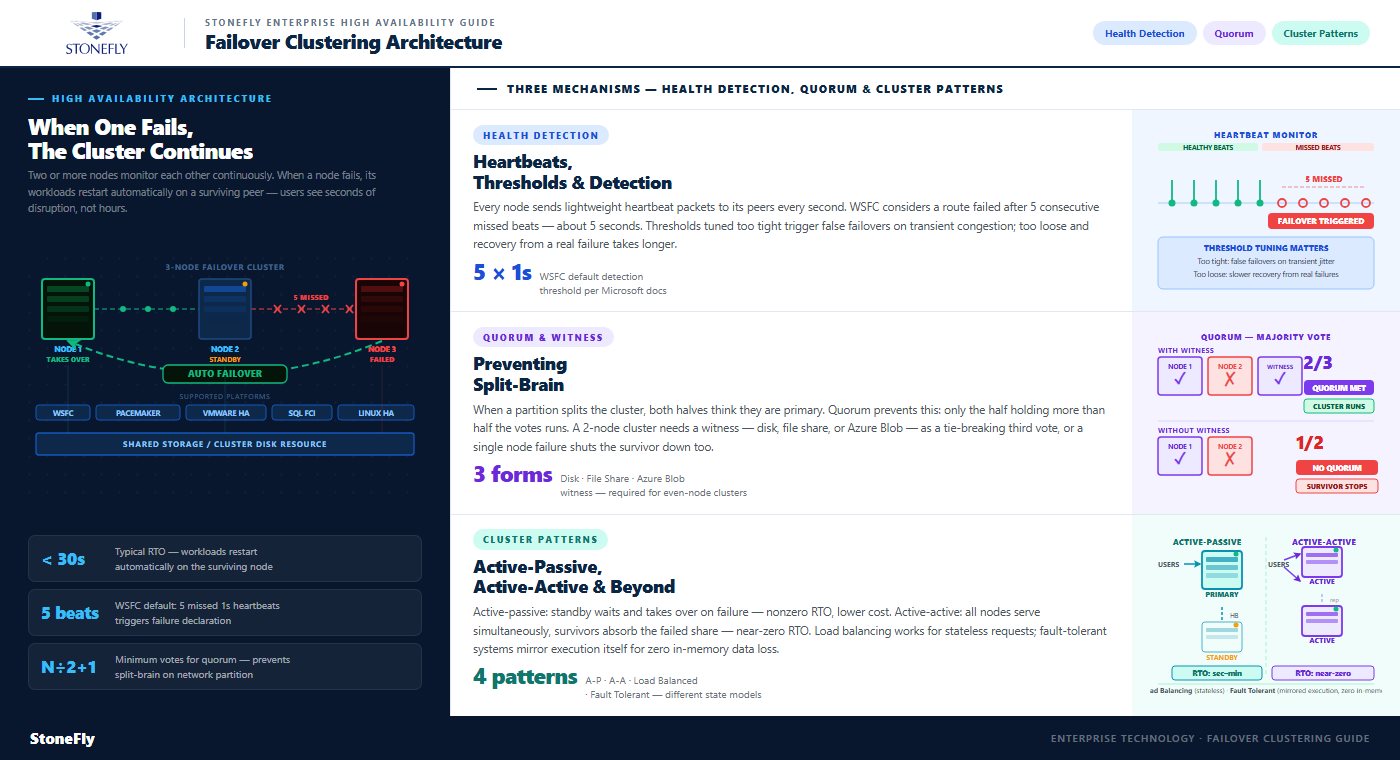
In a clustered server environment, every node sends lightweight heartbeat packets to its peers over one or more cluster networks and expects timely responses. In WSFC, the default policy considers a network route down when five consecutive heartbeats — sent once per second — go unanswered, per Microsoft’s documentation. When all routes to a node are lost, the cluster declares it failed and begins moving its roles to surviving nodes.
The tuning matters more than most teams expect. Thresholds set too aggressively trigger false failovers during transient network congestion; thresholds set too loosely stretch the time between a real failure and recovery. Stretch clusters spanning sites typically run relaxed thresholds to tolerate WAN jitter — one of several ways geography changes cluster behavior.
The dangerous failure mode in any cluster isn’t a dead node — it’s a network partition where both halves believe the other is dead and both try to run the same workloads against the same data. Quorum prevents this split-brain scenario by requiring a majority of votes for any group of nodes to operate: each node gets a vote, more than half must be present, and the minority side shuts its cluster services down.
Because majorities need odd numbers, even-node clusters add a witness — a tie-breaking vote hosted outside the nodes themselves. Microsoft supports three forms: a disk witness on shared storage, a file share witness on a separate server, and a cloud witness in Azure Blob Storage. For a two-node cluster a witness isn’t optional: without one, losing a single node leaves one of two votes — short of a majority — and the survivor stops too, defeating the purpose of clustering entirely.
Not every group of servers is a failover cluster. Server cluster architecture spans several distinct patterns, and choosing the wrong one — or assuming one provides what another does — is a common and expensive design error:
| Cluster pattern | How it works | Downtime on node failure | Best suited for |
| Active-passive failover cluster | Standby node monitors the active node and takes over its roles on failure | Seconds to minutes while services restart | Databases, file services, virtualization hosts |
| Active-active high availability cluster | All nodes serve workloads simultaneously; survivors absorb a failed node’s share | Near-zero, with reduced capacity until repair | Storage controllers, scale-out applications |
| Load balancing clusters | A distribution layer spreads stateless requests across identical nodes | Zero for new requests; in-flight sessions on the failed node are lost | Web front ends, APIs, application tiers |
| Fault tolerant server systems | Workloads execute in lockstep on mirrored hardware or VMs | Zero, with no loss of in-memory state | Trading systems, industrial control, payment processing |
The distinctions are about state. Load balancing clusters work because web requests are stateless — any node can answer any request, so distribution is enough. Stateful workloads like databases need high availability clustering, where exactly one node owns the data at a time and ownership transfers cleanly on failure. Fault tolerant server systems go further, mirroring execution itself so even in-memory state survives — at roughly double the hardware cost and with constraints on performance.
Enterprise server clustering deployments routinely combine patterns: load-balanced web tiers in front of failover-clustered databases on top of active-active storage. StoneFly’s comparison of mirroring vs. replication vs. clustering maps how these techniques relate at the data layer, and the distinction between high availability, fault tolerance, and disaster recovery is worth keeping sharp — each solves a different failure class at a different cost.
A production failover cluster setup is mostly decided before the wizard runs. The sequence that avoids rework:
Storage is where failover cluster designs quietly succeed or fail. Clustering protects compute: when a node dies, another takes over. But the workload’s data must already be reachable by the surviving node, which is why most failover clusters are built on shared storage — a SAN presenting block volumes to every node. If that storage is a single-controller array, the cluster has simply relocated its single point of failure from servers to storage.
A coherent enterprise storage architecture therefore extends clustering principles to the storage tier itself: dual active-active controllers, redundant network paths, RAID-protected disks, and failover measured in seconds. The availability of a high availability server cluster is the availability of its weakest layer — and in audits of failed “HA” deployments, that layer is usually storage. StoneFly’s breakdown of high availability configuration covers what genuine no-single-point-of-failure design looks like at the storage layer.
Clusters degrade silently. A failed disk path, a stale witness, or a node running with mismatched patches doesn’t take the service down — it removes the redundancy you’ll need at the next failure, without any user-visible symptom. Failover cluster management is the discipline of making sure the cluster you have today is still the cluster you tested at deployment.
Effective failover cluster monitoring watches the redundancy, not just the service. The signals worth alerting on:
Routine server cluster management revolves around maintenance without downtime. Cluster-aware updating drains workloads from one node, patches and reboots it, rejoins it, and moves to the next — turning patch windows into non-events, but only if remaining nodes can carry the full load. That’s the N+1 capacity rule: a cluster sized so that all nodes are needed to run the workload isn’t highly available; it’s overcommitted with extra steps.
The second discipline is rehearsal. Planned failovers — run monthly or quarterly, during business hours, on purpose — verify that role placement, scripts, and dependencies still work while the people who built them are watching. Clusters that only fail over during real emergencies tend to discover their configuration drift at the worst possible moment.
A failover cluster has a blast radius: the site it lives in. Every node, network, and shared volume typically sits in one facility, so data center fault tolerance requires layers clustering can’t provide alone — replication of data to a second site, stretch clustering across locations for the most critical workloads, and documented recovery procedures. Enterprise disaster recovery solutions pick up where the cluster’s reach ends, covering the regional events — fires, floods, grid failures — that take out every node at once.
There’s a second gap, and it’s the one that catches mature teams: clusters and replication faithfully preserve whatever the data currently is — including corruption. Ransomware encrypted on the active node is served, identically, after failover; a deletion replicates everywhere within seconds. Complete data protection infrastructure therefore pairs high availability storage solutions for uptime with versioned, immutable backups for recoverability, under a strategy that distinguishes the two — a framework covered in StoneFly’s guide to business continuity vs. disaster recovery.
StoneFly — the original innovator of the iSCSI protocol — builds the storage tier that failover clusters depend on. StoneFly high availability storage appliances run full active-active cluster configurations with dual active-active RAID controllers, redundant power and network paths, and failover measured in seconds, eliminating the single-controller weak point that undermines so many otherwise solid cluster designs. Volumes present over iSCSI or Fibre Channel to Windows Server Failover Clustering, Hyper-V, VMware, and Linux clusters as standard shared storage.
For environments that need capacity and performance to grow with the clustered server environment, StoneFly’s dual-node and scale-out NAS and SAN appliances extend the same no-single-point-of-failure design across nodes — and every StoneFly system integrates with DR365V air-gapped, immutable backup appliances to supply the data protection infrastructure layer that clustering alone can’t: point-in-time recovery when the failure is in the data itself.
Failover clustering earns its place as the backbone of high availability IT systems by making server failure routine: heartbeats detect it, quorum arbitrates it, and surviving failover cluster nodes absorb it — in seconds, not hours. But the cluster is only as available as its shared storage, only as healthy as its monitoring, and only as complete as the disaster recovery and backup layers around it.
Treat availability as a stack: clustered compute on active-active storage, watched by monitoring that tracks redundancy rather than just uptime, replicated for site failures, and backed by immutable copies for the failures replication can’t fix. Enterprises that build failover clustering into that larger architecture stop negotiating with downtime — and start budgeting for its absence.
To design shared storage for a new cluster, retrofit high availability into an existing deployment, or pair failover clustering with air-gapped backup and DR, contact StoneFly at [email protected].










Join our mailing list to receive the latest news, updates, and promotions from StoneFly.