

In enterprise IT environments, it’s important to understand the key components that support identity and access management. Two of the most essential elements in Windows-based networks are Domain Controllers (DCs) and Active Directory (AD). While these terms are sometimes used interchangeably—especially by those new to the field—they serve different purposes. Knowing the distinction between the two, and how they work together, is critical when planning secure, reliable, and scalable network infrastructures.
When designing IT infrastructure for mid-size to large organizations, consistency, centralized control, and security are top priorities. Microsoft’s Active Directory helps centralize user account management, access control, device registration, and policy enforcement—whether on-premises or in hybrid cloud environments. It allows IT administrators to manage authentication methods, password policies, and resource permissions, ensuring users and systems follow required protocols.
Domain controllers, on the other hand, are dedicated servers that make Active Directory functional. They handle authentication requests, validate credentials, host the AD database, and issue security tokens. Without a domain controller, Active Directory cannot operate. Every interaction with AD—from accessing a shared folder to logging into a workstation—relies on the services provided by one or more domain controllers.
A well-structured Active Directory environment backed by properly deployed domain controllers plays a key role in minimizing downtime, maintaining compliance, and protecting sensitive data. When planning these deployments, IT leaders must evaluate factors such as whether to use on-prem, cloud-based, or hybrid domain controllers; whether to implement appliances; and how to monitor and maintain performance. Distinguishing the roles of domain controllers and Active Directory early in the planning process helps improve deployment efficiency and long-term stability.
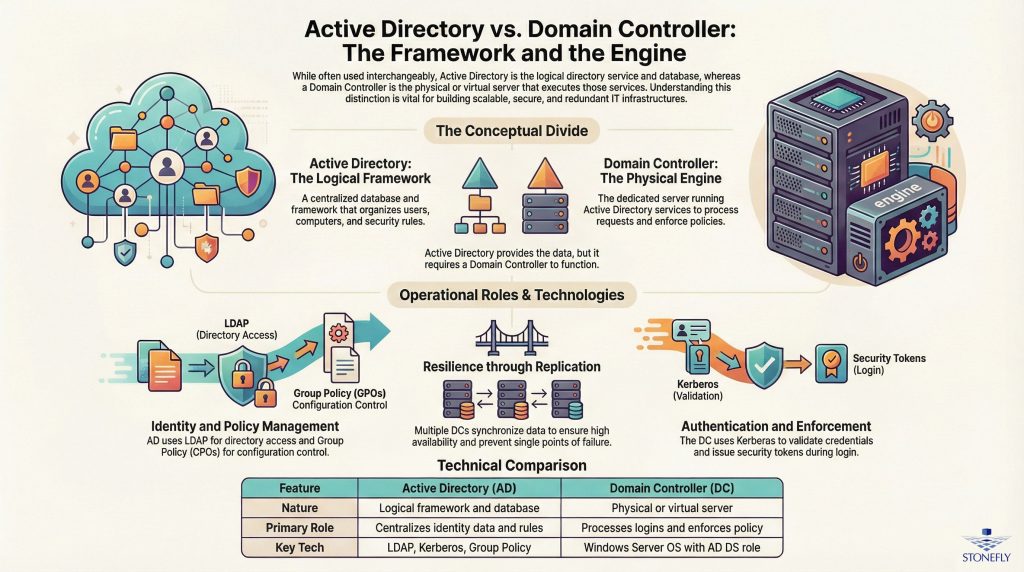
To understand how these technologies work, it helps to draw a simple comparison: Active Directory is the framework and database that organizes users, computers, and resources, while a domain controller is the server that runs that framework.
Active Directory includes features like Group Policy Objects (GPOs), Kerberos-based authentication, Lightweight Directory Access Protocol (LDAP), and deep integration with DNS. It defines the structure and rules for your domain environment.
A domain controller is a physical or virtual server configured with the Active Directory Domain Services (AD DS) role. It handles request processing, replicates directory changes, processes authentication, and enforces security policies. Larger environments often use multiple domain controllers for load balancing, redundancy, and fault tolerance.
Understanding the difference between the two enables better decisions around deployment design, replication strategies, and fault recovery procedures. In this blog, we’ll break down these core concepts so IT professionals can design secure, high-performance, and scalable identity infrastructures that support enterprise operations.
For IT architects and system engineers, misunderstanding the roles of domain controllers and Active Directory can lead to costly mistakes—such as performance bottlenecks, single points of failure, or compliance gaps. For example, deploying all domain controllers in one location without replication introduces risk. Similarly, failing to use monitoring tools limits visibility into health and performance trends.
By understanding how each component works and aligning infrastructure with business requirements, organizations can set best practices and ensure long-term maintainability. Advanced environments often implement domain controller clustering, use performance monitoring for both DCs and Active Directory, and apply custom policies to meet specific recovery time and availability goals.
This blog offers a detailed breakdown of Active Directory and domain controller functions, deployment options, and planning strategies. Whether you’re launching a new domain forest or expanding across multiple locations, the insights here will help support service reliability, compliance, and growth across your IT landscape.
Active Directory (AD) is a core component of enterprise IT environments. Developed by Microsoft for Windows-based domain networks, it serves as a centralized system to manage user authentication, enforce security policies, and control access to files, printers, applications, and other networked resources.
AD enables IT teams to build a structured environment where users, devices, and policies can be managed from one location. This centralized approach helps reduce administrative complexity, ensure security compliance, and scale operations efficiently—making it a key part of enterprise infrastructure, especially where access control and oversight are critical.
To understand how Active Directory functions, it’s important to look at the main components that work together within a network environment.
1. LDAP (Lightweight Directory Access Protocol): LDAP is the communication protocol that AD uses to access and manage directory information. It allows systems and applications to create, read, and modify objects like users, groups, and computers within the directory. This standardized protocol also makes it easier for third-party tools to work with AD.
2. Kerberos: Active Directory uses the Kerberos protocol to authenticate users securely. This ticket-based method avoids sending passwords in plain text over the network, helping to prevent unauthorized access and man-in-the-middle attacks.
3. Group Policy: Group Policy provides detailed control over user and device configurations across the network. Administrators can use Group Policy Objects (GPOs) to enforce settings such as password policies, software installations, and desktop restrictions, ensuring consistent behavior across all systems within a domain.
Together, these features give IT administrators the tools necessary to maintain security, standardize configurations, and streamline operations across departments and locations.
One of the most widespread uses for Active Directory is managing user identities and permissions—commonly referred to as Identity and Access Management (IAM). With AD, organizations gain a centralized platform for handling user login credentials and enforcing access controls across various resources, whether they’re hosted on-premises, in the cloud, or across both environments.
AD assigns users to groups or Organizational Units (OUs), each with predefined permissions. This makes it easier to manage access rights and respond quickly when roles change. For instance, when a user transfers to a new department, IT can simply move their account to the appropriate OU—automatically applying the relevant policies and access settings without manual reconfiguration.
This structure not only strengthens security but also supports regulatory requirements. For companies that must comply with frameworks such as HIPAA, GDPR, or SOX, Active Directory provides audit trails and access logs to support accountability and reporting.
Active Directory supports more than just IT operations—it plays an essential role in everyday functions across all departments, including HR, finance, sales, customer service, and operations. Here’s how different teams use AD in their daily workflows:
– Authenticating users for access to devices, applications, and platforms
– Securing shared resources like network drives and communication systems
– Enforcing policies such as multi-factor authentication and conditional access
– Tracking user activity for compliance and security monitoring
For example, finance teams can use AD permissions to restrict access to sensitive files. HR departments can automate onboarding steps using AD profiles to provision resources like email accounts and shared folders. Operational teams can manage service accounts more securely through defined roles within AD, supporting automation while maintaining tight access controls.
Although the terms “Active Directory” and “Domain Controller” are often used together, they refer to different parts of the directory system.
– Active Directory is the directory service that holds all the user, group, computer, and resource information. It provides the framework for access control, policy enforcement, and resource management.
– A Domain Controller (DC) is a server that runs the AD service. It handles authentication requests, policy enforcement, and directory updates. In essence, it’s the engine that powers AD’s operations.
Active Directory requires one or more Domain Controllers to function. To maintain availability and performance, organizations often deploy multiple Domain Controllers across different sites. This redundancy ensures authentication services remain available, even during outages, and supports replication of directory data across locations.
In large environments, ensuring Domain Controllers are properly equipped is crucial—especially when dealing with high volumes of users or demanding access controls.
Many organizations turn to purpose-built appliances or hyperconverged infrastructure to deploy Domain Controllers. These solutions often come with features such as optimized storage, replication tools, automated failover, and monitoring dashboards—all of which make managing Domain Controllers easier and more secure.
Hybrid environments are also increasing in popularity, with cloud services like Azure AD Domain Services extending on-prem Active Directory to cloud-based workloads. These cloud-native DCs remove the need to operate an entirely separate AD system in the cloud, simplifying IT management and improving integration.
To maintain uptime and safeguard against issues, IT teams routinely monitor Domain Controller performance, implement regular backups, and use tools to detect unauthorized access attempts or replication delays that might affect authentication services.
In an enterprise IT environment, managing user identities and enforcing access policies requires a combination of services, protocols, and systems. A key part of this setup is the domain controller (DC). To understand what a domain controller does, it’s important to know that it’s a server that handles authentication requests and implements security rules for a Windows domain. It plays a central role in networks that use Microsoft Active Directory (AD).
The domain controller is not the same as Active Directory. Active Directory is the underlying directory service — a structured database of users, groups, permissions, and devices. The domain controller is the server that runs Active Directory Domain Services (AD DS), providing authentication and access control across the network.
Any time a user logs in, the domain controller checks their credentials — verifying usernames and passwords — and determines their level of access. This includes authorizing access to file shares, databases, Microsoft 365 accounts, and internal enterprise applications. Domain controllers also enforce Group Policies that define user roles, security settings, device restrictions, and software installations.
Domain controllers act as the core of an organization’s identity and access management system. They support authentication protocols like Kerberos and ensure compliance with standards such as LDAP. With domain-wide enforcement of access controls, they form the foundation for secure and consistent user verification.
To prevent downtime or risk of failure, organizations typically run multiple domain controllers. These work together in a multi-master replication setup, allowing any changes made on one DC to sync across others in the same domain. This creates a fault-tolerant system that ensures continuous availability of authentication services.
As hybrid IT environments become more common, many businesses extend their domain controller functionality to the cloud. Using platforms such as Microsoft Azure, companies can deploy virtual domain controllers to support remote users and cloud-based applications — all while maintaining integration with on-prem systems.
StoneFly provides domain controller appliances designed with built-in redundancy, seamless virtualization support, and synchronization capabilities for hybrid environments.
One of the main functions of a domain controller is to enforce company-wide security policies through Group Policy Objects (GPOs). These configurations help administrators define exactly how users and computers operate within the domain. This allows centralized control over:
– Multi-factor authentication (MFA)
– Password policies and expiration cycles
– Device restrictions and compliance policies
– User access management and role assignment
– Prevention of unauthorized privilege elevation
– Software deployment, updates, and patching
By applying policies through AD domain controllers, organizations can reduce vulnerabilities and maintain a strong defense against cyber threats.
For those wondering about the difference between Active Directory and a domain controller: Active Directory is the service that provides directory information. The domain controller is the server where this service runs. It manages authentication, policy enforcement, and directory lookups.
Monitoring domain controller performance is essential to avoid bottlenecks, replication issues, or hardware failures that could interfere with user access. StoneFly appliances include tools to monitor domain controller health, streamline replication, and provide secure storage for the Active Directory database across backup environments.
Active Directory goes beyond handling logins. It supports a wide variety of enterprise functions: setting permissions for files and folders, managing internal DNS, validating service accounts, and enabling certificate-based security. That’s why understanding Active Directory means seeing it as the foundation for identity-driven access across the business.
No matter where it’s hosted — on physical servers, virtual machines, or in the cloud — the layout of an Active Directory environment influences availability and performance. Proper deployment involves planning domain controller locations, defining replication paths, setting up recovery strategies, and maintaining routine backups.
When configured correctly, domain controllers help build a secure, scalable structure that supports enterprise-level identity management. StoneFly offers integrated solutions that align with domain controller environments, providing storage, backup, and monitoring tailored to enterprise security needs.
| Feature or Function | Active Directory (AD) | Domain Controller (DC) |
|---|---|---|
| Role in the Network | Directory service that centralizes identity data | Server that runs AD services and performs logins |
| Core Responsibilities | Manages user/device info and access rules | Processes authentication and enforces policy |
| Nature of Component | Logical framework | Physical or virtual machine |
| Key Technologies Used | AD DS, LDAP, Kerberos, Group Policy | Windows Server OS with AD DS role |
| Supports High Availability | Yes, via replication across controllers | Yes, via multiple synchronized DCs |
| Cloud Deployment Options | Available via Azure Active Directory | Can run on cloud-based Windows Server |
| Monitoring Tools | Monitored using AD-focused tools | Requires tracking performance and access requests |
| Setup Approach | Configured via server roles | Deployed as standalone or multi-role server |
Domain controllers play a central role in enterprise IT environments, especially in organizations that rely on centralized identity management, secure access controls, and policy enforcement. Active Directory environments cannot function without one or more domain controllers (DCs). These servers handle user authentication, enforce group policies, synchronize directory information, and maintain operational continuity through data replication.
To properly distinguish between “domain controller” and “Active Directory,” it’s important to recognize that Active Directory is the directory service — a centralized database that stores information about users, devices, and permissions. A domain controller is the server that runs the Active Directory Domain Services (AD DS) role, handling authentication and applying policies based on the information stored within AD.
Here’s a closer look at the core functions of a domain controller:
One of the primary responsibilities of a domain controller is verifying the identity of users and systems. When someone logs into a Windows network that’s joined to a domain, their credentials are sent to the domain controller for validation. The DC processes the login by comparing a hashed version of the submitted password with the stored value in the directory database.
After the account is authenticated, the domain controller checks the user’s group memberships to determine access permissions. These include access to shared folders, printers, virtual machines, and cloud resources. Permissions are granted according to predefined access control policies.
Most enterprise networks use Kerberos for authentication — a secure, ticket-based protocol that reduces the risk of password exposure. To ensure high availability across distributed networks or during outages, many organizations deploy additional domain controllers, including read-only domain controllers (RODCs), to handle requests without compromising reliability.
Domain controllers also play a crucial role in managing group policies across the organization. Through Group Policy Objects (GPOs), IT administrators can define and enforce a wide range of configuration settings — from password rules to desktop restrictions and software installation permissions.
Once GPOs are created and linked to organizational units (OUs) in Active Directory, domain controllers take care of replicating and applying those policies across all relevant devices. This approach helps maintain a consistent security posture, reduce manual configurations, and support compliance requirements.
In industries with strict regulatory standards, such as healthcare or finance, monitoring domain controller activity is essential. Changes to group policies can affect system behavior and user permissions — making visibility and auditability critical.
Large environments often include multiple domain controllers to ensure high availability and fault tolerance. These controllers operate within a multi-master replication model, which means any authorized change to the directory — such as creating a new user, modifying permissions, or joining a device to the domain — is copied across all domain controllers.
Replication can occur over IP using Remote Procedure Calls (RPC) or, in some scenarios, through SMTP. For enterprises with branch offices or international data centers, AD Sites and Services can be configured to manage replication traffic, balance bandwidth usage, and align updates with business hours.
Understanding the distinction between Active Directory and domain controllers is especially important here: Active Directory holds the data, but domain controllers ensure that data remains synchronized across the organization and remains accessible during outages or transitions.
Each domain controller stores a copy of the Active Directory database (ntds.dit) and uses mechanisms like update sequence numbers (USNs) and timestamps to manage replication. Administrators can create site links, set replication schedules, and assign priority costs to control how data flows between locations.
In businesses with multiple locations, remote offices often have their own domain controllers to manage authentication and access independently while still being part of the central AD structure. These domain controllers sync data with others in the network, ensuring users can log in and work as expected — no matter where they are.
In hybrid cloud environments, IT teams can deploy domain controller appliances or virtual instances in cloud platforms like AWS or Microsoft Azure. These cloud-based systems work alongside on-premises AD deployments, providing secure and unified identity management for both traditional and cloud-native applications.
For environments with segmented or zero-trust network designs, placing domain controllers in each segment — such as LANs and DMZs — allows organizations to retain localized authentication and policy enforcement while maintaining centralized control. However, to keep replication smooth, administrators need to ensure that DNS settings and AD site boundaries are correctly configured and that any latency issues between sites are properly addressed.
Tools like Windows Performance Monitor, Event Viewer, and enterprise platforms such as StoneFly’s infrastructure management solutions are often used to track domain controller health. These tools help detect issues such as failed replication, expired credentials, or slow authentication processes before they become critical.
With hybrid IT environments becoming more common, many organizations are shifting from traditional on-premises Active Directory (AD) implementations to cloud-based domain controller architectures. This shift is more than a technological change — it’s a strategic approach aimed at achieving better scalability, improved business continuity, and simplified identity management. This section breaks down what cloud-based domain controllers are, how they differ from Active Directory, and how tools like Azure AD Connect and Active Directory Federation Services (AD FS) help bridge the gap between on-prem and cloud environments.
Relying solely on on-premises domain controllers can restrict growth and flexibility, especially for companies operating across multiple sites or supporting remote workers. Cloud-based domain controllers offer a more dynamic solution by extending directory services into cloud platforms such as Microsoft Azure. Depending on the use case, this can involve deploying traditional Active Directory Domain Services (AD DS) on virtual machines in the cloud, or taking a more modern approach with Azure Active Directory (Azure AD) for web-based applications and mobile access.
While Azure AD doesn’t completely mirror the functions of traditional AD, it significantly enhances the identity layer by enabling features such as Single Sign-On (SSO), Multi-Factor Authentication (MFA), and adaptive access controls for cloud-first and hybrid environments.
When comparing traditional domain controller appliances to cloud-native alternatives, businesses should consider several key factors:
– Scalability and Redundancy: Cloud domain controllers can scale on demand and be deployed across multiple Azure regions for better uptime and disaster recovery.
– High Availability: In the event of a system failure or outage, cloud-based solutions can automatically failover to healthy instances in other regions, supporting continuity.
– Operational Simplicity: Automation tools like Azure AD Connect streamline identity synchronization, freeing IT teams from many of the manual management tasks that come with on-prem deployments.
That said, cloud adoption isn’t without challenges. Potential downsides include latency-related authentication issues across long distances and a heavier reliance on constant internet connectivity.
Azure AD doesn’t replace on-prem AD in most enterprise environments, but it does provide valuable functionality that supports modern IT needs. Traditional Active Directory relies on on-site servers and Kerberos for authentication, while Azure AD uses internet-based protocols like OAuth 2.0 and SAML. This makes it more suitable for applications that operate beyond the corporate network, such as SaaS tools and remote systems.
Typical usage scenarios include:
– On-prem AD: Used for local authentication, enforcing Group Policy, and managing internal systems.
– Azure AD: Designed for securing cloud-based services, enabling mobile user access, and integrating with Microsoft’s identity protection tools, such as Defender for Identity.
By using synchronization tools, Azure AD can be tightly integrated with on-prem implementations to create a hybrid identity environment that supports users across platforms.
Creating a seamless user experience across on-prem and cloud environments relies on two essential tools:
– Azure AD Connect: This tool synchronizes user accounts, passwords, and group information between on-prem Active Directory and Azure AD. It supports hybrid scenarios with features like password hash sync and pass-through authentication, allowing users to maintain a consistent login experience across both environments.
– Active Directory Federation Services (AD FS): For organizations with strict compliance requirements, AD FS supports federated authentication — allowing access to Azure resources without storing passwords in the cloud.
Together, these tools enable consistent identity management across diverse infrastructures while offering administrators the flexibility to enforce centrally managed policies and monitor user activities.
As domain controller infrastructures expand into the cloud, keeping systems monitored becomes a critical part of day-to-day operations. Businesses should invest in solutions that allow them to track Active Directory performance, monitor authentication activity, and address any replication delays or server load imbalances in real-time.
Cloud-based domain controllers are about more than just modernizing infrastructure — they help organizations align their identity services with scalable, secure, and flexible IT operations. With tools like Azure AD Connect and federated access via AD FS, enterprise IT teams gain the visibility, control, and agility needed to meet the demands of today’s distributed workforce.
Setting up a domain controller is more than just adding another server. It’s the foundation for managing user access, enforcing policy, and handling identity across the enterprise. Whether you’re building a traditional on-prem AD deployment, setting up domain services in the cloud, or managing a mix of both, a well-executed domain controller implementation supports long-term scalability and security.
By understanding how a domain controller works alongside Active Directory, preparing the right infrastructure, and applying best practices during configuration and monitoring, IT teams can build a resilient environment that meets the organization’s identity and access requirements.









Join our mailing list to receive the latest news, updates, and promotions from StoneFly.






