

As enterprise data continues to grow at an accelerating pace, organizations are facing increased pressure to revamp their storage infrastructure. The rise of cloud-native applications, data analytics platforms, IoT devices, video surveillance, and collaboration tools is generating a flood of unstructured data. Simply expanding primary or archival storage is no longer efficient or cost-effective. Businesses need a smarter, more adaptable approach to managing and storing data.
Today’s storage strategy involves more than just performance and capacity. Enterprises must also account for data access patterns, lifecycle management, compliance requirements, and long-term operational costs. To meet these demands, many are turning to hybrid and multi-tiered storage architectures—where nearline storage plays a key role.
Nearline storage acts as a bridge between hot storage, which is used for frequently accessed data, and cold storage, which is reserved for data that is rarely used. It provides a cost-effective solution with better performance than cold storage, making it ideal for data that needs to be retrieved within hours but doesn’t require real-time access. Using nearline storage can help reduce the burden on expensive primary storage, simplify compliance, and scale with growing data volumes.
Many organizations are deploying nearline storage through hierarchical storage management (HSM) systems. These tools automatically move data between different storage tiers based on how often it’s accessed, its importance, and pre-set policies. This automated approach improves efficiency, optimizes storage usage, and streamlines data retrieval throughout its lifecycle.
Nearline storage refers to a category of data storage that sits between primary (hot) storage and long-term archival (cold/offline) solutions. For IT teams and infrastructure managers, understanding how nearline storage fits into the overall storage architecture helps strike the right balance between performance, cost, and data accessibility.
To understand how nearline storage works, it’s helpful to look at the broader model of hierarchical storage management (HSM). HSM segments data storage into tiers based on how frequently the data is accessed, how fast it needs to be retrieved, and the overall cost of the storage medium.
At the top of this hierarchy is primary, or online, storage—typically high-performance infrastructure used for applications that require constant access, such as databases, virtual machines, or transactional systems. At the other end is offline or cold storage, designed for archiving data that is rarely needed, like long-term compliance records or backups.
Nearline storage sits in the middle. It delivers slower performance than primary storage but costs significantly less. It’s meant for data that isn’t accessed daily but still needs to be available without delay if needed. Typical access times are within a few seconds, making it a practical option for data that’s important but not time-sensitive.
Simply put, nearline storage offers a compromise between speed and cost. It’s slower than high-end flash storage but faster and more accessible than archival tape systems. Compared to cold storage—which may take hours to retrieve data—nearline systems support faster, on-demand access without requiring lengthy rehydration processes.
Here’s how it stacks up:
– Online (Hot) Storage: Millisecond access; high cost; ideal for frequently used, mission-critical data.
– Nearline Storage: Access in seconds; medium cost; suited for data that’s accessed occasionally but needs to stay online.
– Coldline Storage: Access in hours; low cost; used for data with rare or scheduled access, such as archived logs or historical datasets.
– Offline Storage: Stored on tape or removable media; used for long-term archiving and air-gapped backups.
Solutions like StoneFly’s nearline appliance and cloud storage options are built to provide easy access to non-urgent data, without placing a load on your fastest and most expensive systems.
Incorporating nearline storage into your IT strategy makes sense when you need to retain access to data but don’t require high-speed performance. Common scenarios include:
– Regulatory and Compliance Retention: Industries like finance, healthcare, and manufacturing often need to retain data for years to meet compliance standards. Nearline storage keeps that data accessible without the high price tag of online tiers.
– Backup and Recovery: Storing older or completed backup sets on nearline storage frees up space on primary systems and keeps recent restore points available for quick recovery.
– Analytics and Data Preparation: Raw data used for analytics or research doesn’t need round-the-clock access but should still be readily available when needed. Nearline tiers help manage these workloads efficiently.
– Media Libraries: Companies managing large digital libraries—like marketing departments or production studios—can use nearline storage for media that’s published and still in use, while sending lesser-used content to archival storage.
For IT departments managing growing data volumes, keeping everything on high-performance storage isn’t economical. Nearline storage provides a way to manage data more effectively, reducing reliance on expensive storage tiers without undermining accessibility.
Cloud providers, including StoneFly, offer nearline storage options at lower rates than traditional hot storage. This allows businesses to stay responsive without overspending on performance they don’t need for all workloads.
Modern nearline solutions—whether appliance-based, hybrid, or cloud-native—support features like encryption, automation, and deep integration with backup and disaster recovery systems. This means organizations can build intelligent, layered storage strategies that adapt as their data needs evolve.
As more organizations grapple with petabytes of unstructured data, nearline storage offers a flexible, cost-effective path forward. It helps ensure that IT infrastructure remains efficient, scalable, and aligned with operational priorities.
As data volumes continue to grow and budgets remain tight, more organizations are turning to nearline storage as a practical solution within a tiered storage strategy. Nearline storage is designed for data that’s accessed occasionally but still needs to be readily available. It fills the gap between high-speed primary storage and slower archival systems, helping businesses cut costs without compromising accessibility.
At its core, nearline storage is meant for information that doesn’t require real-time access but isn’t cold enough for deep archive. Although it has slightly higher latency than primary storage, it offers faster access than archival options—making it ideal for backups, compliance data, legal holds, large media files, and analytics archives.
One of the primary advantages of nearline storage is its affordability. Compared to high-performance SSD arrays or enterprise hard disk drives, nearline storage offers significantly lower cost per gigabyte. It’s well-suited for data that needs to be retained and quickly accessible, even if that happens just a few times per year. This makes it a smart option for managing storage expenses while still meeting data availability needs.
Cloud providers such as Google Cloud and Microsoft Azure offer nearline tiers, alongside hybrid options like StoneFly’s on-prem and cloud-integrated systems. These choices provide organizations with the flexibility to choose deployments based on regulatory needs and usage patterns. Access and retrieval fees are priced accordingly, making it important to make data placement decisions based on data use and lifecycle policies.
By tracking access trends and using predictive analytics, IT teams can determine which datasets are best suited for nearline storage—helping ensure resources are used efficiently and budget allocation delivers maximum value.
Even though nearline storage is targeted at less frequently accessed data, it still offers enterprise-grade durability and availability. Current architectures are built with redundancy, erasure coding, and off-site replication, ensuring that business-critical information is protected at all times.
Many providers, including StoneFly, offer durability rates of up to 99.999999999% (11 nines), far exceeding standard business continuity requirements. Cloud-based nearline storage often includes availability service level agreements (SLAs) of 99.9%, which is sufficient for most backup and regulatory use cases.
For industries where compliance is a top concern, such as finance and healthcare, StoneFly’s nearline solutions can be configured with features like immutable backup and WORM (Write Once Read Many) policies to meet strict standards, including HIPAA, GDPR, and SEC regulations.
In addition, nearline access speeds typically outperform deep archive storage, supporting faster search, discovery, and data restoration when needed—making it a reliable component for business continuity and disaster recovery planning.
A key reason why many IT teams incorporate nearline storage into their architecture is the balance it provides between performance and cost. The throughput and IOPS (input/output operations per second) offered by nearline storage are more than sufficient for secondary backups, batch analytics, dev/test environments, or staging areas.
Nearline tiers also help automate data management through policies that shift files based on usage, age, or security needs. By positioning nearline storage as the “warm” layer in a multi-tier setup, organizations can keep critical data readily available while moving less-active data off more expensive primary systems.
StoneFly nearline storage solutions are built to seamlessly integrate with both cloud and on-premises infrastructure. Whether deployed in a private datacenter, virtual environment, or public cloud, they offer consistent management and reliable performance.
Support for protocols like S3, Azure Blob, iSCSI, NFS, and SMB ensures nearline storage fits into existing IT environments. StoneFly’s unified SAN and NAS appliances allow companies to serve nearline storage across departments using a centralized platform, reducing operational complexity.
For organizations leveraging multiple clouds or looking to protect data across different geographic zones, nearline tiers enable efficient data mobility—without the limitations or delays often associated with cold storage or physical media transfer.
One of the most practical benefits of nearline storage is its ability to support automated data lifecycle management. Nearline tiers integrate with existing Information Lifecycle Management (ILM) and Hierarchical Storage Management (HSM) tools to ensure outdated or inactive data is automatically moved out of high-cost tiers.
Policies can classify and schedule data movement based on criteria such as retention rules, access logs, or legal requirements. When used with StoneFly’s storage management software, organizations can assign data expiration timelines, automate transitions to archival storage, and generate compliance reports as needed.
Automated tiering powered by user behavior and system use ensures that no data lingers where it doesn’t belong—helping to maintain system performance while keeping storage costs under control.
With its combination of lower cost, enterprise-caliber reliability, automation-ready integration, and hybrid deployment options, nearline storage has become an essential part of modern storage strategies. For businesses looking to simplify long-term data retention, meet compliance needs, and stay within budget, nearline tiers offer more than an in-between solution—they deliver a smarter way to manage data growth efficiently.
Designing an efficient enterprise storage strategy often means taking a tiered approach to balance performance, cost, and data accessibility. Nearline storage plays a key role in this structure. To make informed decisions about storage tiering, it’s important to understand what nearline storage offers, how it differs from coldline and standard tiers, and when it’s the right choice for your environment.
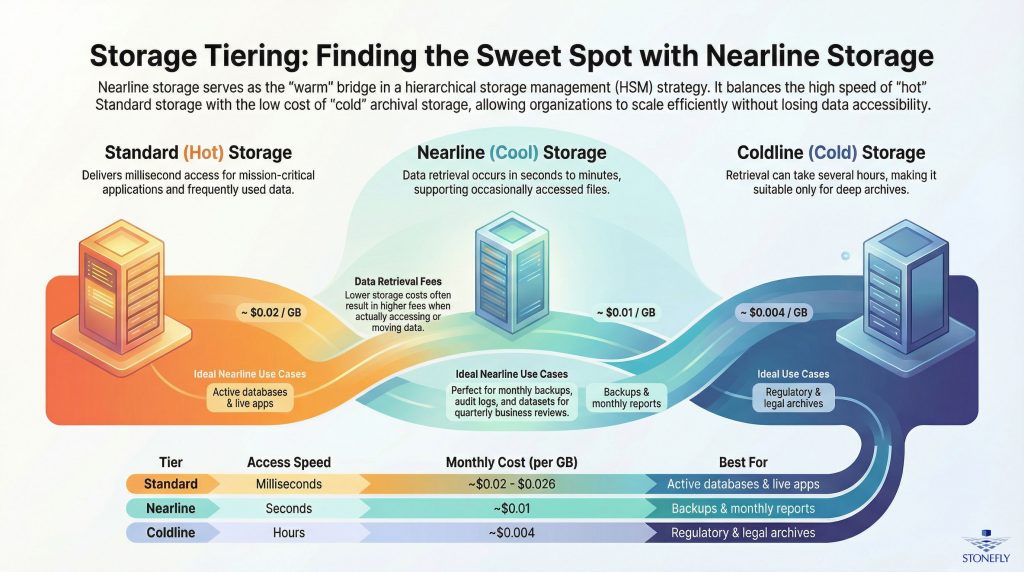
Let’s break down each storage tier to see how nearline fits into the overall mix:
– Standard Storage is meant for data that’s accessed regularly—often referred to as “hot” data. It delivers quick access and high performance, making it ideal for active workloads. However, this comes with the highest storage costs.
– Nearline Storage is categorized as “cool” storage. It’s designed for data accessed occasionally—typically less than once a month but more than once a quarter. It’s a practical option for backups, data that supports periodic business reviews, or archives that need to stay accessible without the premium cost of standard storage.
– Coldline Storage is designed for long-term storage of rarely accessed data, such as regulatory archives. Data retrieval is slower, and while storage costs are low, access fees may be higher.
In terms of performance, nearline sits between standard and coldline. It’s a smart fit for organizations that need data within reach but not immediately on-hand at all times. For example, storing monthly backups or quarterly reports is well-suited for nearline storage.
Choosing between storage tiers comes down to data usage patterns and business needs. Nearline is particularly effective when you need to keep data relatively accessible without incurring high storage costs.
Common use cases for nearline storage include:
– Backups stored on a monthly or quarterly cycle
– Archiving previous versions of application data
– Storage of customer activity logs for analytic purposes
– Email archives retained for compliance
– Datasets used for quarterly strategy or performance reviews
Nearline fills the gap between hot and cold storage, serving as a reliable option when access is infrequent but needs to be faster than coldline can provide.
When data needs to be accessed frequently—within days or even hours—standard storage makes more sense. For archival data kept primarily for compliance or records, coldline is the better fit due to its low cost and acceptably slower retrieval time.
Storage performance has a direct impact on business operations. Standard storage is ideal for latency-sensitive applications like real-time analytics, live databases, or frequently updated logs—it delivers immediate back-and-forth without delays.
Nearline storage supports use cases where minor delays in access are acceptable. Retrieval times are typically within seconds to minutes, making it appropriate for internal reports, restoring backups outside peak hours, or accessing inactive customer data that still must meet compliance requirements.
Coldline storage can require hours for data retrieval, which means it’s best used for deep archives, such as legal records or older media files that don’t need fast access.
When building a storage plan around nearline, it’s important to take your SLAs into account. If your operation requires access to historical records within moments—say, for audits or customer support—nearline offers better performance than coldline without the higher price tag of standard storage.
The cost of storage goes beyond monthly rates. Access fees, API calls, and retrieval charges should all factor into the total cost of ownership. Here’s how the tiers typically compare:
– Standard Storage: Highest monthly cost per GB (around $0.02 to $0.026/GB), but lower access and retrieval fees. Best for high-activity datasets.
– Nearline Storage: Moderate storage rates (around $0.01/GB) with likewise moderate retrieval and access charges. A balanced choice for data that’s needed occasionally.
– Coldline Storage: Lowest monthly cost (around $0.004/GB), but the highest access and retrieval fees. Most effective for data you rarely need to touch.
For semi-active datasets, nearline offers noticeable cost savings without compromising your ability to retrieve the information when needed. Over time, organizations can lower cloud and infrastructure expenses by shifting suitable data from standard to nearline tiers—freeing up high-performance storage for workloads that truly need it.
StoneFly’s solutions simplifies this process, enabling IT teams to automate tiering policies through data lifecycle management. With built-in analytics, data is categorized and shifted to the appropriate tier based on how often it’s used—ensuring nearline storage stays optimized without manual intervention.
Managing growing volumes of data while keeping storage costs under control is a challenge for many enterprises. Some datasets need to remain accessible, but storing them in high-performance storage tiers isn’t always practical. That’s where nearline storage offers real value — providing a cost-effective option that bridges the gap between frequently accessed data and long-term archival.
Nearline storage is typically a cloud-based storage tier built for infrequently accessed data that still needs to be available without extended retrieval delays. Think of it as a “warm” tier — it’s not as fast as standard storage, but far quicker to access than coldline or archival alternatives. Knowing when and how to use nearline storage helps businesses cut storage costs without compromising on availability, compliance, or retention needs.
One of the most common ways enterprises use nearline storage is for secondary backups. Compliance regulations, service-level agreements, and business continuity plans often require that backup data is stored in multiple locations — ideally across geographical regions. But keeping all that data in high-performance tiers can quickly drive up expenses.
Nearline storage offers a more affordable option for storing full backups, especially weekly or monthly snapshots that don’t need to be accessed immediately. These files must still be recoverable within a reasonable time during audits or partial restores, and nearline’s balance of lower cost with moderate retrieval speed makes it well suited for that role.
For disaster recovery scenarios, nearline storage fits naturally into tiered backup strategies. IT teams can store system snapshots and replicated volumes in nearline storage, ensuring that if primary systems fail, critical data can be restored promptly. This makes nearline a key piece in maintaining business continuity without overspending on primary storage.
Many industries are required to retain data for years — sometimes for a decade or longer. While it might seem like cold storage is the right answer, some of that data needs to remain reasonably accessible. Nearline storage is a better fit in these cases, supporting intermittent access without prohibitive retrieval delays or costs.
Legal organizations, for example, often store case files and client communications that must be readily available, even years after closing a case. Court requests for documents can come with little notice, and the ability to retrieve them within hours, rather than days, can make all the difference.
In healthcare, diagnostic imaging such as MRIs and X-rays must be retained for extended periods to meet regulatory requirements. Nearline storage can hold these images securely in compliance with standards like HIPAA and DICOM, while still allowing staff to retrieve older scans when needed for patient care or audits.
Production workflows in the media and entertainment industry also benefit from nearline storage. Editors and content teams frequently revisit archived footage or finalized projects. With nearline storage, master files and project versions can remain accessible for reuse or redistribution without crowding more expensive primary storage solutions.
For organizations using hybrid or multicloud infrastructures, nearline storage can be easily integrated into existing workflows. Solutions from storage providers like StoneFly support automated tiering policies that seamlessly transition older, less frequently accessed data from local systems to nearline cloud storage.
In a hybrid setup, active data can reside on fast, local hardware — such as high-speed SSDs or centralized NAS units — while historic files, logs, or compliance-related data are stored in the cloud. This approach minimizes on-premises storage expansion and leverages the scalability of the cloud for less active data.
With multicloud strategies, enterprises can disperse workloads across different providers to manage cost, redundancy, or location-specific requirements. For instance, logs can be stored in Google Cloud Nearline, snapshots in AWS S3 Infrequent Access, and legal archives in Azure Cool Blob Storage. Using an orchestration tool from a vendor like StoneFly enables efficient management of this data across platforms, including policy-driven movement, deduplication, monitoring, and scheduled access.
When planning for long-term data retention with moderate access needs, nearline storage offers a practical balance between cost and availability. However, selecting and managing nearline cloud storage involves more than understanding its purpose—it requires a clear view of the pricing structure and how to manage costs based on usage patterns, storage location, and individual provider policies. In this section, we’ll break down how nearline storage is priced and how businesses can approach cost management for scalable and predictable storage use.
Unlike standard cloud storage, which is built for frequent read/write operations, nearline storage is intended for data that’s accessed occasionally but needs to stay readily available. Because of this, nearline storage is priced lower per gigabyte per month, but retrieval and egress (outbound transfers) come with additional charges.
Core components of nearline storage pricing typically include:
– Storage Fees: A recurring monthly charge based on the amount of data stored. These costs are lower than standard cloud storage rates but higher than deep archive options like coldline storage.
– Retrieval Fees: Applied whenever data is accessed. Small amounts of data may result in minimal charges, but frequent or large-scale retrievals can significantly increase monthly costs.
– Egress or Outbound Transfer Costs: These fees apply when data is moved out of the cloud provider’s network—for example, to another region or back to on-premises systems.
Major cloud platforms like Google Cloud, AWS, and Microsoft Azure provide clear pricing for each tier. Nearline storage typically includes minimum retention periods of around 30 days, while colder tiers may require data to remain stored for 90 days or more to avoid early deletion fees.
While pricing models offer a baseline, actual nearline costs are determined by how the storage is used. Different applications come with different access patterns, usage frequencies, and service configurations.
– Data Access Frequency: Although nearline is intended for infrequent use, analytics or compliance-related workloads might trigger more frequent data retrieval than expected, which can result in higher charges.
– Retention Duration: Keeping data in nearline storage for extended periods—without frequently accessing it—can lead to cost savings. On the other hand, storing data temporarily but accessing it often can diminish those savings.
– Value-Added Services: Using features like data lifecycle automation, cross-region replication, encryption, or object versioning can increase costs, particularly if heavily relied upon in production workloads.
– Storage Region & Redundancy: Pricing can change depending on where data is stored and the resilience level selected. Options like multi-region storage or compliance-driven redundancy increase both storage and egress expenses.
Choosing the right storage class means weighing performance needs against budget. Nearline storage often serves as a middle ground between standard and coldline options.
– Nearline vs. Standard Storage: Standard cloud storage is built for speed, with quick access suited for applications that interact with data frequently. Nearline, while slightly slower, is more cost-effective for storing data like backups, reports, or compliance records not needed in real time.
– Nearline vs. Coldline Storage: Coldline offers even lower pricing but comes with long retrieval times, higher access costs, and longer minimum storage durations. If your project requires occasional access—every few weeks or months—nearline strikes a better balance.
For businesses with large data footprints, cloud providers often offer discounts tied to usage volumes. These pricing tiers can help reduce storage costs when consistent demand crosses certain thresholds. Services like multi-region replication or high-availability configurations may carry additional charges, but can still fall within budget with the right volume discounts in place.
StoneFly customers can further reduce costs using built-in data management tools that automate tiering strategies across hot, nearline, and coldline data layers. By tracking when and how data is used, IT teams can move files between storage classes based on set policies—without manual intervention.
For example, log files that haven’t been accessed in a week can automatically move from standard storage to nearline. If access remains inactive for longer, they can then transition to coldline storage, significantly cutting down long-term storage costs.
Additionally, storing nearline data in a select group of regions—ideally close to where the data is most frequently accessed—can help avoid unnecessary egress charges and improve overall performance.
Hierarchical Storage Management (HSM) is a data lifecycle strategy that helps organizations make the most of their storage infrastructure. By automatically distributing data across different storage tiers based on access frequency and business importance, HSM helps reduce storage costs while maintaining accessibility and compliance. As data volumes grow, nearline storage is becoming an increasingly valuable component in these environments, striking a practical balance between performance and affordability.
In this section, we’ll take a closer look at how HSM works, the specific role of nearline storage in a tiered model, and how businesses are using it to manage costs and improve storage efficiency without compromising availability.
HSM is based on the understanding that not all data is used the same way. Critical, high-activity workloads such as transaction processing or virtualized environments rely on fast, high-performance primary storage—often SSDs or enterprise-grade SANs. In contrast, older or less frequently accessed files—such as reports, backup images, or archived media—don’t need this level of performance and are more cost-effectively stored elsewhere.
That’s where automated tiering comes in. HSM solutions shift data between the following storage tiers based on pre-set rules:
– Hot storage – High-speed storage optimized for active data.
– Nearline storage – Moderately priced storage that offers decent performance for infrequently accessed data.
– Cold / archival storage – Low-cost storage designed for data that is rarely accessed but needs to be preserved.
Nearline storage sits in the middle of this model—more affordable than hot storage and faster to access than cold storage. It helps reduce reliance on expensive high-performance solutions while keeping data readily available when needed.
What sets nearline storage apart is its ability to deliver timely access at a fraction of the cost of primary storage resources. In both on-prem and cloud-based environments, nearline storage typically costs 70–90% less than high-performance disk options—yet offers much faster retrieval than deep archive storage.
StoneFly’s nearline storage offerings are built for scalability and come with features such as deduplication, compression, snapshots, and replication. These tools are essential for managing large datasets like file archives, surveillance footage, or backup images that still need to be accessible for tasks like audits, compliance reviews, and analytics.
When comparing nearline to standard storage, it’s important to note that standard storage is engineered for high Input/Output Operations Per Second (IOPS), making it suitable for live workloads. Nearline storage, on the other hand, is optimized for capacity and lower overall cost, making it ideal for data that’s used less frequently but still needs to stay online.
In an HSM framework, nearline storage acts as the bridge layer—holding data that’s no longer mission-critical, but still not ready for long-term archival. With policy-driven automation, organizations can define exactly how data should move through the tiers. Policies can control:
– Retention periods on primary storage
– Conditions for moving data to nearline tiers (e.g., inactivity over 30 days)
– Access rules that support just-in-time promotion back to faster storage
– Criteria for eventual archiving to cold storage
As an example, organizations using StoneFly’s HSM tools could automatically migrate VM backups older than 14 days from SAN to nearline cloud storage, or shift user data untouched for 60 days to NAS-based nearline storage. This ensures that data stays accessible and compliant with internal and external regulations—without the added cost of keeping it on high-speed disks.
Imagine a financial firm that must follow strict data retention guidelines. Each day, it processes a high rate of customer transactions. At first, these live transaction logs are kept on NVMe-based storage for rapid access. After 7 days, an automated policy moves the records to nearline storage hosted in a StoneFly hybrid cloud—maintaining access for reports or audits at lower cost.
After one year, older datasets migrate again—this time to a StoneFly-integrated cold storage system using WORM (Write Once, Read Many) technology for long-term, secure retention. This multilayered setup supports compliance needs while improving storage efficiency and recovery speed compared to deep archive-only models.
IT teams deciding when and how to use nearline storage need to evaluate access needs and retention requirements. If data is no longer part of daily workflows but still needs to be available, nearline storage offers a smart compromise. It reduces ongoing operational expenses while maintaining data availability, helping to streamline retrieval without overpaying for unused performance.
StoneFly’s unified approach—with integrated HSM policies and nearline storage options—allows data to naturally fall into the most suitable storage tier. This reduces manual oversight, simplifies lifecycle management, and supports enterprise scalability over time.
By combining hierarchical storage management with nearline storage, organizations can scale confidently, improve cost control, and maintain access to critical data—without sacrificing compliance or performance.
When selecting storage options for enterprise data infrastructure, IT teams must find the right balance between cost, accessibility, and longevity. Nearline storage—positioned between hot (frequently accessed) and cold (archival) tiers—offers a middle ground that’s increasingly being adopted for secondary data storage. Deciding when to use nearline storage requires a clear understanding of its benefits, limitations, and potential risks, especially as more organizations adopt hybrid or multi-cloud environments.
Nearline storage is best suited for data accessed occasionally—such as backups, log files, and historical records required for compliance. Its main appeal lies in its lower cost compared to high-performance, always-available storage. For files that don’t require immediate access, nearline storage offers a practical way to reduce total costs.
Scalability is another key reason enterprises are turning to nearline storage. Whether deployed on-prem through hierarchical storage management (HSM) or in the cloud using solutions like StoneFly S3 object storage and integrated cloud gateways, nearline storage can grow as needed—without the expense of faster media. Organizations managing large volumes of sensor data, video archives, or past project documentation often use nearline as a staging zone before moving data to longer-term cold storage.
In terms of performance, nearline storage delivers moderate data access times—faster than traditional tape systems but slower than hot storage. This makes it a practical option for records needed occasionally, such as during audits or legal reviews, where urgent access isn’t required but long delays aren’t acceptable either.
While nearline storage offers real benefits, it’s not suitable for every use case.
One limitation is access speed. It’s not designed for high-frequency or high-concurrency workloads. Applications that rely on constant read/write operations—such as transactional databases, virtual environments, or collaborative editing platforms—will encounter performance bottlenecks if run on nearline tiers.
Another important factor to consider is cost fluctuation. Many cloud storage providers do not charge for uploading data, but frequent or unpredictable downloads from nearline storage can lead to higher-than-expected charges. Managing access patterns with automated tiering policies is essential to keeping costs predictable.
As a result, enterprise IT planners and architects need to match storage tiers to workload requirements carefully. Misplacing active or sensitive data in nearline storage can lead to disruptions, increased costs, and conflicts with service-level commitments.
Security for nearline storage goes beyond basic login credentials. Since it often holds sensitive or regulated data, organizations must take a layered approach to protection.
Encryption is essential. Whether data is sitting idle or in motion, strong encryption—such as AES 256-bit—must be in place. Enterprise-ready nearline storage solutions, including StoneFly offerings, support encryption with integration into standards-based key management systems (like KMIP) or built-in tools that simplify encryption management.
Compliance is another critical concern. Many industries have legal requirements around how data is stored, accessed, and retained. Nearline storage platforms with features like immutable storage (WORM), audit logging, and isolated tenants can help meet standards like HIPAA, SOC 2, and GDPR. Using software-defined storage that includes compliance features out of the box helps organizations remain agile without compromising oversight.
Redundancy and disaster protection also need to be considered from the beginning. Features such as erasure coding, multi-region replication, and integration with air-gapped infrastructure protect nearline data from both hardware failures and ransomware threats. A well-planned storage environment will include safeguards to ensure ongoing data availability and integrity.
Part of managing nearline storage involves planning for less obvious risks—such as silent data corruption or unintentional delays in access.
Long-term storage can lead to bit rot—where files become unreadable over time if not accessed or verified. To prevent this, IT teams should schedule regular data integrity checks using checksum or hash verification tools. Some nearline platforms include built-in routines that detect inconsistencies during periods of low activity, flagging them for remediation before data is lost.
Intelligent tiering is another important aspect of effective nearline storage management. Hierarchical storage policies can automatically move data between hot, nearline, and cold tiers based on usage patterns, age, or metadata. For example, system logs older than 90 days can shift to nearline, while a user’s recent activity on archived files can promote them to standard storage to improve performance during temporary access.
Automation isn’t just about saving time—it’s a strategy to reduce risk, avoid compliance issues, and ensure business continuity. By enforcing well-defined storage rules and lifecycle paths, enterprises can control data growth and maintain a cleaner, more resilient storage environment.
Nearline storage isn’t just a budget-friendly option—it’s a strategic layer of modern data infrastructure. When used with the right policies and protections, it gives businesses the flexibility to grow, meet compliance needs, and preserve valuable data without overextending their resources.
As data volumes continue to increase, organizations face the ongoing challenge of balancing storage costs with the need to keep certain data accessible and secure. Nearline storage offers a practical solution, delivering reliable access at a lower cost for data that doesn’t need to be retrieved frequently. When used as part of a larger tiered storage strategy, nearline storage helps businesses meet operational and regulatory requirements while reducing spend.
Nearline storage sits between primary storage—designed for frequently used data—and cold storage, which is best suited for archival content. It’s ideal for datasets that aren’t accessed often but still need to be on hand when required. By storing this type of data in nearline tiers, businesses can significantly cut costs without sacrificing reliability.
Compared to higher-performance systems, nearline storage offers considerable savings per terabyte. It’s especially cost-effective when measured against traditional high-speed storage solutions. Cloud platforms such as Google Cloud, AWS, and Microsoft Azure also provide nearline options, complete with service-level agreements and consistent availability benchmarks, often ranging from 95% to 99%. These platforms support automated workflows through APIs, making it easier to archive and retrieve data when needed.
Nearline storage is particularly useful for backups, replicated media content, regulatory records, disaster recovery images, and archived project files. These files don’t need immediate access but can’t simply be deleted or deeply archived either.
Nearline storage delivers the most value when it’s part of a structured storage approach such as hierarchical storage management (HSM). HSM systems move data across different storage tiers depending on how often it’s accessed, how long it’s needed, and whether specific compliance requirements apply.
IT teams can analyze data sets and shift infrequently accessed content from more expensive flash storage to cost-effective nearline tiers. Examples include older system logs, CRM records, archived marketing materials, and bulk analytics data.
This helps reduce storage sprawl, conserve bandwidth, lower overall storage costs, and streamline data management. It also supports data deduplication, faster backups, better metadata handling, and more resilient disaster recovery processes.
Solutions from StoneFly, Inc. are designed to support this strategy. Our hybrid appliances and gateway solutions help seamlessly connect existing SAN, NAS, and cloud environments to a nearline tier, creating a unified and manageable storage infrastructure.
Before rolling out nearline storage, conduct a thorough review of your data lifecycle. Identify which files are critical, subject to compliance, or hold long-term value, but are only occasionally accessed.
Analyze how often historical data is referenced, how backups are rotated, what retrieval times are acceptable, and whether replication is required. These insights help define parameters for tier assignments and ensure the right content is placed in nearline storage.
Work with storage teams to implement automation tools that move files based on age, file type, or metadata. StoneFly’s intelligent policy engines—available in our hyper-converged and scale-out NAS products—allow for rule-based data movement across tiers, enabling smarter resource use.
Nearline isn’t just an inexpensive option—it’s a core part of a scalable, efficient data strategy.
Nearline storage helps enterprises manage data more efficiently by lowering storage costs for information that needs to remain accessible, but isn’t in constant use. Whether for backup retention, disaster recovery, compliance, or media workflows, nearline offers a practical solution for storing mid-frequency data. When used within a hybrid or multicloud environment, it adds flexibility and scalability — making it a valuable part of long-term data management strategies.










Join our mailing list to receive the latest news, updates, and promotions from StoneFly.






