Ask three enterprise systems for the same customer record and you’ll often get three different answers — a current address in the CRM, a stale one in the ERP, and a third variant in the data warehouse. Data synchronization is the discipline that prevents that drift: keeping multiple copies of data consistent across the databases, applications, sites, and clouds where modern enterprises actually run. As infrastructure spreads across on-premises systems and multiple clouds, the copies multiply — and unsynchronized copies don’t just sit there, they actively mislead the applications and people relying on them.
The cost is measurable. Gartner has estimated that poor data quality costs organizations an average of $12.9 million per year, and inconsistent copies of the same record are among its most common forms. Meanwhile, the tolerance for lag keeps shrinking: distributed applications, AI pipelines, and globally spread teams expect every system to reflect reality now, not after tonight’s batch job.
This blog explains what data synchronization is and how its mechanisms work, the difference between synchronization, replication, and data harmonization, how distributed data synchronization operates across sites and clouds, and what to look for in data synchronization tools built for enterprise scale.
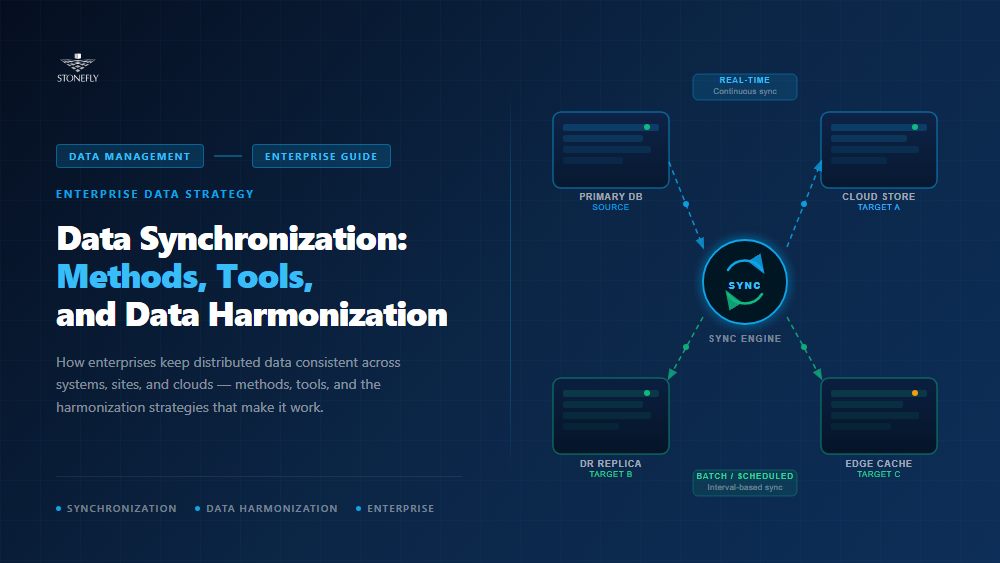
Data synchronization is the ongoing process of keeping two or more copies of data consistent with each other, so that a change made in one location is reflected in all others — automatically, and within a defined time window. Synchronization can run one-way, from a source system to its targets, or two-way, where any copy can accept changes that propagate to the rest.
Under the hood, every synchronizing mechanism answers three questions: how changes are detected, how they are transported, and how conflicts are resolved. Detection ranges from simple timestamp comparison to database triggers to log-based change data capture (CDC), which reads the database’s own transaction log and has become the standard for enterprise data synchronization because it captures every change without adding load to production queries.
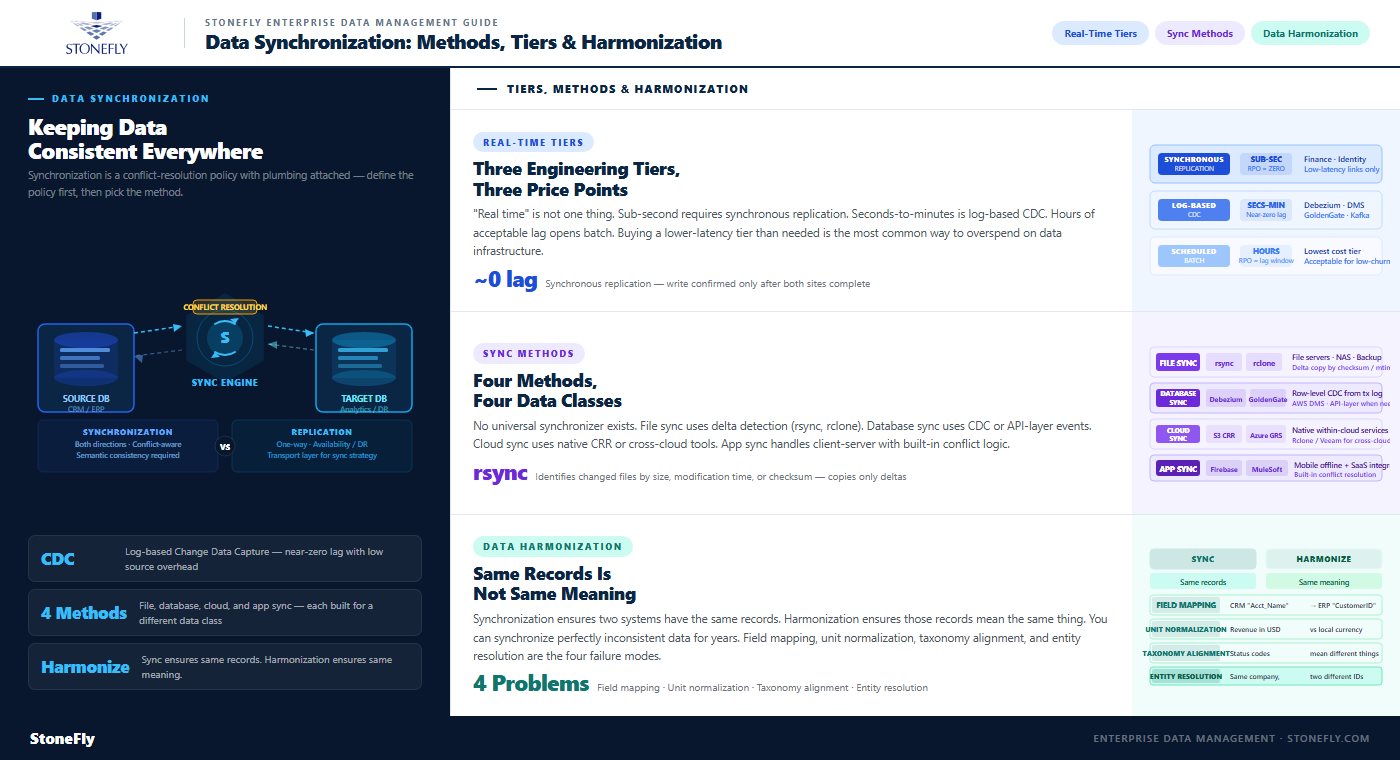
Database synchronization is the specific case of keeping records consistent across two or more databases — a CRM and an ERP, an operational store and an analytics platform, or regional database instances serving the same application. One-way database synchronization is relatively tame. Two-way is where teams get hurt: when both systems update the same record in the same window, the synchronizing mechanism must decide which write wins. Last-write-wins policies are simple but silently discard data; version vectors and application-defined merge rules preserve more truth at the cost of complexity. The teams that suffer are the ones that never made the decision explicitly.
That’s the honest answer to “what is database synchronization” in production: a conflict-resolution policy with plumbing attached. Define the policy first, then pick the plumbing.
Enterprise data replication copies data from one storage system or database to another — typically one-way, from a primary to one or more replicas — to provide availability, disaster recovery, and read scaling. Synchronization is the broader discipline of keeping active, independently updated copies consistent, conflicts and all. Replication is often the transport layer a synchronization strategy rides on; StoneFly’s guide to data replication technology covers that layer in depth.
The distinction matters when choosing technology: a replication product optimized for disaster recovery may have no concept of bidirectional sync or conflict resolution, and a sync platform built for app integration may be hopeless at replicating terabyte-scale volumes. Match the mechanism to the failure mode you’re solving.
“Real time” spans three very different engineering tiers, and pricing follows the tier. Sub-second freshness requires event streaming or synchronous replication; seconds-to-minutes freshness is the territory of log-based CDC and continuous data replication; hours of acceptable lag opens the door to scheduled batch jobs. Buying a lower-latency tier than the business case needs is one of the most common ways to overspend on data infrastructure.
| Synchronization tier | How it works | Typical freshness | Best suited for |
| Synchronous replication | Every write is committed at all copies before acknowledgment | Zero lag — copies always identical | High availability data replication for failover-critical volumes and databases |
| Real time data replication (streaming/CDC) | Changes captured from transaction logs and applied continuously | Sub-second to seconds | Real time data synchronization between active systems, analytics feeds |
| Continuous data replication (async) | Changes queued locally and shipped continuously over WAN | Seconds to minutes | Cross data center replication and cloud DR copies |
| Scheduled / batch sync | Periodic comparison or export-import on a timer | Hours to a day | Reporting warehouses, archival tiers, low-change datasets |
The top tier doubles as an availability mechanism: high availability data replication keeps a second copy close enough to current that a storage or server failover loses nothing. The physics constraint from synchronous designs applies here too — every write waits for the remote acknowledgment, which confines zero-lag synchronization to metro-scale distances and pushes longer hauls onto real time data replication in its asynchronous forms.
Distributed data synchronization is where the discipline earns its complexity. Multiple sites, multiple clouds, and multiple databases mean more copies, longer distances, and more independent writers — every hard problem at once. The architectures that survive treat topology as a first-class decision: hub-and-spoke designs route all changes through a central authority that orders and distributes them, while mesh designs let any site sync with any other and accept the heavier conflict-resolution burden in exchange for resilience.
Between data centers, synchronization rides on cross data center replication — synchronous within metro distances, asynchronous beyond them. The design questions are bandwidth and ordering: replication links must sustain peak change rates or lag grows unbounded, and changes must apply at the remote site in a sequence that never exposes a half-applied transaction. Done well, the same replication fabric serves three purposes at once: geographic redundancy, disaster recovery, and locality — users on each continent reading from a nearby, current copy.
Hybrid architectures add two cloud-specific flavors. Cloud storage synchronization keeps file and object data aligned between on-premises systems and cloud buckets — the mechanism behind file sync services and S3 cross-region replication alike. Cloud database replication keeps managed database read replicas or cross-region instances current, usually through the provider’s own log shipping. Both are operationally easy, which is exactly why they get misused as backup.
They aren’t backup. Synchronization faithfully propagates every change — including ransomware encryption and accidental deletion — to every synchronized copy, usually within seconds. A sync target is a current copy, not a recoverable history. The distinction, and what to deploy for each purpose, is laid out in StoneFly’s comparison of cloud sync versus cloud backup.
Two operational details decide whether distributed designs hold up. The first is initial seeding: synchronization only ships changes, so the first copy of a large dataset has to get to each site somehow — over the WAN for modest volumes, by physical transfer for tens of terabytes — and the sync mechanism must pick up precisely where the seed left off. The second is lag visibility: every distributed pair should expose its current synchronization lag as a monitored metric with an alert threshold tied to the freshness SLA. A sync topology whose lag nobody watches is a consistency guarantee on the honor system.
Data harmonization is the process of transforming data from heterogeneous sources into a common format, schema, and meaning so it can be combined and compared. Where synchronization makes copies identical, harmonization makes different data compatible: reconciling the CRM’s “customer_name” with the ERP’s “client_id,” converting units and currencies, mapping regional product codes to a master taxonomy, and deduplicating entities that three systems describe three ways.
The two disciplines are complements, not competitors. Synchronization without harmonization gives you perfectly consistent copies of mutually incomprehensible data; harmonization without synchronization gives you a beautifully unified dataset that’s three weeks stale. Analytics platforms, compliance reporting, and especially AI training pipelines — which inherit every inconsistency in their source data — need both: synchronized pipelines feeding harmonized, analysis-ready datasets. That’s the practical answer to “what is data harmonization”: the semantic layer that makes synchronized data actually usable across the enterprise.
In practice, harmonization runs as a pipeline stage: profile the sources to discover formats and anomalies, define the canonical schema and mapping rules, transform and validate incoming records against them, and reconcile duplicates into master entities. The mapping rules are living artifacts — every source-system upgrade and every acquisition adds new variants — which is why harmonization belongs in version-controlled, automated pipelines rather than in one-off migration scripts that rot the day after go-live.
The core advantages of synchronizing mechanism adoption show up across operations, resilience, and analytics:
Data synchronization tools span a wide market — CDC platforms, database-native replication, storage-level replication, and integration suites — and the right choice follows from four questions. What freshness does the business case actually require (and what tier does that map to)? Is the flow one-way or two-way — and if two-way, what is the explicit conflict policy? What scale must the transport sustain at peak change rate, not average? And does the tool synchronize at the right layer — application records, database transactions, or storage volumes?
Enterprise-grade data synchronization software adds the unglamorous requirements: monitoring that exposes sync lag as a first-class metric, alerting when lag breaches the freshness SLA, encryption in transit, and the ability to resynchronize after an outage without a full re-copy. The tools that lack these reveal it at the worst time — mid-incident, when you need to know how stale the surviving copy is.
Layer matters more than feature lists suggest. Application-level data synchronization software understands records and business rules but tops out at modest volumes; database-level CDC moves transactions efficiently but only for databases; storage-level replication synchronizes entire volumes — files, VMs, and databases alike — without caring what’s inside them. Most enterprises end up running two layers deliberately: storage-level synchronization for bulk consistency and disaster recovery, with targeted database or application sync where business logic demands it. (StoneFly’s comparison of mirroring, replication, and clustering maps the storage-layer options in detail.)
StoneFly implements synchronization where it’s most durable — in the enterprise storage architecture itself. StoneFly NAS, SAN, and unified storage appliances provide volume-level synchronous replication for hot-tier data, keeping a second copy identical in real time for failover, and asynchronous, schedule-driven replication for colder tiers where minutes of lag are acceptable. The same engine drives cross-site and cloud replication to a second StoneFly system or to Azure and AWS via Cloud Connect — one mechanism covering high availability, geographic distribution, and hybrid cloud synchronization.
Because synchronized copies are not recoverable history, StoneFly pairs the replication layer with DR365V air-gapped, immutable backup appliances — point-in-time versions that ransomware and deletion can’t propagate into. The combination closes both gaps at once: synchronization for currency, backup for history, in a single managed stack.
Data synchronization has graduated from plumbing to strategy. The enterprises getting value from distributed infrastructure, hybrid cloud, and AI are the ones whose copies agree — where real time data synchronization keeps systems current, harmonization keeps them comparable, and explicit conflict policies keep two-way flows honest.
Start with the freshness the business actually needs, choose the tier and tools to match, and never let a synchronized copy masquerade as a backup. Enterprises that treat data synchronization as architecture — not as an afterthought bolted between systems — turn their many copies of the truth back into one.
To design storage-level data synchronization, cross-site replication, or a combined sync-plus-backup architecture for your environment, contact StoneFly at [email protected].









Join our mailing list to receive the latest news, updates, and promotions from StoneFly.