

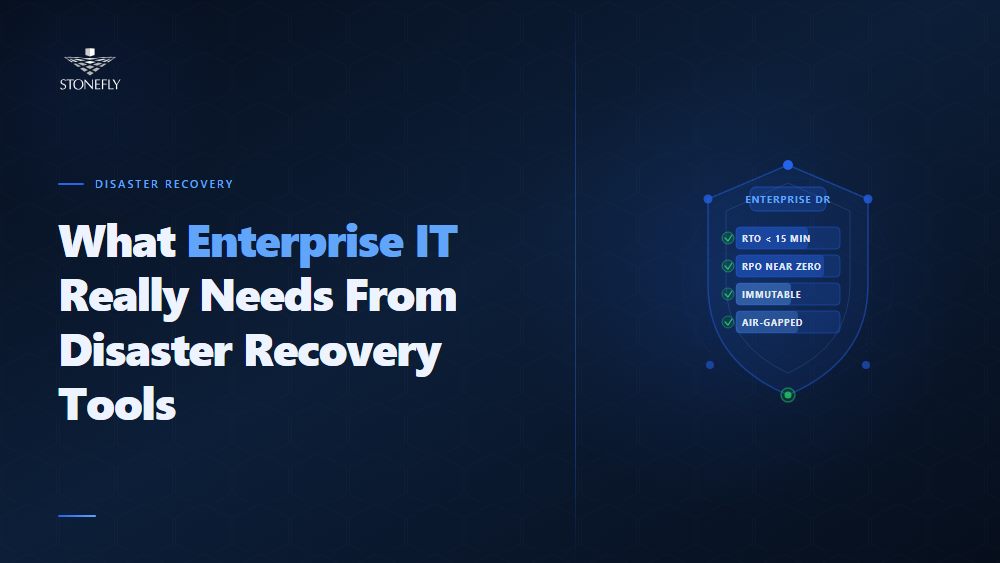
Ask most enterprise IT teams whether they have disaster recovery tools and the answer is yes. Ask them when those tools were last tested against a realistic failure scenario, whether the recovery point objectives they are configured to meet have been validated, and whether the team could execute a full site failover at 2 AM without the person who built the DR plan — and the answers get less confident. The tools exist. The working DR capability often does not.
The gap between having DR tools and having a functional DR architecture is not a technology problem. It is a scope problem: organizations deploy backup software and call it DR, or they configure replication and assume failover is covered, or they buy a DR orchestration platform and never test it against a production workload. A resilient IT infrastructure requires a complete, layered set of disaster recovery systems — backup and recovery, orchestration, uptime monitoring, ransomware-specific protection, and regular testing — and each layer has to be configured correctly and validated regularly to be worth anything when a real incident occurs.
This blog covers what business continuity and disaster recovery actually require from a tooling perspective, what the core categories of disaster recovery software do, where each fits in a complete DR architecture, and what separates the most reliable disaster recovery tools from the ones that look good on paper but fail under pressure.
Business continuity and disaster recovery (BCDR) refers to the combination of policies, processes, and technology that enable an organization to maintain or rapidly restore critical operations after a disruptive event — whether a hardware failure, cyberattack, natural disaster, or human error. Business continuity planning addresses the broader operational and organizational response: which processes must continue during a disruption, who has decision authority, how staff communicate, and which services take priority. Disaster recovery is the IT-specific subset: restoring the technology infrastructure and data that those business processes depend on.
Disaster recovery tools are the technology layer underneath the DR plan. They do not replace the plan — a tool that runs automated failover according to a bad recovery sequence will execute the bad sequence faster and more consistently — but without the right tools, the best-designed DR plan cannot be executed within the RTO and RPO commitments it documents. The tools determine what is technically possible; the plan determines how that capability is applied. Both are required, and neither substitutes for the other.
IT service continuity management — the discipline of keeping DR capabilities aligned with business requirements as both evolve — requires that DR tools be evaluated not just at initial deployment but continuously. Infrastructure changes, workload additions, compliance requirement updates, and threat landscape changes all affect what DR tools must do. An organization whose DR tooling was correctly scoped in 2022 but has not been reassessed since may have significant gaps in 2026, particularly in ransomware recovery capabilities.
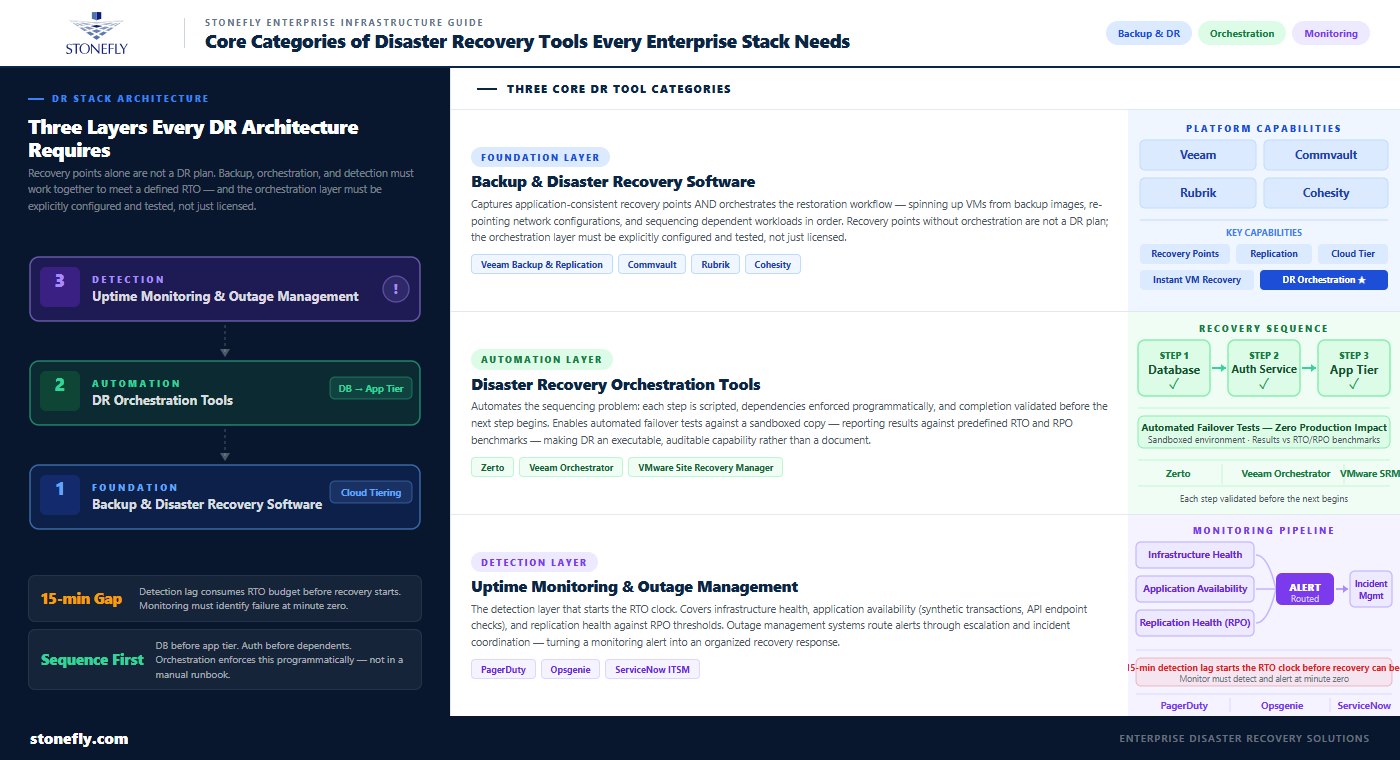
Backup and disaster recovery software is the starting point for any DR toolset. It captures application-consistent snapshots and recovery points, manages retention policies, and provides the mechanism for restoring individual files, databases, VMs, or entire sites. Modern backup DR software — platforms like Veeam Backup & Replication, Commvault, Rubrik, and Cohesity — go beyond simple backup to include replication, instant VM recovery, and cloud-tiering capabilities that bridge backup and DR into a single platform.
The distinction between backup tools and disaster recovery software is meaningful in practice. A backup tool captures recovery points and stores them; a disaster recovery software platform also orchestrates the recovery workflow — spinning up VMs from backup images, re-pointing network configurations, validating application availability, and sequencing the recovery of dependent workloads in the correct order. Organizations that deploy backup tools without the DR orchestration layer have recovery points but not a tested, orchestrated path to using them within a defined RTO. The two capabilities are commonly bundled in modern enterprise platforms, but the orchestration functionality must be explicitly configured and tested, not just licensed.
Disaster recovery orchestration tools address one of the most failure-prone aspects of DR execution: the sequencing problem. Recovering a complex application environment requires that workloads come back online in a specific order — the database before the application tier, the authentication service before anything that depends on it, the network configuration before any workload tries to communicate. Manual runbooks encode this sequence as a series of steps, each dependent on the previous one completing successfully. Under pressure, with an actual outage in progress, manual runbook execution is slow, error-prone, and difficult to verify.
DR orchestration tools automate this sequence as a defined recovery workflow: each step is scripted, dependencies are enforced programmatically, and completion of each step is validated before the next begins. Platforms including Zerto, Veeam Orchestrator, and VMware Site Recovery Manager implement orchestration at the VM and application level, with the ability to run automated failover tests — executing the entire recovery sequence against a sandboxed copy of the environment without impacting production — and reporting the test results against predefined RTO and RPO benchmarks. This is what transforms a DR plan from a document into an executable, auditable capability.
Uptime monitoring tools and outage management systems are the detection layer of the DR architecture — the systems that identify that something has gone wrong before the DR playbook activates. Without reliable detection, even the fastest failover mechanism cannot meet its RTO: if the monitoring system takes 15 minutes to identify a failure that occurred at minute zero, the RTO clock has already been running for 15 minutes before the recovery workflow starts.
Enterprise uptime monitoring covers infrastructure health (server, storage, and network availability), application availability (synthetic transaction monitoring, API endpoint checks, and database query response time), and replication health (confirming that DR recovery points are being captured within RPO thresholds). Outage management systems — platforms like PagerDuty, Opsgenie, and ServiceNow’s ITSM module — handle the alert routing, escalation, and incident coordination that turn a monitoring alert into an organized response. The combination of robust monitoring and structured incident management determines how quickly the team moves from detection to recovery execution.
Disaster recovery automation tools at the runbook level translate human-written recovery procedures into executable scripts and workflows that run consistently without operator intervention. The goal is not to eliminate human judgment from the DR process — authorization checkpoints and go/no-go decisions before committing production to a DR environment remain appropriate — but to eliminate the manual execution of individual recovery steps that introduce delays and errors under pressure.
Effective runbook automation for DR requires three elements: a trigger mechanism that initiates the workflow when failure criteria are met; a dependency graph that defines the correct sequencing of recovery steps; and a validation layer that confirms each step completed successfully before proceeding. The validation layer is the piece most commonly omitted in initial automation implementations, and its absence means the automation will proceed through a failed step without detecting the failure, resulting in a partially recovered environment that appears to be running but is not. Every DR automation workflow should include explicit success criteria for each step — a database recovery step should confirm that the database process started, that the listener is accepting connections, and that a test query returns the expected result before the next step begins.
Virtual machine recovery is one of the most operationally significant capabilities in modern backup DR software. Instant VM restore — the ability to boot a VM directly from a backup image without a full restore to production storage — compresses the time to a running state from hours to minutes. Platforms including Veeam, Rubrik, and Cohesity support instant VM recovery by mounting the backup repository as a datastore and booting the VM image directly from it, allowing the application to come online immediately while a background restore moves the VM to production storage asynchronously.
For site-level disaster recovery, VM recovery at scale — recovering hundreds of VMs in the correct dependency sequence — requires the orchestration layer described above. The practical limit of manual VM recovery is approximately 10–20 VMs per hour per skilled operator working from a runbook. An orchestrated DR platform can recover the same set in a fraction of the time, in the correct order, with validation at each step. For environments with large VM estates and tight RTOs, the difference between manual and orchestrated VM recovery determines whether the RTO is achievable at all.
| DR Tool Category | What It Does | Key Capability | Where It Fails Without Attention |
| Backup & DR software | Captures recovery points, manages retention, restores workloads | Application-consistent snapshots, instant VM restore, cloud tiering | No orchestration = slow manual recovery; untested restores = silent corruption |
| DR orchestration tools | Automates recovery sequencing with dependency enforcement and validation | Runbook automation, sandboxed failover testing, RTO/RPO reporting | Not configured = documentation only; not tested = unknown failure modes |
| Uptime monitoring tools | Detects failures and triggers alert/escalation workflows | Infrastructure and application health checks, replication lag monitoring | Alert fatigue from poor thresholds; gaps in application-layer visibility |
| Ransomware recovery solutions | Provides immutable, air-gapped recovery points unreachable by malware | Immutable WORM storage, air-gap isolation, clean restore point validation | Standard backups reachable from production network are encryption targets |
| DR testing platforms | Validates recovery workflows without impacting production | Sandboxed failover tests, automated RTO/RPO measurement, audit reporting | DR plans untested against real workloads fail during real incidents |
| Outage management systems | Routes alerts, coordinates response teams, tracks incident timelines | On-call scheduling, escalation policies, incident post-mortem tracking | Delayed escalation extends time-to-response and time-to-recovery |
Ransomware recovery solutions represent a specialized subset of DR tooling that addresses a threat the traditional backup and DR model was not designed for. In a conventional disaster recovery scenario — hardware failure, power outage, natural disaster — backup data is untouched because the failure mode does not target it. Ransomware specifically targets backup infrastructure: modern ransomware families enumerate network shares, identify backup repositories, and encrypt them before triggering the production encryption event. Organizations that discover their backups are encrypted at the same time as their production data have no standard DR recovery path.
According to Veeam’s 2024 Ransomware Trends Report, 96% of ransomware attacks specifically targeted backup repositories, and 76% of those attacks were at least partially successful in encrypting or destroying backup data. Standard backup DR tools stored on network-accessible repositories — regardless of how well they are configured for conventional DR scenarios — do not meet the ransomware recovery requirement. The data protection compliance requirement for ransomware recovery is a backup copy that is physically or logically isolated from the production network and immutably protected against modification or deletion for a defined retention period.
Immutable backup repositories implement WORM (Write Once Read Many) storage policies that prevent modification or deletion of backup data for a defined retention period — regardless of credentials. Even an attacker with domain administrator access cannot delete or encrypt an immutable backup object within its retention window. Air-gapped repositories add physical or logical isolation: the backup target is completely unreachable from the production network, either through physical disconnection, protocol-level isolation, or network segmentation that permits only outbound backup writes and no inbound connections from the production environment.
Disaster recovery security in a ransomware-resilient architecture requires both properties. Immutability without isolation protects against backup deletion but not against an attacker who compromises the backup infrastructure directly. Isolation without immutability protects against network-based attacks but not against an attacker who reaches the backup system through an alternative path. The combination — immutable retention policies on storage that is network-isolated from the production environment — is what makes a recovery point genuinely ransomware-resistant and what qualifies as a reliable recovery option when everything else has been encrypted.
A disaster recovery testing strategy is what separates organizations with a working DR capability from those with a documented DR plan. The most important property of a DR testing approach is that it must be executable without impacting production — otherwise the barrier to testing is too high, tests get deferred, and the DR plan ages without validation. Non-disruptive testing uses sandboxed or isolated environments: recovery workflows execute against copies of production workloads in an isolated network segment, application functionality is validated, RTO and RPO measurements are captured, and the test environment is torn down without the production workload being affected.
DR testing should be structured to answer three questions that the DR plan cannot answer on its own: Does the recovery complete within the defined RTO? Is the recovered data within the defined RPO? Do applications function correctly after recovery — not just that they start, but that they process transactions, authenticate users, and communicate with dependencies correctly? Each test should produce a written report against these criteria, with failures documented and tracked to resolution. A DR test that produces no report produces no accountability and no improvement.
Disaster recovery monitoring fills the gap between formal tests by continuously validating the conditions that a successful DR test depends on. Replication lag monitoring confirms that recovery points are being captured within RPO thresholds — a replication lag alert at 2 AM is far preferable to discovering during a real incident that the standby data is six hours stale. Configuration drift monitoring compares the DR environment against its last validated state and alerts when changes in the production environment have not been reflected in the DR configuration. Recovery point currency monitoring confirms that backup jobs are completing on schedule and that the most recent recovery point was captured within the expected window.
The infrastructure monitoring strategy for DR readiness should generate a daily or weekly DR readiness report: replication lag within threshold (yes/no), last successful backup within expected window (yes/no), DR environment configuration current (yes/no), last successful DR test within policy (yes/no). Four green lights means the DR capability is ready. Any red light means there is a gap between what the DR plan promises and what the DR infrastructure can currently deliver — a gap that should be resolved before the next test, not after the next incident.
Disaster recovery planning tools — software platforms that document, manage, and track DR plans, test schedules, and compliance status — provide the operational scaffolding for the IT resilience framework. Platforms including Fusion Framework, Castellan, and ServiceNow’s Business Continuity Management module maintain the relationship between business processes, the IT systems they depend on, and the DR configuration that protects those systems. When a new application is deployed, the DR planning tool ensures it is assigned to a recovery tier, configured with appropriate RTO and RPO targets, and included in the next DR test cycle.
RTO and RPO targets must drive DR tool configuration specifically, not generically. A tier-1 workload with a 15-minute RTO requires synchronous replication to a hot standby, automated failover orchestration, and a tested runbook that can execute in under 15 minutes. A tier-3 workload with a 24-hour RTO can be protected with nightly backup to a cloud target and manual restore procedures. Deploying the same DR toolset to all workloads regardless of tier wastes budget on over-protection for low-priority systems and under-protects critical ones. IT service continuity management requires tier-based DR tool configuration that explicitly matches the protection level to the recovery requirement.
Data protection compliance requirements — HIPAA, SOC 2, PCI DSS, GDPR, CMMC, and SEC Rule 17a-4, among others — impose specific requirements on DR tooling that go beyond operational recovery needs. HIPAA requires that covered entities maintain contingency plans with data backup, disaster recovery, and emergency mode operation procedures, with regular testing and revision. PCI DSS Requirement 12.10 requires a documented and tested incident response plan. SEC Rule 17a-4 requires WORM storage for broker-dealer records — a requirement that directly drives the immutable repository configuration described above.
Data loss prevention strategies in the DR context address the gap between what data protection compliance requires on paper and what the DR tooling actually enforces. Compliance documentation that says backups are retained for 90 days is not the same as a backup platform configured with a 90-day immutable retention policy that cannot be overridden. Auditors increasingly request evidence of DR tool configuration — screenshots, policy exports, and test reports — not just policy documentation. Organizations whose DR tools are correctly configured to enforce the policies their compliance documentation describes are in a stronger position than those whose policies describe capabilities the tools do not actually enforce.
Cloud disaster recovery tools extend the DR architecture beyond the on-premises data center, providing geographically separated recovery targets without the capital cost of a dedicated secondary site. The most reliable cloud DR tools for enterprises share several characteristics: they support continuous replication rather than scheduled backup copies, they provide orchestrated failover and failback rather than manual restore procedures, and they include testing capabilities that validate recovery without incurring cloud compute costs for standby resources during idle periods.
The leading enterprise cloud DR platforms include Zerto (continuous journal-based replication with sub-second RPO to Azure, AWS, and VMware Cloud), Veeam Cloud Connect and Veeam Backup for Microsoft Azure (backup and DR to cloud targets with Veeam’s orchestration layer), and VMware Site Recovery Manager with VMware Cloud on AWS (for organizations with existing VMware investment). Each has strengths and target environments that make it more or less appropriate for specific workload types and cloud provider relationships. The selection criteria that matter most in enterprise cloud DR tool evaluation are replication granularity (journal-based vs. snapshot-based), failover orchestration completeness, failback capability, and the operational overhead of running the platform at scale.
| Cloud DR Platform | Replication Model | Failover Type | Best For |
| Zerto | Continuous journal (sub-second RPO) | Fully orchestrated, automated | VMware/Hyper-V workloads; tight RPO requirements |
| Veeam Cloud Connect | Backup-based (RPO = backup interval) | Orchestrated via Veeam Orchestrator | Organizations with existing Veeam investment |
| VMware SRM + VMware Cloud | vSphere replication (RPO configurable) | Orchestrated with runbook automation | VMware-centric environments, AWS cloud DR |
| Azure Site Recovery | Agent-based continuous replication | Orchestrated recovery plans | Mixed Windows/Linux workloads targeting Azure |
| AWS Elastic Disaster Recovery | Continuous block-level replication | Automated or manual activation | Any workload targeting AWS as DR site |
StoneFly’s disaster recovery systems are built around the recognition that most enterprise DR gaps are not technology gaps — they are gaps in the combination of backup protection, immutable storage, and tested orchestration that a complete DR capability requires. The DR365V addresses all three in a single platform designed for enterprise data protection and ransomware recovery.
The DR365V is StoneFly’s Veeam-integrated disaster recovery appliance with built-in air-gapped and immutable backup repositories. It provides the ransomware recovery capability that standard backup DR tools cannot: recovery points stored on WORM-protected storage physically isolated from the production network, so that even a fully compromised production environment — including backup infrastructure connected to the network — leaves clean recovery points intact. Veeam’s backup and replication engine running on the DR365V handles application-consistent backups, replication to secondary targets, and instant VM recovery for the workloads it protects.
For DR orchestration, the DR365V integrates with Veeam Orchestrator to automate recovery plans that sequence VM recovery in dependency order, execute validation checks at each step, and generate audit-ready test reports documenting RTO and RPO achievement. Organizations subject to compliance frameworks that require documented, tested DR procedures — HIPAA, SOC 2, PCI DSS — use these automated test reports as evidence of DR capability rather than manually generating compliance documentation after the fact.
StoneFly’s USS hyperconverged infrastructure is the right addition for organizations that want a dedicated production HCI environment separate from the DR appliance itself. In that architecture, USS hosts the production VM and application workloads — NVMe-backed compute and storage with built-in redundancy and live migration for planned maintenance — while the DR365V protects those workloads through continuous backup, replication, and immutable recovery points. For organizations whose production workloads run on other platforms, the DR365V stands on its own as the complete DR solution; the USS is a separate infrastructure decision, not a requirement for DR coverage.
The question for enterprise IT is not whether to invest in disaster recovery tools — the consequences of not having working DR are too clear and too costly to justify the alternative. The question is whether the tools deployed are the right ones, configured to the right standards, and tested frequently enough to be trusted when they are needed. Continuous operations planning is built on that trust, and trust in DR tools is earned through evidence: test reports that show the RTO was achieved, replication monitoring that shows the RPO is being maintained, and recovery documentation that was written against what the tools actually do rather than what the procurement documents said they would do.
The enterprise data protection strategy that holds up under real pressure — ransomware, hardware failure, site-level disruption — is one that treats each layer of DR tooling as a validated capability rather than a purchased checkbox. Backup without tested restore is a liability. Orchestration without tested sequences is documentation. Monitoring without response procedures is noise. Each tool in the DR stack earns its place by demonstrating, in a test environment before the incident, that it does what the recovery plan requires it to do. That demonstration is what makes the DR architecture resilient rather than merely compliant.
Contact StoneFly to discuss DR365V deployment and architecture options for your enterprise data protection and disaster recovery requirements.








Join our mailing list to receive the latest news, updates, and promotions from StoneFly.






