
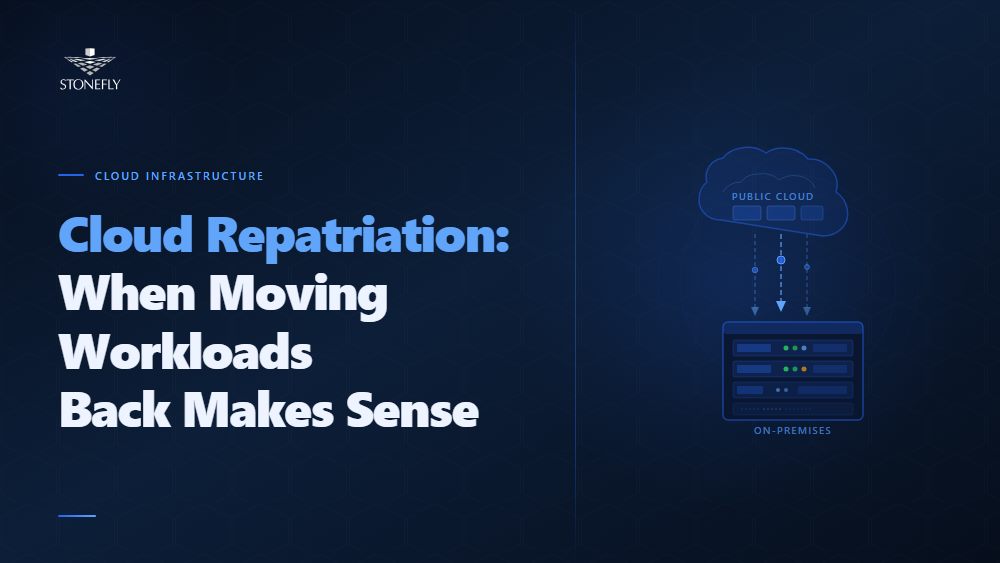
The cloud-first mandate that shaped enterprise IT strategy for the better part of a decade is getting a harder look. Not because cloud is wrong — for the right workloads, it remains the correct answer — but because the original economics that justified moving everything to public cloud don’t hold at scale for every workload type. Cloud repatriation is what happens when organizations do the math on specific workloads and find that moving them back on-premises or to a private cloud environment costs significantly less and performs significantly better than keeping them in a public cloud service.
This isn’t a fringe movement. A 2024 Citrix survey found that 93% of IT decision-makers who had moved workloads to the public cloud had already moved some back, with cost cited as the primary driver in the majority of cases. The pattern is consistent: organizations migrate workloads to cloud in volume, encounter unexpected egress fees, storage costs, and licensing overhead at scale, run a TCO comparison, and repatriate the workloads where on-premises infrastructure wins. The ones that remain in cloud are the workloads cloud actually suits: variable-demand applications, development environments, disaster recovery targets, and services that benefit from cloud-native managed services.
This blog examines what cloud repatriation is, what is driving it across enterprise IT in 2026, how to build a cloud exit strategy that doesn’t recreate the problems that sent workloads to cloud in the first place, and how hybrid cloud infrastructure handles the workloads that belong in neither extreme.
Cloud repatriation is the process of migrating workloads, data, or applications from a public cloud environment back to on-premises infrastructure, a private cloud, or a colocation facility. It is also called reverse cloud migration or cloud-to-on-prem repatriation, and it applies equally to compute workloads (VMs, containers, databases) and to data (moving datasets out of cloud object storage to on-premises storage systems).
Cloud repatriation is distinct from a cloud exit strategy, though the two are related. A cloud exit strategy is the broader plan for how an organization systematically reduces its public cloud footprint — identifying which workloads to repatriate, to what target infrastructure, on what timeline, and with what migration tooling. Cloud repatriation is the execution of that strategy for individual workloads. Organizations that attempt repatriation without a documented exit strategy tend to move workloads piecemeal, without a designed target architecture, and often replicate the same infrastructure management problems that drove them to cloud in the first place.
It is also worth distinguishing cloud repatriation from cloud migration failure. Moving a workload back from cloud is not inherently a mistake — it is often the correct architectural decision once accurate cost data is available at scale. The mistake is in treating cloud as a permanent destination for workloads that were never suited to it, rather than recognizing repatriation as a legitimate step in a mature hybrid IT strategy.
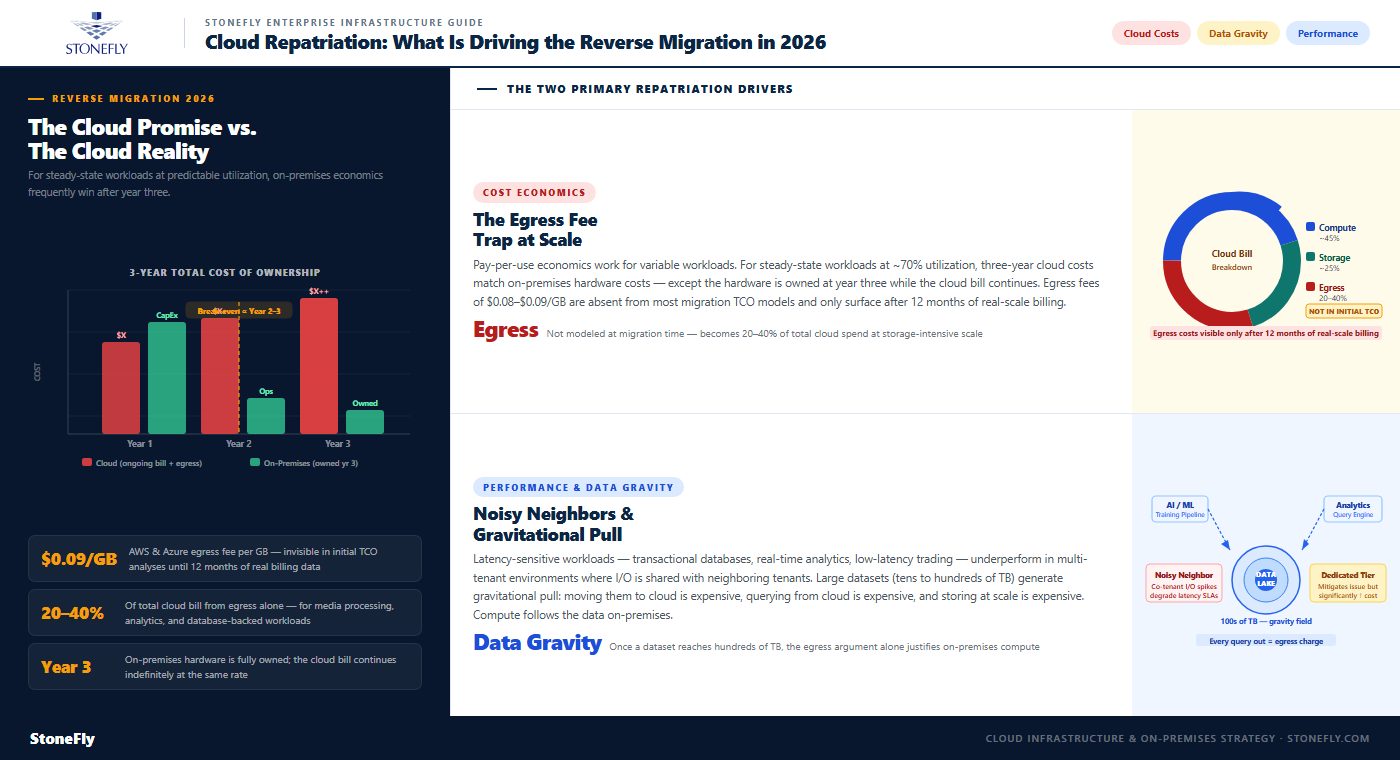
The expected economics of cloud — pay only for what you use, eliminate CapEx, reduce operational overhead — work as described for workloads with highly variable demand. For steady-state workloads that run continuously at predictable utilization, the economics are different. A virtual machine running at 70% utilization for 730 hours per month in AWS costs roughly the same over three years as the on-premises hardware that would run the same workload — except the on-premises hardware is fully owned at the end of year three, while the cloud bill continues indefinitely.
The compounding factor is egress fees: moving data out of a public cloud provider costs between $0.08 and $0.09 per GB on AWS and Azure. For organizations with storage-intensive workloads — media processing, analytics pipelines, database-backed applications — egress fees alone can represent 20–40% of the total cloud bill. These costs are not visible during initial cloud migration planning, where most TCO analyses model compute and storage costs in isolation, and they are a primary driver of repatriation decisions once organizations receive 12 months of actual cloud billing data at scale.
Performance is the second major driver. Latency-sensitive workloads — transactional databases, real-time analytics, low-latency trading systems — frequently underperform in multi-tenant public cloud environments where I/O and network resources are shared across neighboring tenants. “Noisy neighbor” conditions, where a co-located tenant’s heavy I/O spikes degrade performance for adjacent instances, are common in public cloud environments and difficult to reliably mitigate without moving to dedicated hardware tiers, which significantly increases cost.
Data gravity is the related phenomenon: large datasets create gravitational pull toward the compute that processes them. Once a dataset grows to tens or hundreds of terabytes, moving it to cloud is expensive (egress on the way back), processing it in cloud is expensive (egress for every analytical query), and keeping it in cloud permanently is expensive (object storage at scale). Organizations building large data lakes, analytics platforms, or AI training pipelines often find that the data gravity argument alone — independent of compute costs — justifies keeping the dataset on-premises and running compute adjacent to it.
Not every workload that costs money in cloud is a repatriation candidate. The decision requires a workload-by-workload TCO comparison that accounts for the full on-premises cost: hardware amortization, power and cooling, facility space, software licensing (including hypervisor), and staffing overhead for infrastructure management. Workloads that are strong repatriation candidates share several characteristics: they run at high, predictable utilization rather than bursty demand; they are storage-intensive or egress-heavy; they require consistent, low-latency performance; and they are not tightly integrated with cloud-native services that would require re-architecting to run on-premises.
Workloads that should stay in cloud regardless of cost include: applications built on cloud-native services (serverless, managed Kubernetes, cloud-specific databases) that would require significant re-architecture to move; development and test environments that benefit from rapid provisioning and teardown; disaster recovery targets that leverage cloud’s geographic distribution; and SaaS workloads that have no on-premises equivalent. Misidentifying a cloud-native application as a repatriation candidate is a common and expensive mistake in cloud exit planning.
Reverse cloud migration carries a specific set of risks that differ from cloud-to-cloud or on-prem-to-cloud migrations. The most common: the target on-premises infrastructure was not designed for the workload being returned. Organizations that migrated to cloud years ago often decommissioned the on-premises hardware the workload ran on, meaning the repatriation destination needs to be built from scratch — and undersizing that infrastructure recreates exactly the performance problems that justified cloud adoption in the first place.
Data repatriation is frequently the hardest part. Moving large datasets out of cloud object storage incurs the same egress fees that make cloud expensive to operate, creating a one-time exit cost that must be factored into the repatriation business case. For datasets in the hundreds-of-terabytes range, physical transfer via cloud provider data transfer services (AWS Snowball, Azure Data Box) is often more practical than network transfer, but requires lead time for device provisioning and shipping that must be built into the migration timeline. Application dependencies on cloud-hosted services — DNS, CDN, identity providers, monitoring stacks — must also be mapped and resolved before cutover, or the repatriated application arrives on-premises with broken integrations.
| Workload Type | Repatriation Candidate? | Primary Reason | Recommended Destination |
| Steady-state OLTP database (high utilization) | Yes | Predictable load makes CapEx competitive; egress from queries is expensive | On-premises or private cloud on NVMe storage |
| Large analytics / data lake (100TB+) | Yes | Data gravity and egress fees dominate TCO at scale | On-premises with scale-out object or NAS storage |
| AI/ML training workloads (large datasets) | Yes — data, sometimes compute | Training data should be co-located; GPU cloud spot pricing may still win for burst | Hybrid: data on-prem, burst compute to cloud |
| Variable-demand web application | No | Cloud elasticity reduces cost vs. overprovisioned on-prem capacity | Remain in public cloud |
| Dev/test environments | No | Rapid provisioning and teardown offset higher per-unit cost | Remain in public cloud |
| Disaster recovery target | No | Geographic distribution and managed failover justify cloud economics for DR | Remain in public cloud or cloud DR service |
| Cloud-native SaaS application | No — without re-architecture | Tightly coupled to cloud provider services; move requires significant rebuild | Remain in public cloud |
Full public cloud-to-on-prem repatriation — moving entirely out of a cloud provider — is the right answer for some organizations but represents a minority of repatriation projects in practice. Most enterprises retain meaningful cloud usage alongside their on-premises infrastructure, which means the destination for repatriated workloads is typically a private cloud deployment rather than traditional bare-metal on-premises infrastructure. A private cloud built on VMware, Proxmox VE, or OpenStack provides the same self-service provisioning and workload mobility that made public cloud attractive, but on owned or leased hardware with predictable unit economics.
The private cloud deployment must be designed to handle the workloads being repatriated, not just the baseline currently running on-premises. Sizing mistakes are common: organizations planning repatriation often model based on the cloud instance sizes their workloads occupy, without accounting for the overhead of the hypervisor layer, storage replication, and backup jobs that will run on the same infrastructure. A proper private cloud sizing exercise for repatriation should target 65–70% average utilization on the new platform, with clear expansion capacity in the rack design for the following 2–3 years of workload growth.
Hybrid IT infrastructure — a deliberate architecture that places workloads in the environment best suited to their economics, performance requirements, and operational characteristics — is the destination most mature enterprise repatriation strategies converge on. It is not a failure to repatriate everything; it is the recognition that cloud and on-premises infrastructure serve genuinely different workload profiles, and the right strategy keeps each workload in the environment where its total cost and performance are optimized.
Hybrid cloud infrastructure management adds complexity that must be factored into the strategy: unified monitoring across on-premises and cloud environments, consistent security policy enforcement across both, and operational runbooks that work regardless of where a workload runs. Organizations that treat hybrid as a temporary state on the way to full on-premises repatriation or full cloud adoption tend to underinvest in hybrid management tooling and end up with the operational overhead of two separate environments managed with separate tooling — the worst of both worlds. The organizations that succeed with hybrid treat it as a permanent architecture and invest in it accordingly.
Before executing a repatriation project, enterprises should perform a thorough cloud infrastructure optimization pass to ensure the decision is based on accurate costs rather than mismanaged cloud spend. Cloud resource optimization — right-sizing instances to actual utilization, eliminating idle resources, switching to reserved instances or savings plans for steady-state workloads, and removing orphaned storage volumes and snapshots — routinely reduces cloud bills by 20–35% without moving anything. If that optimization changes the TCO calculation enough that repatriation no longer makes sense for a given workload, the optimization was the right answer, not the repatriation.
Cloud resource management tools — AWS Cost Explorer, Azure Cost Management, and third-party platforms like CloudHealth, Apptio Cloudability, and Spot.io — provide the visibility required to make accurate repatriation decisions. Specifically, they surface workload-level cost attribution with egress fees, data transfer costs, and support fees broken out separately, which is the granularity required to build a credible on-premises TCO comparison. Organizations that attempt repatriation decisions based on top-line cloud bills, without workload-level cost attribution, consistently underestimate both the cloud cost they are escaping and the on-premises cost they are taking on.
An on-premises TCO model for repatriation must be fully loaded: hardware amortization over 3–5 years, software licensing (hypervisor, storage management, backup), power and cooling at actual PUE, facility cost per rack unit, and the staffing cost to manage the additional infrastructure. Partial TCO models that include hardware cost but exclude software licensing and operational overhead systematically understate the true cost of on-premises infrastructure and produce overly optimistic repatriation projections.
The comparison should be run over a 3-year and 5-year horizon. At year one, cloud usually wins because the on-premises CapEx appears as a large upfront cost while the cloud bill is a monthly operating expense. At year three, the crossover point appears for most steady-state workloads: the on-premises hardware is paid off and the cloud bill continues. At year five, the on-premises advantage for the right workload types is typically substantial — often 40–60% lower total cost. The repatriation decision should be based on the 3-to-5-year horizon, not the first-year cost comparison.
Enterprise workload migration for repatriation follows the same wave-based sequencing discipline as any migration project, but with a specific wrinkle: the workloads being moved have already been migrated once (to cloud), which means their dependencies are known — but they may now depend on cloud services they did not depend on before. Mapping those cloud service dependencies (managed databases, cloud identity providers, object storage APIs, cloud-native logging and monitoring stacks) is the critical first step in repatriation planning, and it is more complex than the original migration to cloud because cloud-native integrations tend to accumulate over the lifetime of a cloud deployment.
The application migration strategy for repatriation should prioritize workloads with the cleanest cloud service dependency profile — those that use cloud infrastructure (compute, storage, networking) without deep integration into cloud-native managed services. These move with lift-and-shift tooling and minimal refactoring. Workloads with deep cloud-native dependencies move last, after the target on-premises environment is validated with simpler workloads and the team has run the repatriation process end-to-end at least once.
Cloud migration tools designed for the cloud-to-on-prem direction are less mature than the reverse, but several platforms handle the workload well. VMware HCX supports bidirectional migration between on-premises VMware environments and cloud hypervisors. Zerto’s continuous replication can be configured to replicate cloud-hosted VMs to on-premises targets. CloudEndure (AWS) handles bulk VM replication but is designed for cloud ingress, not egress. For many repatriation projects, the most practical migration tooling is a combination of VM export (OVA/VMDK format), data transfer via physical devices for large datasets, and manual application reconfiguration for cloud-native integrations.
Infrastructure deployment tools for the target on-premises environment — Terraform, Ansible, and similar infrastructure-as-code platforms — are important for ensuring the on-premises private cloud is built consistently and repeatably. One of the operational improvements a well-executed repatriation should deliver is a more disciplined infrastructure provisioning process than the one that existed before the original cloud migration. Using infrastructure-as-code for the target environment from day one prevents the undocumented, manual configuration sprawl that characterizes many legacy on-premises environments.
The infrastructure platform that repatriated workloads land on determines whether the repatriation delivers its projected cost and performance benefits. Returning workloads to underpowered or poorly configured on-premises hardware recreates the performance problems that initially drove cloud adoption. StoneFly’s infrastructure platforms are designed to be the landing zone for workloads that have outgrown public cloud economics.
StoneFly’s USS (Unified Storage and Server) hyperconverged infrastructure provides the compute, NVMe-backed storage, and networking required to host repatriated VM and container workloads at enterprise scale. The USS runs VMware vSphere, Microsoft Hyper-V, and Proxmox VE, giving organizations the flexibility to land repatriated workloads on the hypervisor platform they already operate without platform migration overhead on top of the repatriation project. Built-in storage replication and snapshot capabilities mean the same platform handling production workloads also covers the data protection requirements that would otherwise require separate infrastructure.
For data repatriation specifically — moving large datasets out of cloud object storage back on-premises — StoneFly’s USO (Unified Scale-Out SAN, NAS, and S3 Object Storage) provides an S3-compatible on-premises target that accepts data via standard S3 API writes. Applications that write to S3 buckets in AWS can be re-pointed to a USO endpoint with a configuration change rather than an application rewrite, preserving existing data pipeline architecture while moving the storage tier back on-premises. The USO scales from tens to hundreds of terabytes in a single namespace, accommodating the data lake and analytics workloads where cloud repatriation economics are most compelling.
StoneFly’s DR365V rounds out the repatriation architecture by providing the backup and disaster recovery layer that every repatriated workload requires. One advantage organizations do gain from cloud is that DR is handled by the provider — after repatriation, that responsibility returns to the IT team. The DR365V, with its air-gapped, Veeam-integrated immutable backup repositories, replaces the cloud-based backup target and provides ransomware-resistant data protection for the on-premises infrastructure hosting repatriated workloads.
Enterprise IT teams planning cloud repatriation projects can explore StoneFly’s USS, USO, and DR365V platforms or contact StoneFly to discuss repatriation sizing and target architecture for specific workloads.
Cloud repatriation is not a reversal of cloud strategy — it is the maturation of it. The organizations doing repatriation well are the ones that understand which workloads belong in which environment, and have the TCO data to back up that understanding rather than defaulting to an ideological position in either direction. Public cloud is the right answer for variable-demand applications, cloud-native workloads, and DR targets. On-premises or private cloud is the right answer for predictable, storage-intensive, latency-sensitive workloads that run continuously at high utilization. Hybrid cloud infrastructure is the architecture that holds both.
The practical question for enterprise IT leadership is not whether to repatriate, but which workloads, to what target infrastructure, and on what timeline. That requires accurate workload-level cost attribution, a fully loaded on-premises TCO model, a documented cloud exit strategy with mapped dependencies, and a target infrastructure platform capable of handling the workload performance requirements. Done with that discipline, repatriation delivers the cost and performance benefits the original cloud migration was supposed to — for the workloads it actually applies to.
Contact StoneFly to discuss the infrastructure platform for your cloud repatriation project, or request a TCO comparison for specific workloads you are evaluating for repatriation.








Join our mailing list to receive the latest news, updates, and promotions from StoneFly.