Offsite Backup & Replication with Veeam Cloud Connect as a Service
Enable business continuity with backup & replication of your IT environment into StoneFly’s cloud. Instantly spin up your virutal machines or restore backups for individual files, entire VMs and application items in minutes.
Backup, Replication and Disaster Recovery as a Service
Veeam Backup and Replication to StoneFly Cloud helps you achieve 24.7.365 availability for all your workloads including virtual Microsoft Hyper-V and VMware vSphere environments, as well as physical and cloud-based workloads. You can manage flexible, fast and reliable backup, replication and recovery of all your data and applications.
What Makes StoneFly Best in the Market
StoneFly has been in the forefront of the backup and storage industry for more than 18 years. Beginning with its registration of the iSCSI.com Internet domain name, StoneFly shipped its first iSCSI storage appliance in 2002 and subsequently made iSCSI into the established storage standard which today is used by IT professionals around the world. This same expertise is applied to our Veeam Backup and Replication services as we develop, maintain, support, and provide upgrades all under the same roof. StoneFly is a Veeam Software Technology Alliance Partner (TAP) and a Cloud Solution Service Provider. We are the only Veeam Cloud Service Provider that offers Cloud Connect backup in the Microsoft Azure Government Cloud and supports all Microsoft Azure datacenters around the world.
StoneFly Solutions Are Trusted By Customers Worldwide



































Stonefly Veeam backup & replication Features List

Storage Snapshots
Ease of Replication
Built-in Deduplication
End-to-End Encryption
Automated Data Protection
On-demand DR plan
Recovery Assurance
Flexible Cloud Repository
Exceptional support

simplified management
Fast and secure

Availability for ALL workloads
StoneFly Private Cloud Infrastructure
Reduce the time, cost and complexity of deploying and operating an offsite cloud infrastructure while meeting your data needs. StoneFly brings a secure, trusted, scalable, and reliable private cloud to customers to transform their business and reduce costs of offsite backup, replication and disaster recovery services. Some details about the StoneFly Cloud:
- 200,000 square feet
- 3000 Cabinets
- 70 Internet Networks and 2 Internet Exchange Points (SFMIX and AMS-IX Bay).
- Custom designed video surveillance of every cabinet
Veeam Backup & Replication Single-Click VM Recovery
You can immediately restore a virtual machine (VM) with instant VM recovery, by running the VM directly from the backup file in StoneFly’s Cloud. Instant VM recovery helps minimize disruption and downtime of production VMs and improve recovery time objectives (RTO).
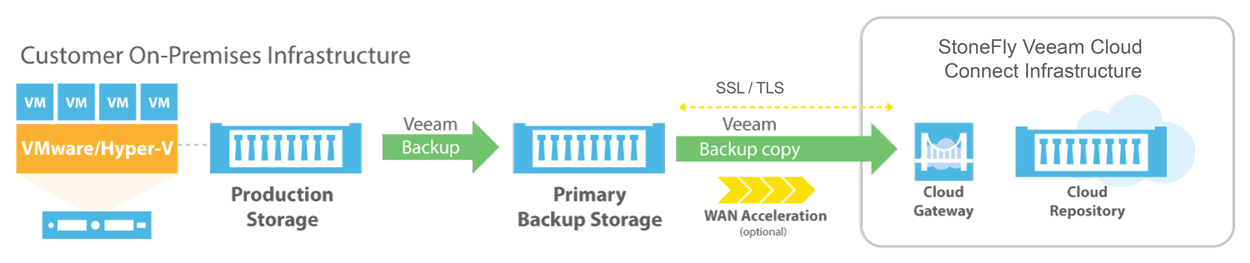
Veeam Backup & Replication to StoneFly Cloud Architecture
Veeam Backup & Replication components are deployed at the customer end. At StoneFly, Cloud repository is provisioned against the customer Veeam Backup & Replication instance. StoneFly is added as a service provider (SP) to the customer Veeam console on-premise, and all the SP details including the cloud repository from StoneFly appear at the customer side. The customer uses the Cloud repository as a target for the backup and replication jobs.
StoneFly has been delivering enterprise-grade solutions for over a decade. Our expertise enables us to effectively address the requirements of all kinds of businesses (ranging from SMBs/SMEs to large enterprises).
Sign up for a free trial of StoneFly’s solution for Veeam Cloud backup and ReplicationFill the form below to get a Veeam Cloud Backup Free Trial (1TB)
Relevant Downloads

Internet Networking Problems
Today’s internet is suffering significant problems and growing pains and it’s worth bearing some of these in mind and thinking about them, as many of them give rise to interesting research problems to think about. The thing that all of those problems have in common is that they all require changes to the basic infrastructure and changing basic infrastructure is really difficult. SDN is the key. Software defined networking makes it easier to solve some of these problems by rolling out new software technologies, protocols, and other systems to help manage some of these issues

Deep Dive in Virtualization
Creation of virtual operating system, server, and storage device or network resources instead of actual is known to be virtualization. You can manage workloads by radically transforming traditional computing to make it more scalable. In full virtualization the idea is to leave the operating system pretty much untouched so you can run the unchanged binary of the operating system on top of the hypervisor. Not even a single line of code is modified in these operating systems in order to run on the hypervisor simultaneously.

How and What to move to the cloud
Being an IT professional you are under pressure, you have to keep your company’s data up and running with simplicity. Every bite and bit of data, every key element depends on you. You ought to be focused on greater things than troubleshooting email, like figuring out how to adjust your existent infrastructure set-up to the demands of the digital world. You understand your company the most and you know what are the mission critical applications for your business. The article discusses that which type of data is essential to move to the cloud and what is the fine process for it
Five Stages of Security for Incident Response
Threats to your data are on the explosion. You need a strong security system to keep your data safe. Ask yourself how many of you can ensure that your data is secure. Ransomware attacks are on the advancement. Ransomware is starting to become more and more prominent where it is starting to communicate back with you and they are negotiating with you now. Cyber criminals are starting to become more and more prevalent as they start to attack your systems, whether it’s on-premise or in the cloud. So, what are your five stages of going through such process? The article will be discussing 5 stages which will clear you the process
Key Considerations When Looking for a Cloud Services Provider
In order to ensure the business continuity, you have to make the right choice about the cloud service provider. You need PERFECTION so that, you can ensure your business continuity. The market comprises of large number of service providers which have their own perks. So, how can you select the right cloud provider from so many options? The articles suggests the key considerations you require to have while choosing the cloud service vendor.
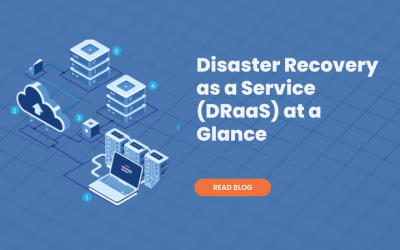
Disaster Recovery as a Service (DRaaS) at a Glance
Backup alone is not enough to ensure business continuity. You require a disaster recovery plan. Disaster recovery as a service is a cloud computing and backup model that uses cloud resources to protect applications and data from disruption caused by disaster. It allows the businesses to have business continuity and total backup in any event of system failure. The article explains about Disaster Recovery as a Service
FAQ
What is the maximum size of data transfer supported?
How much bandwidth would be available for the Veeam backup and replication solution?
What is the subscription model?
Veeam Cloud Connect Backup & Replication
Veeam Backup for Microsoft Office 365
Veeam Agent for Microsoft Windows
Veeam Agent for Linux