
Offsite Backup & Replication with Veeam Cloud Connect as a Service
Enable business continuity with backup & replication of your IT environment into StoneFly’s cloud. Instantly spin up your virutal machines or restore backups for individual files, entire VMs and application items in minutes.
Backup, Replication and Disaster Recovery as a Service
Veeam Backup and Replication to StoneFly Cloud helps you achieve 24.7.365 availability for all your workloads including virtual Microsoft Hyper-V and VMware vSphere environments, as well as physical and cloud-based workloads. You can manage flexible, fast and reliable backup, replication and recovery of all your data and applications.
What Makes StoneFly Best in the Market
StoneFly has been in the forefront of the backup and storage industry for more than 18 years. Beginning with its registration of the iSCSI.com Internet domain name, StoneFly shipped its first iSCSI storage appliance in 2002 and subsequently made iSCSI into the established storage standard which today is used by IT professionals around the world. This same expertise is applied to our Veeam Backup and Replication services as we develop, maintain, support, and provide upgrades all under the same roof. StoneFly is a Veeam Software Technology Alliance Partner (TAP) and a Cloud Solution Service Provider. We are the only Veeam Cloud Service Provider that offers Cloud Connect backup in the Microsoft Azure Government Cloud and supports all Microsoft Azure datacenters around the world.
StoneFly Solutions Are Trusted By Customers Worldwide









































Stonefly Veeam backup & replication Features List

Storage Snapshots
Ease of Replication
Built-in Deduplication
End-to-End Encryption
Automated Data Protection
On-demand DR plan
Recovery Assurance
Flexible Cloud Repository

Exceptional support

simplified management
Fast and secure

Availability for ALL workloads
StoneFly Private Cloud Infrastructure
Reduce the time, cost and complexity of deploying and operating an offsite cloud infrastructure while meeting your data needs. StoneFly brings a secure, trusted, scalable, and reliable private cloud to customers to transform their business and reduce costs of offsite backup, replication and disaster recovery services. Some details about the StoneFly Cloud:
- 200,000 square feet
- 3000 Cabinets
- 70 Internet Networks and 2 Internet Exchange Points (SFMIX and AMS-IX Bay).
- Custom designed video surveillance of every cabinet
Veeam Backup & Replication Single-Click VM Recovery
You can immediately restore a virtual machine (VM) with instant VM recovery, by running the VM directly from the backup file in StoneFly’s Cloud. Instant VM recovery helps minimize disruption and downtime of production VMs and improve recovery time objectives (RTO).
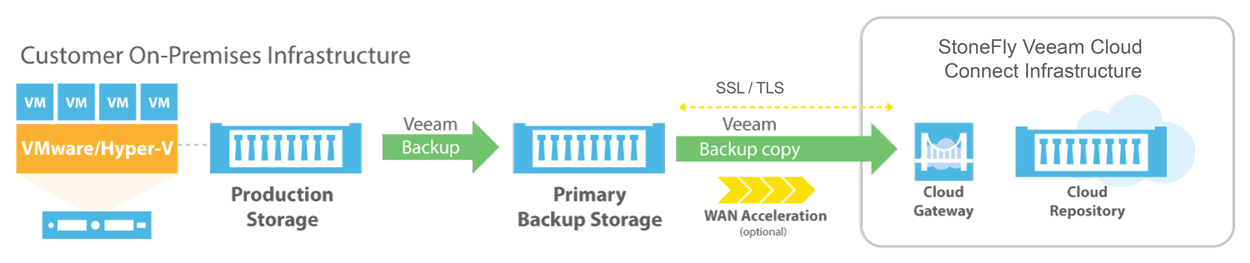
Veeam Backup & Replication to StoneFly Cloud Architecture
Veeam Backup & Replication components are deployed at the customer end. At StoneFly, Cloud repository is provisioned against the customer Veeam Backup & Replication instance. StoneFly is added as a service provider (SP) to the customer Veeam console on-premise, and all the SP details including the cloud repository from StoneFly appear at the customer side. The customer uses the Cloud repository as a target for the backup and replication jobs.
StoneFly has been delivering enterprise-grade solutions for over a decade. Our expertise enables us to effectively address the requirements of all kinds of businesses (ranging from SMBs/SMEs to large enterprises).
Sign up for a free trial of StoneFly’s solution for Veeam Cloud backup and ReplicationFill the form below to get a Veeam Cloud Backup Free Trial (1TB)
Relevant Downloads

Microsoft Azure and its Unique Functionality for A True Hybrid Platform
Amazon has dominated the cloud market for several years, so much so that it had become synonymous with the term “Private Cloud”. However the trend is changing now and organizations are making progress towards cloud adoption. They are now keen to include more than one Cloud provider in their business strategy…
StoneFly Integrates 4 Amazon AWS and Microsoft Azure Cloud Storage Platforms as Repositories for its DR365 Disaster Recovery Solution
StoneFly storage solutions now announces full integration with Microsoft Azure and Amazon AWS cloud platforms. This enhances the total business continuity features of the DR365 with secure cloud repositories. This step will give securer offsite business backup with enhanced business continuity and mobility.
Cloud Data Protection for VMware Environments
An organization’s data protection and disaster recovery (DR) strategy often consists of many disparate recovery and backup “solutions,” which may or may not be compatible with each other. As a result workloads are often isolated and it becomes difficult to be migrated across systems and geographies, leaving organizations at risk of failing to meet data security needs and losing business continuity…
StoneFly Expands its Veeam Backup and Disaster Recovery into Microsoft Azure Government
StoneFly has achieved a milestone. StoneFly’s scalable cloud storage for Veeam is expanded into the Microsoft Azure Government cloud computing platform. Microsoft, Veeam, and StoneFly have partnered up to offer state-of-the-art backup and disaster recovery solutions for Commercial, Government, and Cloud Service providers.

After WannaCry. What Businesses Need to Withstand the Ransomware Era
WannaCry, one of many Ransomware variants, has been turned into a deadly virulence with data stolen from the NSA (National Security Agency), spread across 100 countries and counting, bringing down the Telefonica company in Spain, 16 hospitals in the UK, FedEx, Russian Telecom and the Russian Interior Ministry…
Why FedRAMP is Important?
The Federal Risk & Authorization Management Program (FedRAMP) is a government-wide program that provides a standardized-approach to continuous monitoring, authorization and security assessment for cloud services and products. This allows Cloud Security Solutions to be assessed and that assessment can be used across multiple organizations…
FAQ
What is the maximum size of data transfer supported?
How much bandwidth would be available for the Veeam backup and replication solution?
What is the subscription model?
Veeam Cloud Connect Backup & Replication
Veeam Backup for Microsoft Office 365
Veeam Agent for Microsoft Windows
Veeam Agent for Linux