Offsite Backup & Replication with Veeam Cloud Connect as a Service
Enable business continuity with backup & replication of your IT environment into StoneFly’s cloud. Instantly spin up your virutal machines or restore backups for individual files, entire VMs and application items in minutes.
Backup, Replication and Disaster Recovery as a Service
Veeam Backup and Replication to StoneFly Cloud helps you achieve 24.7.365 availability for all your workloads including virtual Microsoft Hyper-V and VMware vSphere environments, as well as physical and cloud-based workloads. You can manage flexible, fast and reliable backup, replication and recovery of all your data and applications.
What Makes StoneFly Best in the Market
StoneFly has been in the forefront of the backup and storage industry for more than 18 years. Beginning with its registration of the iSCSI.com Internet domain name, StoneFly shipped its first iSCSI storage appliance in 2002 and subsequently made iSCSI into the established storage standard which today is used by IT professionals around the world. This same expertise is applied to our Veeam Backup and Replication services as we develop, maintain, support, and provide upgrades all under the same roof. StoneFly is a Veeam Software Technology Alliance Partner (TAP) and a Cloud Solution Service Provider. We are the only Veeam Cloud Service Provider that offers Cloud Connect backup in the Microsoft Azure Government Cloud and supports all Microsoft Azure datacenters around the world.
StoneFly Solutions Are Trusted By Customers Worldwide






















Stonefly Veeam backup & replication Features List

Storage Snapshots
Ease of Replication
Built-in Deduplication
End-to-End Encryption
Automated Data Protection
On-demand DR plan

Recovery Assurance
Flexible Cloud Repository

Exceptional support

simplified management
Fast and secure

Availability for ALL workloads
StoneFly Private Cloud Infrastructure
Reduce the time, cost and complexity of deploying and operating an offsite cloud infrastructure while meeting your data needs. StoneFly brings a secure, trusted, scalable, and reliable private cloud to customers to transform their business and reduce costs of offsite backup, replication and disaster recovery services. Some details about the StoneFly Cloud:
- 200,000 square feet
- 3000 Cabinets
- 70 Internet Networks and 2 Internet Exchange Points (SFMIX and AMS-IX Bay).
- Custom designed video surveillance of every cabinet
Veeam Backup & Replication Single-Click VM Recovery
You can immediately restore a virtual machine (VM) with instant VM recovery, by running the VM directly from the backup file in StoneFly’s Cloud. Instant VM recovery helps minimize disruption and downtime of production VMs and improve recovery time objectives (RTO).
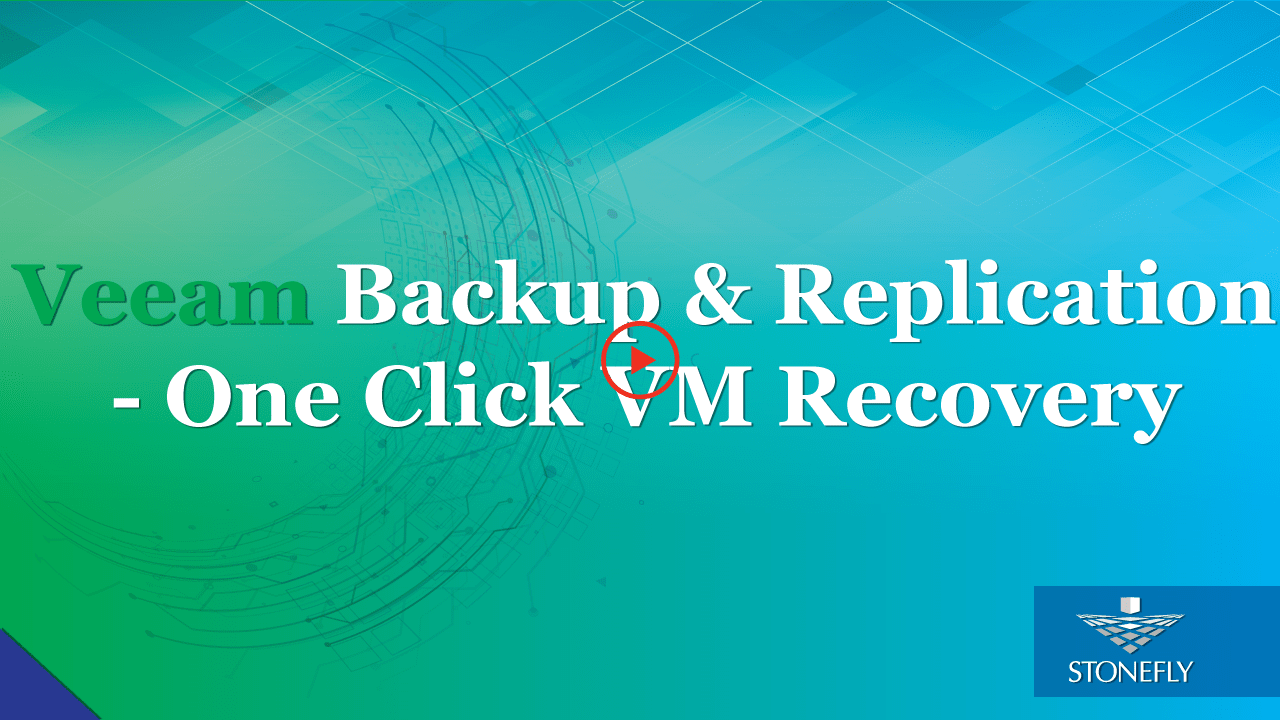
Veeam Backup & Replication to StoneFly Cloud Architecture
Veeam Backup & Replication components are deployed at the customer end. At StoneFly, Cloud repository is provisioned against the customer Veeam Backup & Replication instance. StoneFly is added as a service provider (SP) to the customer Veeam console on-premise, and all the SP details including the cloud repository from StoneFly appear at the customer side. The customer uses the Cloud repository as a target for the backup and replication jobs.
StoneFly has been delivering enterprise-grade solutions for over a decade. Our expertise enables us to effectively address the requirements of all kinds of businesses (ranging from SMBs/SMEs to large enterprises).
Sign up for a free trial of StoneFly’s solution for Veeam Cloud backup and ReplicationFill the form below to get a Veeam Cloud Backup Free Trial (1TB)
Relevant Downloads

Extending Enterprise Backup to the Cloud
Cloud backup and disaster recovery ensures that sensitive data is always secure on multiple offsite locations, is always available and recoverable. This has revolutionized businesses, service provision and life around the globe. In order to make their operations efficient, Governments around the globe are now employing backup and disaster recovery services to empower their data and operations.
Protecting Finance Industry from Ransomware Attacks
Ransomware is a major threat to FinTech Organizations and the Finance industry needs effective backup and disaster recovery solutions. However, there are a number of challenges associated with the industry. Learn about the challenges of FinTech organizations and explore how StoneFly DR365™ not only addresses those challenges but also delivers effective data protection from ransomware.
How Healthtech can be made Ransomware-proof with DR365™
Healthcare industry deals with PII and mission-critical data that cannot tolerate downtime or disruption. Ransomware is a global threat that does not spare healthcare IT environments. Using StoneFly’s feature-rich backup and DR appliance – DR365™ healthcare IT environments can effectively protect their workloads from ransomware and ensure continuity for their workloads. In this article, explore how DR365™ secures mission-critical data of the healthcare industry.
Make IT environments Ransomware-proof with DR365™
Ransomware is a continuously growing and forever lingering cyber-threat to enterprise IT environments worldwide. A successful attack can lead to millions of dollars in losses, discontinuity, data loss and brand reputation damage. Enterprises can easily avoid the disaster of ransomware with StoneFly’s innovative backup and disaster recovery (DR) appliance – DR365™. Explore ransomware’s aftereffects and the purpose-built appliance – DR365™ in this article.
StoneFly Introduces VSO™ Value Scale Out: A Cost-Effective Scale Out Storage Solution
StoneFly now offers VSO™ (Value Scale Out) storage solution, specially designed for budget-conscious businesses. VSO™ storage appliance provides lowest CapEx and OpEx costs in the market. It is a high performance, affordable, highly scalable storage solution. As data generation is on the explosion, StoneFly VSO™ solves this challenge in a cost-effective way.
Eradicating storage and disaster recovery challenges with StoneFly SCVM
There is an increase in data day by day. With this increase in data, the traditional ways of data storage have failed to answer the data storage requirements of the enterprises. Cloud based solutions are cost effective, easy to manage, scalable and customized. StoneFly’s SCVM virtual storage appliance is ALL-IN-ONE solution for your enterprise for your storage, backup and disaster recovery requirements.
FAQ
What is the maximum size of data transfer supported?
How much bandwidth would be available for the Veeam backup and replication solution?
What is the subscription model?
Veeam Cloud Connect Backup & Replication
Veeam Backup for Microsoft Office 365
Veeam Agent for Microsoft Windows
Veeam Agent for Linux