
Offsite Backup & Replication with Veeam Cloud Connect as a Service
Enable business continuity with backup & replication of your IT environment into StoneFly’s cloud. Instantly spin up your virutal machines or restore backups for individual files, entire VMs and application items in minutes.
Backup, Replication and Disaster Recovery as a Service
Veeam Backup and Replication to StoneFly Cloud helps you achieve 24.7.365 availability for all your workloads including virtual Microsoft Hyper-V and VMware vSphere environments, as well as physical and cloud-based workloads. You can manage flexible, fast and reliable backup, replication and recovery of all your data and applications.
What Makes StoneFly Best in the Market
StoneFly has been in the forefront of the backup and storage industry for more than 18 years. Beginning with its registration of the iSCSI.com Internet domain name, StoneFly shipped its first iSCSI storage appliance in 2002 and subsequently made iSCSI into the established storage standard which today is used by IT professionals around the world. This same expertise is applied to our Veeam Backup and Replication services as we develop, maintain, support, and provide upgrades all under the same roof. StoneFly is a Veeam Software Technology Alliance Partner (TAP) and a Cloud Solution Service Provider. We are the only Veeam Cloud Service Provider that offers Cloud Connect backup in the Microsoft Azure Government Cloud and supports all Microsoft Azure datacenters around the world.
StoneFly Solutions Are Trusted By Customers Worldwide

































Stonefly Veeam backup & replication Features List

Storage Snapshots
Ease of Replication
Built-in Deduplication
End-to-End Encryption

Automated Data Protection
On-demand DR plan
Recovery Assurance
Flexible Cloud Repository

Exceptional support

simplified management
Fast and secure

Availability for ALL workloads
StoneFly Private Cloud Infrastructure
Reduce the time, cost and complexity of deploying and operating an offsite cloud infrastructure while meeting your data needs. StoneFly brings a secure, trusted, scalable, and reliable private cloud to customers to transform their business and reduce costs of offsite backup, replication and disaster recovery services. Some details about the StoneFly Cloud:
- 200,000 square feet
- 3000 Cabinets
- 70 Internet Networks and 2 Internet Exchange Points (SFMIX and AMS-IX Bay).
- Custom designed video surveillance of every cabinet
Veeam Backup & Replication Single-Click VM Recovery
You can immediately restore a virtual machine (VM) with instant VM recovery, by running the VM directly from the backup file in StoneFly’s Cloud. Instant VM recovery helps minimize disruption and downtime of production VMs and improve recovery time objectives (RTO).
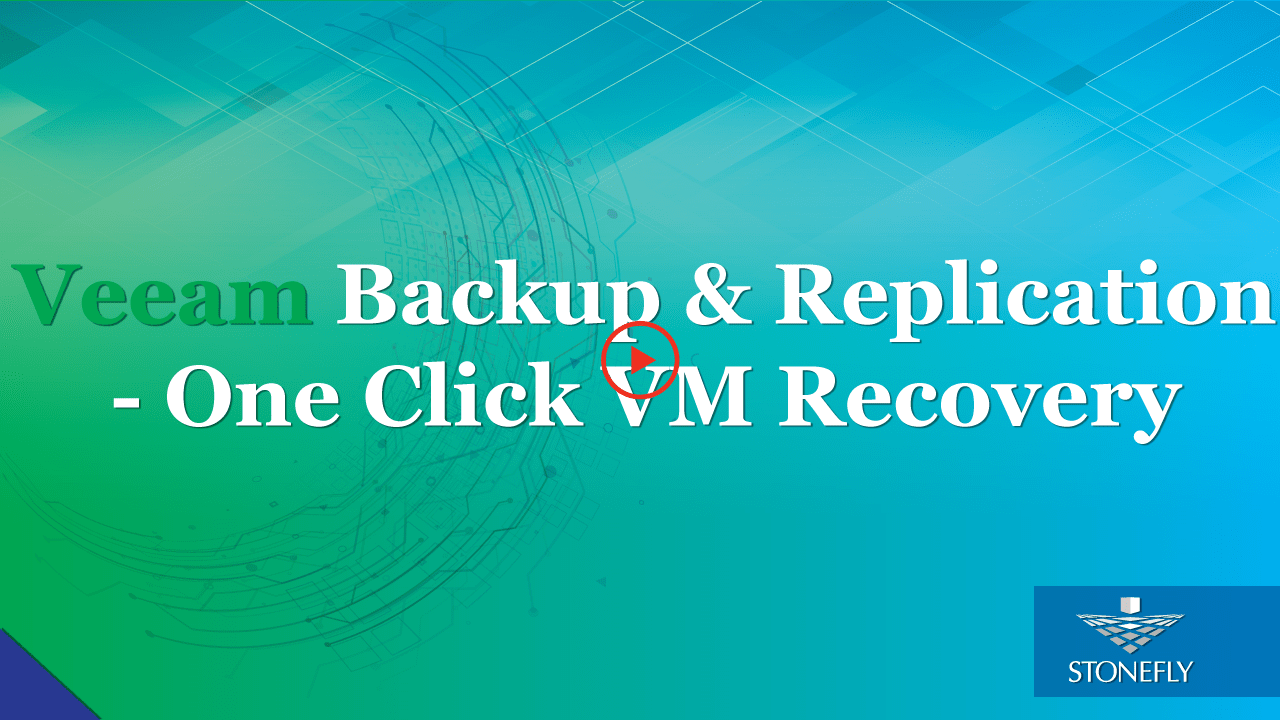
Veeam Backup & Replication to StoneFly Cloud Architecture
Veeam Backup & Replication components are deployed at the customer end. At StoneFly, Cloud repository is provisioned against the customer Veeam Backup & Replication instance. StoneFly is added as a service provider (SP) to the customer Veeam console on-premise, and all the SP details including the cloud repository from StoneFly appear at the customer side. The customer uses the Cloud repository as a target for the backup and replication jobs.
StoneFly has been delivering enterprise-grade solutions for over a decade. Our expertise enables us to effectively address the requirements of all kinds of businesses (ranging from SMBs/SMEs to large enterprises).
Sign up for a free trial of StoneFly’s solution for Veeam Cloud backup and ReplicationFill the form below to get a Veeam Cloud Backup Free Trial (1TB)
Relevant Downloads
Veeam Backup & Replication Best Practices: #3 – Architecture overview
Veeam Backup & Replication has a scale out architecture, in which multiple components (both for data processing and control) work together in a coordinated fashion. This blog provides a brief overview of these components and provides the best practices for the deployment of these components. Veeam Backup Server, Backup Proxy and Backup repository deployment best practices are discussed in this article.
Veeam Backup & Replication Best Practices: #2 – Hypervisor, Backup Job and Restore
StoneFly and Veeam Offer state of the Art backup and disaster recovery solutions for Commercial, Public Sector and Cloud Service Providers. Veeam is the premier availability software for StoneFly, which offers high performance, elastic and always available IT infrastructure solutions. This blog discusses the Veeam Backup & Replication V9.5 best practices for supported hypervisors, backup jobs as well as the restore options.
Veeam Backup and Replication Best Practices: #1 – Backup Proxies
This article is the first in the series about the best practices about Veeam backup and replication. The article explores how enterprise IT environments can deploy and use backup proxies. It also provides insights about storage optimization, intelligent load balancing and parallel processing of VMs.

Veeam Backup and Restore to Azure Government
As threats from both disgruntled employees and hackers continue to evolve and expand, government agencies and the organizations that work with them may be subject to security breaches and substantial financial losses. Given such risks, a robust data protection solution that complies with security mandates is critical for any government organization. By leveraging the combination of StoneFly, Veeam and Microsoft Azure Government, government organizations can backup and restore their sensitive data to the Azure Government Cloud.

Transform your business with the Cloud
Digital transformation is necessary for businesses. In order to digitally transform themselves, business need to revise their culture and integrate technology that compliments them and their core operations effectively. With StoneFly SCVM™, businesses can easily integrate the cloud with their existing infrastructure and acquire the tools to easily and effectively manage their resources in the cloud.

Deploy a Complete Business Model in the Cloud with the StoneFly SCVM™
Data is essential for delivering value to your customers and outpacing your competitors. But as data growth accelerates and with 80% of new data being unstructured, finding a way to store, distribute and manage all your data is a big challenge. StoneFly’s SCVM™ provides a new approach combining the best of cloud scalability and low cost, data security, high availability and control platform.
FAQ
What is the maximum size of data transfer supported?
How much bandwidth would be available for the Veeam backup and replication solution?
What is the subscription model?
Veeam Cloud Connect Backup & Replication
Veeam Backup for Microsoft Office 365
Veeam Agent for Microsoft Windows
Veeam Agent for Linux