
Offsite Backup & Replication with Veeam Cloud Connect as a Service
Enable business continuity with backup & replication of your IT environment into StoneFly’s cloud. Instantly spin up your virutal machines or restore backups for individual files, entire VMs and application items in minutes.
Backup, Replication and Disaster Recovery as a Service
Veeam Backup and Replication to StoneFly Cloud helps you achieve 24.7.365 availability for all your workloads including virtual Microsoft Hyper-V and VMware vSphere environments, as well as physical and cloud-based workloads. You can manage flexible, fast and reliable backup, replication and recovery of all your data and applications.
What Makes StoneFly Best in the Market
StoneFly has been in the forefront of the backup and storage industry for more than 18 years. Beginning with its registration of the iSCSI.com Internet domain name, StoneFly shipped its first iSCSI storage appliance in 2002 and subsequently made iSCSI into the established storage standard which today is used by IT professionals around the world. This same expertise is applied to our Veeam Backup and Replication services as we develop, maintain, support, and provide upgrades all under the same roof. StoneFly is a Veeam Software Technology Alliance Partner (TAP) and a Cloud Solution Service Provider. We are the only Veeam Cloud Service Provider that offers Cloud Connect backup in the Microsoft Azure Government Cloud and supports all Microsoft Azure datacenters around the world.
StoneFly Solutions Are Trusted By Customers Worldwide














































Stonefly Veeam backup & replication Features List

Storage Snapshots
Ease of Replication
Built-in Deduplication
End-to-End Encryption

Automated Data Protection
On-demand DR plan

Recovery Assurance
Flexible Cloud Repository

Exceptional support

simplified management
Fast and secure

Availability for ALL workloads
StoneFly Private Cloud Infrastructure
Reduce the time, cost and complexity of deploying and operating an offsite cloud infrastructure while meeting your data needs. StoneFly brings a secure, trusted, scalable, and reliable private cloud to customers to transform their business and reduce costs of offsite backup, replication and disaster recovery services. Some details about the StoneFly Cloud:
- 200,000 square feet
- 3000 Cabinets
- 70 Internet Networks and 2 Internet Exchange Points (SFMIX and AMS-IX Bay).
- Custom designed video surveillance of every cabinet
Veeam Backup & Replication Single-Click VM Recovery
You can immediately restore a virtual machine (VM) with instant VM recovery, by running the VM directly from the backup file in StoneFly’s Cloud. Instant VM recovery helps minimize disruption and downtime of production VMs and improve recovery time objectives (RTO).
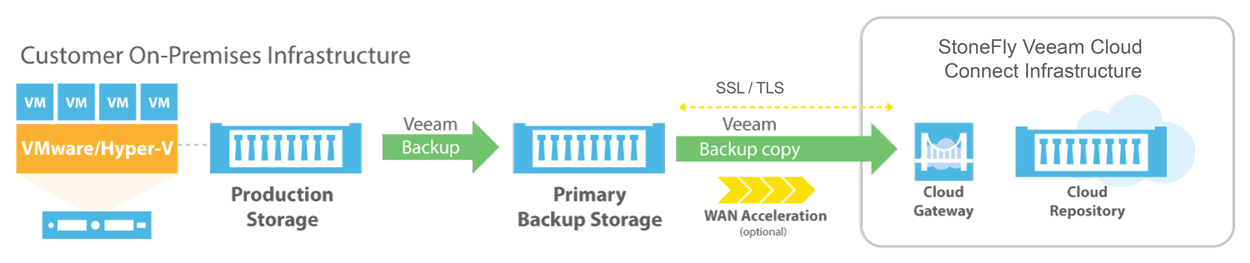
Veeam Backup & Replication to StoneFly Cloud Architecture
Veeam Backup & Replication components are deployed at the customer end. At StoneFly, Cloud repository is provisioned against the customer Veeam Backup & Replication instance. StoneFly is added as a service provider (SP) to the customer Veeam console on-premise, and all the SP details including the cloud repository from StoneFly appear at the customer side. The customer uses the Cloud repository as a target for the backup and replication jobs.
StoneFly has been delivering enterprise-grade solutions for over a decade. Our expertise enables us to effectively address the requirements of all kinds of businesses (ranging from SMBs/SMEs to large enterprises).
Sign up for a free trial of StoneFly’s solution for Veeam Cloud backup and ReplicationFill the form below to get a Veeam Cloud Backup Free Trial (1TB)
Relevant Downloads

What You Need to Know About Migrating to a CJIS Compliant Cloud
CJIS is a policy that enables government agencies to evaluate their own Procedures, Networks and Cloud providers. For secure Cloud Storage, Amazon Web Services (AWS) signed the contract to run CJIS workload in the AWS Cloud.
Natural Disasters in Every Place! Get Data Protection at Rapid Pace
Natural disasters have become a frequent occurrence over the period of time. Large storms are becoming more and more frequent. Rising temperatures are causing a snowball effect which ultimately results in more atmospheric instability. Weather patterns are changing with the occurrence of more severe storms around the globe.

AWS Management Tools & Features for Efficient Cloud Backup and Recovery
Amazon’s innovative management tools and features are designed to ease the process of backup and disaster recovery while retaining their cost efficient nature. Amazon provides a number of tools that facilitate data analysis, management and the creation of policies that classify data based on access frequency.

An Innovative Method of Data Protection and Disaster Recovery
The era of rapid technological advancements is helping the world develop more and more insight into methods of data protection and disaster recovery. The world of big data has made organizations realize the importance of reliable backup and recovery. Newer technologies like ‘Erasure Coding’ are becoming necessary as we move on with the modern world.
Hybrid Cloud DR: On premises Backup and Offsite Replication with StoneFly and Veeam
Modern age is the era of big data. Cloud Backup is one of the solutions for the storage and Disaster Recovery. These Cloud backup files can be used to create Replication copies. StoneFly provides a cloud gateway that allows customers to send data up in the StoneFly cloud repository which can be used to create replicas restore points.
Cloud Backup and replication for Hyper-V Environments
Backup and disaster recovery are essential for enterprises around the globe because these services ensure data availability and recoverability. However, data security and protection is even more significant and comparison. Only the combination of efficient data security with backup and recovery can ensure a promising future for an enterprise.
FAQ
What is the maximum size of data transfer supported?
How much bandwidth would be available for the Veeam backup and replication solution?
What is the subscription model?
Veeam Cloud Connect Backup & Replication
Veeam Backup for Microsoft Office 365
Veeam Agent for Microsoft Windows
Veeam Agent for Linux