
Offsite Backup & Replication with Veeam Cloud Connect as a Service
Enable business continuity with backup & replication of your IT environment into StoneFly’s cloud. Instantly spin up your virutal machines or restore backups for individual files, entire VMs and application items in minutes.
Backup, Replication and Disaster Recovery as a Service
Veeam Backup and Replication to StoneFly Cloud helps you achieve 24.7.365 availability for all your workloads including virtual Microsoft Hyper-V and VMware vSphere environments, as well as physical and cloud-based workloads. You can manage flexible, fast and reliable backup, replication and recovery of all your data and applications.
What Makes StoneFly Best in the Market
StoneFly has been in the forefront of the backup and storage industry for more than 18 years. Beginning with its registration of the iSCSI.com Internet domain name, StoneFly shipped its first iSCSI storage appliance in 2002 and subsequently made iSCSI into the established storage standard which today is used by IT professionals around the world. This same expertise is applied to our Veeam Backup and Replication services as we develop, maintain, support, and provide upgrades all under the same roof. StoneFly is a Veeam Software Technology Alliance Partner (TAP) and a Cloud Solution Service Provider. We are the only Veeam Cloud Service Provider that offers Cloud Connect backup in the Microsoft Azure Government Cloud and supports all Microsoft Azure datacenters around the world.
StoneFly Solutions Are Trusted By Customers Worldwide

























Stonefly Veeam backup & replication Features List

Storage Snapshots
Ease of Replication
Built-in Deduplication
End-to-End Encryption
Automated Data Protection
On-demand DR plan
Recovery Assurance
Flexible Cloud Repository
Exceptional support

simplified management
Fast and secure

Availability for ALL workloads
StoneFly Private Cloud Infrastructure
Reduce the time, cost and complexity of deploying and operating an offsite cloud infrastructure while meeting your data needs. StoneFly brings a secure, trusted, scalable, and reliable private cloud to customers to transform their business and reduce costs of offsite backup, replication and disaster recovery services. Some details about the StoneFly Cloud:
- 200,000 square feet
- 3000 Cabinets
- 70 Internet Networks and 2 Internet Exchange Points (SFMIX and AMS-IX Bay).
- Custom designed video surveillance of every cabinet
Veeam Backup & Replication Single-Click VM Recovery
You can immediately restore a virtual machine (VM) with instant VM recovery, by running the VM directly from the backup file in StoneFly’s Cloud. Instant VM recovery helps minimize disruption and downtime of production VMs and improve recovery time objectives (RTO).
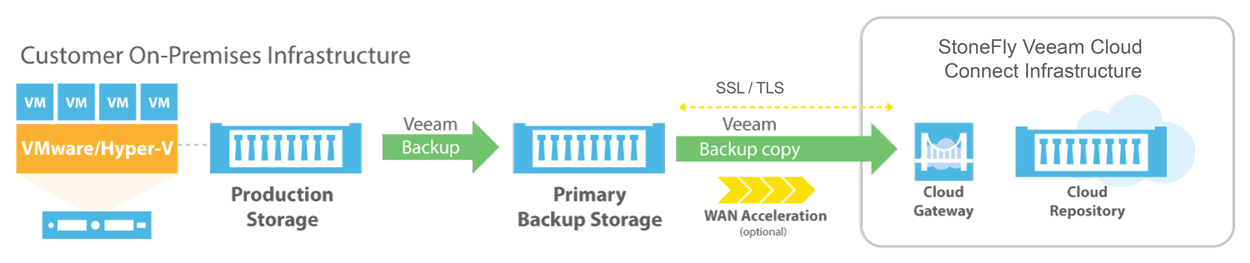
Veeam Backup & Replication to StoneFly Cloud Architecture
Veeam Backup & Replication components are deployed at the customer end. At StoneFly, Cloud repository is provisioned against the customer Veeam Backup & Replication instance. StoneFly is added as a service provider (SP) to the customer Veeam console on-premise, and all the SP details including the cloud repository from StoneFly appear at the customer side. The customer uses the Cloud repository as a target for the backup and replication jobs.
StoneFly has been delivering enterprise-grade solutions for over a decade. Our expertise enables us to effectively address the requirements of all kinds of businesses (ranging from SMBs/SMEs to large enterprises).
Sign up for a free trial of StoneFly’s solution for Veeam Cloud backup and ReplicationFill the form below to get a Veeam Cloud Backup Free Trial (1TB)
Relevant Downloads
Accelerate Scientific Discovery with Microsoft Azure and Stonefly Storage
Today’s cutting-edge researchers move to the cloud leaving behind the limitations of physical data processing facilities and high costs. Cloud computing has changed the way research is done, bringing almost limitless computational-power and scalability to data intensive research. StoneFly cloud Storage provides a scale-out, massively scalable and elastic file storage solution with a global namespace. Collaboration, Big Data Analytics, File Sharing, Rich Media Streaming, Archival, and Disaster Recovery are easier than ever before with StoneFly

Disaster Recovery and Business Continuity: How to Plan, Maintain and Test
Having an accurate disaster recovery and business continuity plan can ensure the data safety and security. Although many businesses think they’re prepared for a disaster, most actually lack a comprehensive Disaster Recovery (DR) and business continuity plan. In reality, they have a backup-strategy in place. Unfortunately, many organizations do not piece together their DR plan until after disaster strikes. The article discusses about disaster recovery and business continuity plan

What is Ransomware and How Can You Protect Yourself from It?
A new threat to your data is ransomware. Ransomware is at a sudden explosion making your data vulnerable to be hostage. Recent years have seen a rise in ransomware attacks. Making your data secure is the only solution. The Word Ransomware is a combination of ransom and software and refers to any kind of malware that demands a ransom from user in exchange for the return of a kidnapped file. If you have a good security solution and run frequent backups, you shouldn’t have any problems. StoneFly is here to help and protect your files from ransomware
StoneFly introduces Disaster Recovery as a Service for Veeam Backup and Replication in the Cloud
StoneFly’s new Cloud Backup and Replication Service for Veeam is an affordable new solution that allows Veeam customers to back up or replicate their machines to the Public or Private Cloud for as low as 7.5 cents per Gigabyte per month. Hayward, Calif. – February...
Microsoft Azure cloud and StoneFly Cloud Storage
While moving to the cloud you have many things to consider about. We need to think about the operating system we’re going to use and how to keep that patched and up to date. We need to think about the network load balancers, routers, DNS and how those will interact with our system. The article will discuss about the Microsoft Azure cloud and StoneFly Cloud Storage

What is Recovery Time Objective and Recovery Point Objective?
Backing up your data is not enough alone. Backup and disaster recovery goes hand to hand to provide business continuity. Disaster recovery has the two main concepts. When designing disaster recovery plan you need to keep in mind two concepts RTO recovery time objective and RPO recovery point objective. The article discusses the both concepts in detail and why these are important for your business continuity plan
FAQ
What is the maximum size of data transfer supported?
How much bandwidth would be available for the Veeam backup and replication solution?
What is the subscription model?
Veeam Cloud Connect Backup & Replication
Veeam Backup for Microsoft Office 365
Veeam Agent for Microsoft Windows
Veeam Agent for Linux